Chipp.in Tech News and Reviews

Windows, Security & Privacy, Open Source and more

Menu
  • Home
  • Windows
  • Security & Privacy
  • Gaming
  • Guides
  • Windows 11 Book
  • Contact
  • RSS Feed
Menu
IT Crowd Turning it off and on again

Have you tried turning it off and on again? Microsoft posts fix for OneDrive Search issue

Posted on July 4, 2025July 4, 2025 by Martin Brinkmann

One of the most famous lines of the British comedy series IT Crowd, a show revolving around two IT support geeks and a manager who does not have a clue about “computers”, is “Have you tried turning it off and on again”.

When the crew gets a support call, it is this question that they ask first. Most of the time, it works and the situation is resolved.

If you used computers before, you know that turning the device off and on again can indeed fix issues that you experience. Not all of course. There is a logic behind that, as restarting a system does a number of beneficial “things” in the background that may help resolve issues. Among them terminating apps and thus freeing up memory and potentially CPU performance.

Microsoft’s IT Crowd moment

Last month, Microsoft confirmed that users could run into problems when searching files on OneDrive, the company’s cloud storage service. While the files were still there, OneDrive would return no files in search and show a blank results page instead.

Neowin reports that Microsoft fixed the issue in the meantime. OneDrive users are encouraged to update the client to the latest version to apply the fix.

Microsoft, in the meantime, posted a workaround for affected users. As you may have guessed already, it recommends refreshing the browser or turning the mobile device off and on again.

So, if you are experiencing this issue, have you tried fixing it by turning it off and on again?

Amazon Prime Video Ad Free

Amazon kills Freevee, because it moved ads to Prime Video

Posted on July 3, 2025July 3, 2025 by Martin Brinkmann

The writing was on the wall. Some time ago, Amazon pulled a fast one on Prime subscribers by introducing ads for everyone. Subscribers who did not want the new experience could pay Amazon a few bucks extra to get rid of the advertisement again. To hammer that home even more, Amazon recently started to show more ads to users per hour.

Questions about the fate of Amazon’s then ad-powered streaming service Freevee came up at the same time. It did not really make sense to have Freevee as an option if all of the streams on Prime Video would also show advertisement to users.

Amazon kept Freevee around for the time being. CNBC reports that some Freevee users see notifications when they launch the app on their devices about the upcoming end of it.

According to the report, Amazon plans to put the standalone Freevee app to rest in August 2025. The notice states “Prime Video is the new exclusive home for Freevee TV shows, movies and Live TV”.

The app will stop working in August 2025 and users may tune in directly on the Amazon streaming service to get their Freevee fix. Amazon users, with or without Prime Video subscription, may continue to watch free content with advertisement on the Amazon website. The only requirement for that is an Amazon account.

Closing Words

Amazon established Freevee in 2019 to stream videos with ads to users. The decision to turn Prime Video into a bigger version of Freevee came in 2024. The only differentiating factor will be that users may watch Freevee content on Amazon without a Prime subscription going forward. Other than that, you will get ads either way unless you pay extra.

It is probably only a matter of time before Freevee is retired entirely and the available media library is integrated into the Amazon Prime Video library.

As far as I’m concerned, I started to watch more content on DVD and Blu-Ray again as it is giving me full control and a (mostly) ad-free experience.

How to enable the advanced configuration about:config in Firefox for Android

Posted on July 2, 2025July 2, 2025 by Martin Brinkmann

Mozilla has locked down Firefox for Android significantly. When it first launched the revamped version, it blocked access to what some Firefox users would call essential features: namely extensions support and access to the advanced configuration about:config.

It changes its stance on extensions support just recently, which is a step in the right direction and a main differentiating factor between Firefox and Google Chrome.

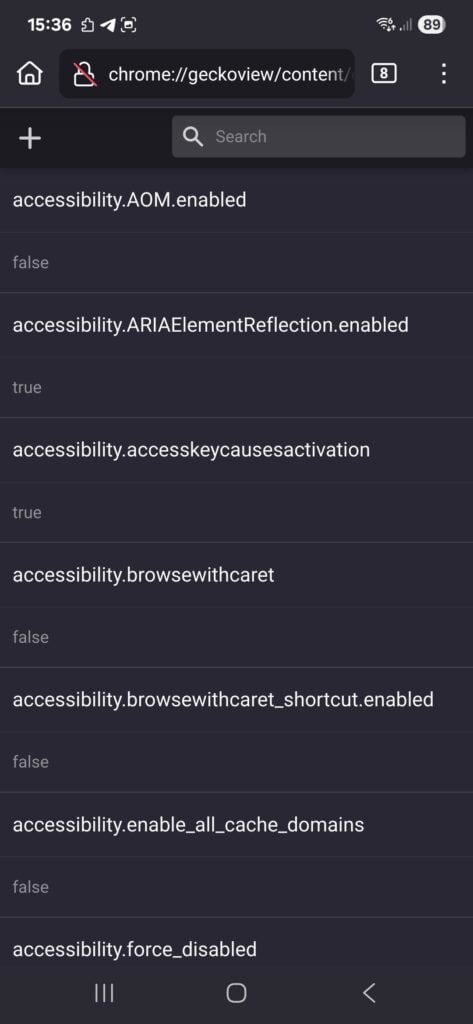
As for access to the advanced configuration, you may access it in all Firefox for Android versions. While you may get an error when you try to launch about:config in the address bar, you will get access to the configuration if you load chrome://geckoview/content/config.xhtml instead.

There you get the option to modify advanced configuration parameters. Also, if you want, you may switch the preference general.aboutConfig.enable to True to enable about:config. May be easier to access than the resource listed above.

It is a handy way to gain access to the advanced configuration of the browser on Android. Allows you to disable or enable certain features, and modify settings to your liking. (via AskVG)

Google fixes another 0-day vulnerability in Chrome, advises to update asap

Posted on July 1, 2025July 1, 2025 by Martin Brinkmann

If you have installed Google Chrome on one of your devices, then you may want to start the browser’s update engine immediately to update it to the latest version.

Google released a new version of Chrome for desktop and Android to fix a 0-day vulnerability in the browser. This one is exploited in the wild, which means that there is a chance that the issue may be exploited when you run older versions of the Google browser.

The official release notes list CVE-2025-6554 as a type confusion issue in V8, the JavaScript engine that Google Chrome uses. A type confusion vulnerability exploits a flaw in software where a program mistakes a specific type of data for another. This can lead to unexpected behavior, which threat actors may exploit in attacks.

Google mentions that the issue was reported by Clément Lecigne of Google’s Threat Analysis Group on June 25th, 2025. Google says that it mitigated the issue a day later by pushing a configuration change to the stable channel of the browser across all platforms.

This suggests that most devices — all that received the configuration change — are protected from attacks targeting the vulnerability. Still, it is recommended to update the browser immediately.

Desktop users, those who run Google Chrome on Windows, Mac, or Linux devices may select Menu > Help > About Google Chrome to do so. Chrome runs a check for updates and will install the new version automatically. Note that a restart of the browser is necessary to complete the process.

Tip: Windows users may also run winget upgrade google.chrome.exe in Terminal to upgrade the browser to the new version without first starting it.

Android users are not so lucky. The update depends on Google Play in that case, and that may take a while. There is no option to speed up the installation of the mobile browser on Android, if installed via Google Play.

Windscribe: Google is blocking our extension update because of “too many privacy features”

Posted on June 30, 2025June 30, 2025 by Martin Brinkmann

Windscribe is a popular VPN solution thanks to its free version, privacy features, and interesting build a plan feature. Windscribe users may install the official extension to integrate the VPN better into Google Chrome and other Chromium-based browsers, and get several privacy features on top.

The extension adds features such as ad blocking, webRTC blocking, cookie-banner hiding, and much more.

This just happened: The developers confirmed on X that Google is blocking the latest extension update from its Chrome Web Store.

The provided screenshot shows that Google claims that the extension does not comply with the “Single Use” policy for Chrome extensions.

Good to know: The Single Purpose Policy requires that extensions focus on one specific function or theme. Google says that this improves the user experience.

The posted screenshot of the Google email shows that Google claims that the “extension is providing multiple unrelated functionalities”, such as “masking physical location”, “circumventing censorship”, and “blocking ads and trackers”.

Google is asking the developers of the extension to modify it, so that it offers a “narrowly-focused single functionality”.

Windscribe appealed Google’s objection to no avail. As it stands, Windscribe is blocked from updating its extension on the Chrome Web Store.

Tip: you can check out the Windscribe extension for Firefox, which does not have any of these issues.

This is not the first time that legitimate popular extensions have issues with the update process on the Chrome Web Store. Google’s Store is the default location for most Chromium-based browsers when it comes to extensions.

Several browsers, including Brave, do not operate their own extensions store. While some do, Microsoft with Edge or Opera with its Opera Web Browser, the majority relies on extensions from the Chrome Web Store. Even the two mentioned browsers have limited extensions listed in their respective stores.

As for Windscribe, it will be interesting to see how this works out for the company. Usually, public attention is required to get Google to look deeper into the matter and change its stance on a violation.

PixelUnion: EU-based Google Photos alternative with 16 GB of free storage space

Posted on June 28, 2025 by Martin Brinkmann

Google Photos and iCloud Photos are two cloud-based tools to view, organize, and share photos and videos on the web. They are the default applications for this type of service on Android and iOS, which gives them a dominating grip on the market.

While convenient to use, not all Internet users may want to allow Google, an advertising company, to store their photos and videos online. There are plenty of alternatives when it comes to photo hosting, and one of the newest is PixelUnion.

PixelUnion is based in the Netherlands. The service promises an ad-free and tracking-free experience that resembles the photo services of Google and Apple. Users who sign-up for the service get 16 GB of online storage with the free account. Paid accounts start at €29,50 per year for 150 GB and €99,50 per year for 1 TB of online storage. Custom plans of up to 20 TB are also available.

There is one caveat though, at least for users who want full control over their photos at all times. PixelUnion does not support end-to-end encryption. Most photo hosting services do not support this. Google Photos does not. But if that is one of your requirements, PixelUnion is not for you.

Main features of PixelUnion:

  • Stored in the European Union by EU companies.
  • Secure and private photo storage.
  • Show photos on map.
  • Full API access.
  • Uses the open source Immich app for mobile access.
  • Option to self-host.
  • Advanced features: facial recognition with privacy, AI object recognition, add users, advanced deduplication, no uploading limits, sharing of photos, detailed image searching.

Signing up for a free account is a simple process. You need to pick a name for your storage, which also is the subdomain (name.pixelunion.eu) for web access and management. You can upload photos via the web interface or via Immich.

You can share uploaded photos and videos as albums with others or keep them to yourself. PixelUnion uses facial recognition to detect people and claims that the machine learning stays in the user’s container. There does not seem to be an option to turn this feature off at this point though.

Closing Words

PixelUnion promises Google Photos-like functionality with better privacy. So, if your pain point is that your photos and videos do get stored on US-based servers, then it may be a valid option. The free plan is generous and the paid plans are user-friendly options to avoid self-hosting an instance.

However, PixelUnion is a new service that does not have a track record. Privacy-conscious users who require end-to-end encryption need to look elsewhere as well, as this is not offered by PixelUnion.

All in all, it could become a good alternative to Google Photos for users who prefer hosting in the European Union and a bit more privacy as well.

Firefox 140.0.1 fixes a crash and a usability issue

Posted on June 27, 2025June 27, 2025 by Martin Brinkmann

Hot of the heels of the Firefox 140.0 Stable update, released earlier this week, is the first point update for the web browser. It addresses two non-security issues in the browser, one of them a crash at browser start.

The main issue fixed in the update is a startup crash that Mozilla says affected some users of the browser. It is caused by DLL injection. The bug report on Mozilla’s bug tracking website suggests that Mozilla reverted a change that it made in Firefox 140 to address the issue.

Mozilla lists Windows 10 specifically, which suggests that the bulk of users who experienced the crash use devices with Microsoft’s operating system.

The second fix resolves text contrast issues in the sidebar. They occurred if certain dark themes were used by the user. The text in the sidebar was barely readable in some instances. The update addresses the issue.

Firefox users who are affected by one or both of the issues may want to upgrade to the new version to resolve these issues. Just select Menu > Help > About Firefox to run a check for updates.

The browser should pick up the new version so that it gets downloaded and installed automatically. A restart is required to complete the upgrade process.

You find the original release notes for the Firefox 140.0.1 update here.

Microsoft says Windows 11 is a lot faster than Windows 10 (on newer hardware)

Posted on June 26, 2025June 27, 2025 by Martin Brinkmann

Microsoft published several performance claims that it says demonstrate how much better its Windows 11 operating system is in this regard when compared to its predecessor Windows 10.

Here are the claims that Microsoft is making:

  • Windows 11 PCs have 2.7 more hours of battery life than Windows 10 PCs.
  • Windows 11 PCs are up to 2.3 times faster than Windows 10 PCs.
  • Windows 11 PCs offer up to 3.2 times faster web browsing than Windows 10 PCs.
  • Windows 11 PCs offer up to 2 times faster Microsoft Office productivity than Windows 10 PCs.

Impressive stats. If you dig deeper, you may notice that Microsoft skewed the results significantly by using Windows 10 PCs with older hardware.

While it is fair to say that Windows 10 PCs are, on average, equipped with older processors, memory, hard drives and graphics adapters, it feels a bit like comparing apples to oranges. Yes, you can do that, but it does not really make a whole lot of sense other than to get some impressive sounding performance stats for marketing.

If you have used electronic devices for some time, you know that new device generations are often faster than previous generations. This is true for Windows PCs, mobile devices, streaming boxes, gaming consoles, and most devices that you can buy. If you compare the performance of a Google Pixel 9 with a Pixel 6, you will likely come to the conclusion that the newer device offers better performance. Same is true for PlayStation 5 vs 4, Apple iPhone 16 vs 15, and most devices that you can compare in that regard.

It should not come as a surprise, therefore, that a Windows 11 PC with an Intel 12th or 13th core processor runs better in benchmarks than a Windows 10 PC with an Intel 6th, 8th, or 10th core processor. That is the exact test setup that Microsoft used to conclude that Windows 11 PCs offer up to 2.3 times the performance of Windows 10 PCs.

To convince users, Microsoft should have used the exact same hardware setup for objective comparison. This way, it could have demonstrated that Windows 11 has the performance edge on the same hardware, if that is the case.

Microsoft’s claims boil down to Windows 11 running better on PCs with hardware that is one, two or more generations ahead of the hardware of the Windows 10 PC. The stats would very likely be not nearly as impressive if the same hardware would have been used.

Use Split View in Chrome to view two websites side-by-side

Posted on June 25, 2025June 25, 2025 by Martin Brinkmann

Split View is quite the handy option. Supported by many browsers, such as Vivaldi or Brave, for some time, it allows you to display two websites next to each other in a single tab in the browser.

Quite handy for comparison, playing a game or watching a YouTube video, while doing something else.

It took a while, but Google is now offering Split View functionality in the desktop version of its Chrome web browser as well.

As is the case with features these days, they are rolled out gradually. This means that while your neighbor may have access to a feature already, that you have to wait until the mighty overlords over at Google decide that it is your time.

However, you can enable this feature in the experimental options right away, if you want to.

Split View in Chrome

Here is how that is done:

  1. Load chrome://flags/#side-by-side in the Chrome address bar.
  2. Change the value of Split View to Enabled.
  3. Restart the browser.

You should see the new Split View option when you right-click on an open tab in the browser after the restart.

The selected tab and the next tab will be displayed next to each other. Google Chrome displays both titles in a single tab and you can switch between them easily. Doing so displays the address of the active website, which you can change to load a different site.

Google Chrome Split View example

You can also right-click on links to get an open in Split View option.

Note that Chrome does not retain the Split View when you restart the browser. It displays both websites in separate tabs in that case.

All in all, it is a handy feature, especially on smaller screens that do not have enough room for displaying two browser windows side-by-side.

Now You: does your favorite browser support Split View? If so, do you use that mode at all? Feel free to leave a comment down below.

Firefox

Mozilla should test Firefox with best-in-class ad blocker and privacy

Posted on June 24, 2025June 24, 2025 by Martin Brinkmann

The future looks quite grim for Mozilla and its Firefox web browser. The average monthly user count continues to drop while the browser of its ex-CEO is reporting new heights regularly. Then there is the looming death of Google and its impact on Mozilla’s finances to consider.

Mozilla’s reaction came as a surprise. It started to add features that users requested for years. Firefox supports vertical tabs now, tab groups, and a lot more.

It also took a look at its assets to figure out what to keep and what to terminate. This resulted in the termination of recent acquisitions, such as Fakespot, and long-standing staples, such as Pocket.

While these help free up resources and reduce expenses, it is likely that they won’t prevent the Mozilla-ship from capsizing, if things take a turn for the worse.

What to do? Here is an idea!

Why is Brave gaining users and Firefox losing them? You could say that it is all because of the different underlying platforms that the browsers use. Brave, after all, uses the same core as Google Chrome. Firefox uses Mozilla’s own engine. It has advantages, as it gives Mozilla full control over the engine. However, all development weight is on Mozilla whereas Brave and others reap what (mostly) Google developers and others work on.

It would be shortsighted to focus solely on this. Brave includes a content blocker by default. It also includes lots of privacy enhancements. While some criticize the browser for its integration of crypto-stuff, the combination of Chromium with its integrated content blocker works really well most of the time.

Firefox users can install uBlock Origin or another content blocker, but they have to do so manually.

Why is not Mozilla integrating its own content blocker or establishing a partnership with Raymond Hill, the creator of uBlock Origin? Mozilla never revealed the answer, but the most likely answer is because of its search deal with Google.

An ad blocker would prevent Google ads from showing up. Google would rightfully so want to pay less to Mozilla, as it would not make enough revenue anymore to justify the price that it pays Mozilla each year.

But what about running a test? Create a special version of Firefox. Install an ad-blocker and enable it by default. Distribute it, maybe ask for donations in the same way that the Thunderbird team is asking for them.

See how it goes. Just make sure that privacy is excellent for users, that they won’t see any sponsored content or other paid content in Firefox, and that their privacy is always valued more than anything else.

It might work. Users might pick Firefox as it would keep them safe and private while using the browser. It might not work, but Mozilla would at least tried something.

Now You: do you use Firefox or another browser? Let me know in the comments below.

  • Previous
  • 1
  • …
  • 14
  • 15
  • 16
  • 17
  • 18
  • 19
  • 20
  • …
  • 70
  • Next

Support This Site

If you like what I do please support me!

Any tip is appreciated. Thanks!
  • March 4, 2026 by Martin Brinkmann The March 2026 Android Security update is here and you should install it asap (if you can)
  • March 3, 2026 by Martin Brinkmann Google to release two Chrome Stable releases per month
  • March 2, 2026 by Martin Brinkmann Don't Bother with Windows 11's new Speedtest feature
  • February 27, 2026 by Martin Brinkmann Warning! That laptop on Amazon? It comes with temporary storage
  • February 26, 2026 by Martin Brinkmann "If your printer works today, it will continue to work": Microsoft corrects previous announcement

About

We talk, write and dream about Technology 24/7 here at Chipp.in. The site, created by Martin Brinkmann in 2023, focuses on well-researched tech news, reviews, guides, help and more.

Legal Notice

Our commitment

Many websites write about tech, but chipp.in is special in several ways. All of our guides are unique, and we will never just rehash news that you find elsewhere.

Read the About page for additional information on the site and its founder and author.

Support Us

We don't run advertisement on this site that tracks users. If you see ads, they are static links. Ads, including affiliate links, never affect our writing on this site.

Here is a link to our privacy policy

©2026 Chipp.in Tech News and Reviews