
Mozilla has released several updates for its web browser Firefox, including version 148.0 Stable and also updates for the extended support release (ESR) versions. It is a special day, as Mozilla is ending support for older versions of Windows and macOS with the release of Firefox 115.33.0 ESR.
Firefox 148.0: The release highlights
- The AI kill switch and AI controls make their debut, allowing users to control AI in Firefox.
- Important security fixes.
- Improved PDF screen reader support for math formulas.
- Translation improvements.
- Telemetry adjustments.
How to download and install Firefox 148
Most unmanaged Firefox installations will be updated automatically to the latest release once it has been released officially. This may take minutes, hours and sometimes even days. You can speed this up by selecting Menu > Settings > Help > About Firefox.
The new AI controls
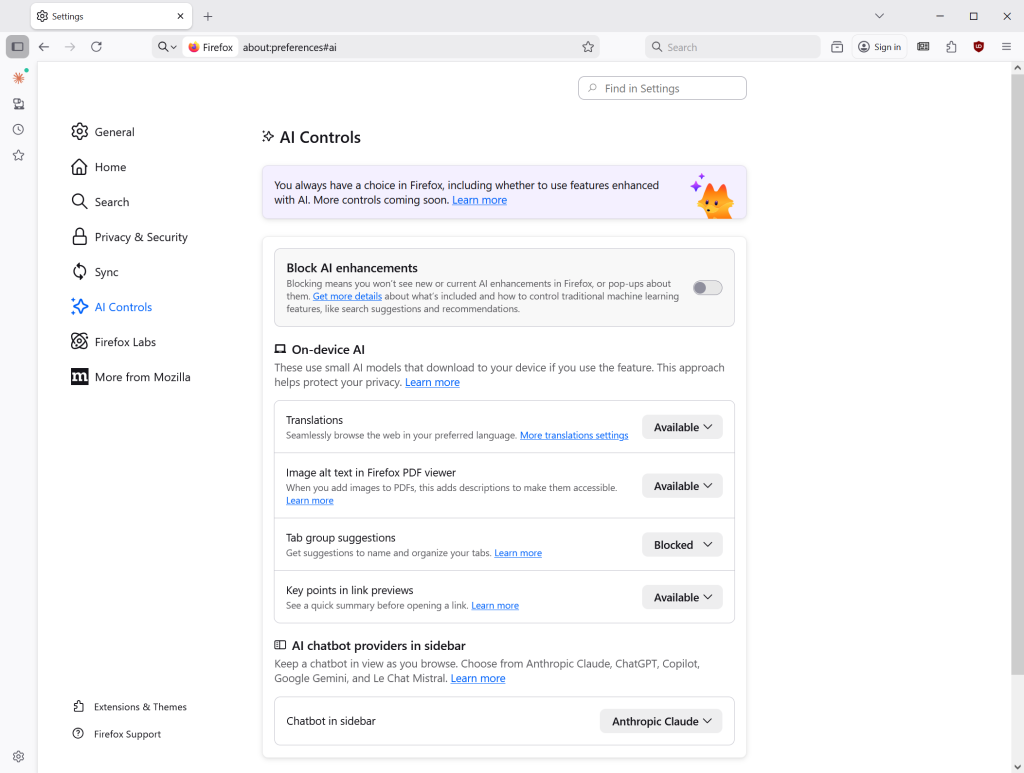
Probably the main feature of Firefox 148.0 is the new AI controls that Mozilla added to the browser. Load about:preferences#ai in the browser’s address bar or go to Menu > Settings > AI Controls to display all options.
The options are divided into two main sections: first a toggle to block all AI enhancements in Firefox with a single click or tap, and then individual controls for users who want to enable some but not other AI features.
So, if you want to block all AI, toggle “Block AI enhancements” and confirm the decision. This should take care of all current and future AI features in Firefox.
The second section is divided into two parts: On-device AI and AI chatbot providers in sidebar. Here you can enable or block the following features individually:
- Translations.
- Image alt text in Firefox PDF Viewer.
- Tab group suggestions.
- Key points in link previews.
- Chatbot in sidebar.
When you see available, it means that the feature is not active. Blocked means that it is disabled and enabled means that it is active.
A word or two about Remote Improvements
Remote Improvements are small changes to Firefox that are delivered remotely. Previously, this required for Firefox to share “technical and interaction data”, short Telemetry, with Mozilla. Starting in Firefox 148, this is no longer the case.
In other words, you can receive the fixes without sharing the data or participating in experimental studies.
Opting-out
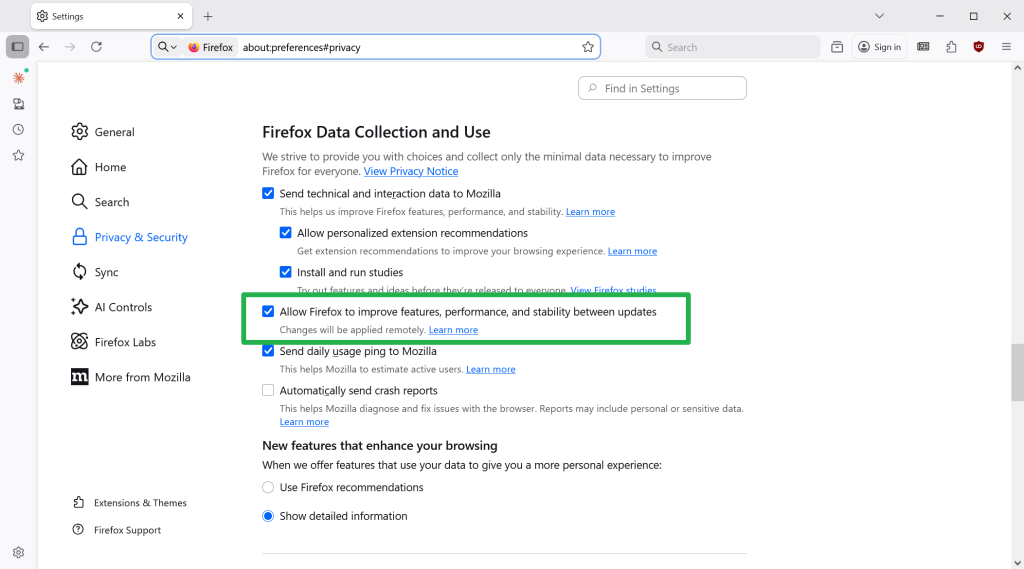
The feature is on by default in Firefox 148, unless you have opted out of studies in the Settings prior to the release of Firefox 148.
To make sure that you are opted-out, do the following:
- Load about:preferences#privacy in the address bar.
- Scroll down to the Firefox Data Collection and Use section near the bottom.
- Uncheck “Allow Firefox to improve features, performance, and stability between updates”.
Smaller changes in Firefox 148
- Firefox now has improved support for screen readers accessing mathematical formulas embedded in PDFs.
- Firefox Backup is now also available to Windows 10 users who set “Clear history when Firefox closes” to enabled. Backups will only include data that is not set to be cleared on exit in that case.
- Translation into Vietnamese, and translation into and from Traditional Chinese is now supported.
- New Tab wallpapers will show up on new container tabs also now.
The security updates
Firefox 148 fixes several security issues in previous versions. The severity is high and a massive 51 issues or potential issues are patched when the updated is installed.
The end of the road for old Windows and macOS versions
Mozilla is ending support for older operating systems with the release of Firefox 115.33.0 ESR. It is the last official release for systems that are no longer supported by their makers. Mozilla was the last major browser maker to support these operating systems, but this is coming to an end.
Firefox 115.33.0 continues to work on these systems, but updates won’t be released anymore. This means that security issues won’t get fixed anymore, which can be problematic as time passes by. Similarly, new web technology support is absent, which means that some sites or apps may not work correctly or at all.
Firefox may no longer receive security updates on Windows 7 and Windows 8.x but for those who still use the older operating systems, your other option is Supermium which is based on Chromium, but as for Firefox-based browsers, I think there’s no other option than to continue using Firefox ESR 115.33 [unless Mozilla goes back on their word and updates Firefox 115 until Firefox 115.40]
Nope.
https://github.com/Eclipse-Community/r3dfox
Fully functional and modern Firefox usable on Windows 7/8/8.1
Regular releases. Last week was 147.0.4. 148 should likely be available within the week.
HA HA!
v148.0 just two days ago
https://github.com/e3kskoy7wqk/Firefox-for-windows-7
another good one
https://github.com/Blaukovitch/Mozilla_Firefox_Windows_7
This has all the appearances of being an excellent, user and privacy oriented update. While I usually block all automated updates of any kind, I’m going to allow the Remote Improvements and see how that goes. Kudos to Mozilla on this one.
Updated and “AI Controls” immediately turned off 🙂
Too easy 🙂
I’ve toggled everything under AI controls off except Translations. Translations are fully offline and is useful.
I would like one change of being turned off by default. Otherwise this is how all AI features should be made available in a products. Allowing it to be completely turned off.
Great implementation by the Firefox team.
Any information regarding these AI settings on Firefox for Android?
I can’t find any.
Now, I do use the Fennec version through F-droid…
Hank, in Tennessee
This has not been implemented yet in Firefox for Android.