It has been over six months since Rarlab released a fix for the critical WinRAR vulnerability known as CVE-2025-8088, but attacks continue to target it as if the patch was released just days ago.
Despite a patch being available since August 2025, Google Threat Intelligence reports that state-sponsored actors and financially motivated hackers are still finding immense success targeting users who have neglected to hit the update button.
This “long tail” of exploitation serves as a stark reminder that a vulnerability doesn’t disappear just because a solution exists.
Key Information:
Detail
Updated Information
Vulnerability ID
CVE-2025-8088
Patch Status
Available for 6+ months
Primary Threat
State-sponsored and financially motivated actors
Action Required
Ensure WinRAR is updated to the latest version
When Rarlab released WinRar 7.13 to patch the security vulnerability back in July 2025, barely anyone thought that this security issue would remain a problem six months later.
A report by Google security researchers suggests that the issue is still exploited actively. It appears that a percentage of WinRar users have not patched the archiving software yet.
Google found out that attacks originate from several countries, including Russia and China. To exploit the issue, attackers need to create a specially prepared RAR archive. When a victim unpacks the archive, malicious files are moved to the autostart of the system for execution.
Google writes:
CVE-2025-8088 is a high-severity path traversal vulnerability in WinRAR that attackers exploit by leveraging Alternate Data Streams (ADS). Adversaries can craft malicious RAR archives which, when opened by a vulnerable version of WinRAR, can write files to arbitrary locations on the system.
The issue affects WinRar and also related apps and files, including unrar.dll. However, the issue affects RAR on Windows only. Other operating systems with RAR apps, including Linux and Android, are not affected by the issue.
How to protect your systems
It is necessary to update WinRar or any of the other Rar tools affected by the issue, to the latest version. Windows users need to install WinRar 7.13 to protect their devices. Downloads are provided on the official Rarlab website.
Just download the latest release and run the installer to update the application. Installation of WinRar 7.20 Beta will also resolve the issue, but since it is a beta release, it is not recommended to run it on most PCs.
The “trust but verify” era of document security has been blindsided by a sophisticated new threat that turns Microsoft’s own integration features against the user.
This week, Microsoft disclosed a critical zero-day vulnerability, CVE-2026-21509, which allows attackers to bypass core Object Linking and Embedding (OLE) security mitigations within the Microsoft Office Suite.
The flaw is actively exploited in the wild, affects most versions of Office, and allows malicious actors to execute unauthorized code when a victim opens a compromised file.
The essentials
Name of vulnerability: Microsoft Office Security Feature Bypass Vulnerability
Affected Software: Office 2016, Office 2019, Office LTSC 2021, Office LTSC 2024, Microsoft 365 Apps for Enterprise
Microsoft has a solution for the issue that is applied automatically in some cases and requires an update in others.
In short: If Office 2016 or 2019 is used, an update is required to patch the vulnerability. All newer versions of Office do not require an update, as Microsoft is adding the protection using a service-side change. However, Office needs to be restarted before this protection is applied.
Downloads, if necessary, are provided on the official Update Guide website linked above (under ID).
Microsoft published mitigations as well, but these are not really required, unless updates can’t be installed immediately. The mitigations require Registry edits and as such a restart before they protect the application from potential exploits.
Ever since its inception, the world’s most popular messaging app has retained the status of an ad-free, then almost ad-free experience, but that “free” ride is officially reaching a fork in the road. WhatsApp is reportedly preparing to launch a paid membership tier this year starting with users in Europe to allow them to bypass the advertisements currently rolling out across the platform.
As Meta looks to monetize the “Updates” tab, this new ad-free subscription marks the first time in history that users may have to pay to keep their messaging experience clean.
This move is not happening in a vacuum. WhatsApp, owned by Meta, is following the exact strategy that Meta deployed for Facebook and Instagram across Europe. Under the model, users are asked to make the following choice: either allow Meta to track their activity for personalized advertisement or pay a monthly fee to keep the feed clean.
While Meta is copying the base strategy directly from Facebook and Instagram, WhatsApp’s personal chats remain ad-free, at least for now. This means that users pay Meta to keep the Status and Channels sections ad-free and stop creating an advertising profile of users who pay the premium.
What happens if you don’t pay?
Personal chats remain free of advertisement, at least for now. This is something that Meta has shied away from as it would like drive users towards competitors like Signal or Telegram.
Users who do not subscribe will continue to see sponsored content in the “Updates” tab.
The Verdict: Is WhatsApp Premium Worth It?
Pros
Cons
Clean Interface: Removes intrusive banners and sponsored posts from the Status and Channels tabs.
New Monthly Expense: Adds to “subscription fatigue” for an app that has been free for over a decade.
Data Privacy: Meta may not create a profile for advertising, since there are not any ads to show.
Partial Solution: Early reports suggest ads remain in “Channels” you don’t follow, so it may not be 100% ad-free.
Early Access: Potential for premium-only features, such as larger file sharing or advanced chat organization.
Limited: Meta may limit the ability to pay to avoid ads to certain countries, similarly to how it handles this on Facebook and Instagram.
As the line between personal messaging and social media continues to blur, WhatsApp’s transition into a “freemium” service feels like the end of an era. For now, the core of WhatsApp, private conversations between users, remains untouched and ad-free.
However, now that the infrastructure is in place, Meta might consider pushing ads more aggressively on WhatsApp.
Imagine if Google Search didn’t just know the internet, but actually understood your context. Scary? Wonderful?
Google is making this a reality for AI Pro and Ultra subscribers with the launch ofPersonal Intelligence in AI Mode, a new feature that lets you securely connect Gmail and Google Photos directly to your search results.
This update is designed to save your time by transforming — often — generic search queries into personalized answers while ensuring your personal data remains private, opt-in, and strictly under your control, according to Google.
This week’s announcement extends Personal Intelligence to Google Search. More precisely, to AI Mode of Google Search.
Personal Intelligence in AI Mode for Search
What it does: It connects Gmail and Google Photos to the AI Mode of Google Search. This allows Gemini to cross-reference information from emails or photos with general search information to provide answers that are specific to the user.
For example, if you ask for an itinerary, it may look up flight or accommodation information in Gmail as well as what you liked to do in past holidays on Google Photos to suggest an itinerary that is personalized.
Who gets it: The feature is rolling out as a Labs experiment. It is only available for Google AI Pro and AI Ultra subscribers in the United States who search in English.
What about privacy? The feature is strictly opt-in. Google claims that it is not using any personal data for training and users may disconnect the feature from Search at any time to end it.
Google’s ultimate goal is to bridge the gap between a search engine that knows “the world” and its users. For some, it is a new level of convenience that makes searching on Google better and faster. For others, it is a nightmare come true.
However, since the feature is opt-in and limited to Google AI Pro and Ultra subscribers, the latter camp is likely very small at this point. This could change with a general rollout to non-paying Google Search users.
The success of the feature will ultimately hinge on trust, not so much on the technology and its effectiveness. While Google implemented important guardrails, including making the feature opt-in and promising that personal emails or photos won’t be used for training, handing over the keys to private memories and information requires a huge leap of faith, especially considering that Google’s main line of business is advertisement.
For years, Bitwarden held the undisputed title of the tech world’s best password manager bargain, offering top-tier password security for just $10 a year. But that era officially ended today.
In a major strategic shift, the open-source company announced an immediate price increase that sees its individual Premium plan rise to $1.65 per month—effectively doubling the annual cost—while the Families plan climbs to $3.99 per month.
Here is the old and new price comparison.
Old Price
New Price
Basic
Free
Free
Premium
$1 per month $10 per year
$1.65 per month $19.80 per year
Family
$40 per year
$3.99 per month $47.88 per year
The free basic plan remains as is.
Premium nearly doubles to $20 per year.
Family increases by about $8 per year.
The company argues the hike is necessary to fund a transition from passive storage to “proactive” defense, rolling out new features like real-time vault health alerts, expanded encrypted storage, and an upcoming phishing blocker designed to stop attacks before they happen.
Here is an overview of the new security features that Bitwarden announced:
Real-Time Vault Health & Coaching
The new feature automates the security process of checking for weak or exposed passwords.
In-Vault Alerts: Bitwarden shows a risk-icon next to vault items if a password is weak, reused, or was found in a breach.
Password Coaching: The moment a user logs in a site with a weak or compromised password, Bitwarden will prompt them to change it and guide them through the process.
Phishing Blocker
Upgrades defenses against phishing attacks.
Proactive Blocking: Bitwarden will attempt to discern legitimate from phishing websites in order to block the latter before filling any credentials.
Protection Layer: Aims to stop credential theft before it happens.
Expanded Encrypted Storage
Bitwarden Premium and Family plan customers get five times more storage space under the updated plans. This gives each user five gigabytes of secure file storage space, which they may use to store digital copies of passports, backup codes, wills, and other sensitive documents or files.
Advanced Two-Step Login options
Here, users get two expansions to existing support:
More Hardware Keys: Users may register up to ten hardware keys, e.g., a Yubikey, with Bitwarden. This doubles the old limit of five hardware keys.
Passkey Support: Improved support for the password-less authentication standard.
Closing Words
Ultimately, this update signals Bitwarden’s growth from a budget-friendly utility into a comprehensive security suite.
While a 100% price jump may sting long-time loyalists, the new ~$20 annual cost remains nearly half the price of top-tier competitors like 1Password and Dashlane.
Bitwarden is softening the blow with a one-time 25% renewal discount for existing users, but the company is clearly betting that active phishing defense and expanded storage are worth the premium. The days of the $10 vault are gone; users must now decide if they are ready to pay double for a smarter, more protective Bitwarden, or if the service’s robust free tier is effectively all the security they need
Artificial Intelligence (AI) has been mostly reactionary up to this point: a user initiates a conversation or asks the AI to do something, and the AI reacts to the input.
It marks a shift towards a deeply integrated AI, including into Android and ChromeOS. Unlike the Gemini app, which is mostly there to provide the user with information or create something for the user, Personal Intelligence is designed to know the user fully to provide a deeply personal experience.
When does it start? It is rolling out for Google AI subscribers in the United States already.
Opt-in or Opt-out? Personal Intelligence is opt-int.
Where can you use it? Across Web, Android, and iOS.
How does it work? The AI creates a local database of a user’s life that is based on emails, photos, calendar entries, messages, and application usage. It pulls data from various sources to know as much as possible about a particular user.
Google reveals that Personal Intelligence runs on Gemini Nano v3, which is optimized heavily for running on the neural processing units of Pixel 9 and Pixel 10 series devices. This allows it to process sensitive data on the device without the data leaving it at any stage of the process.
Unlike Gemini App, which is just a chat window for the most part, Personal Intelligence sees what the user sees on the screen. Furthermore, the AI may act on the user’s behalf with other apps.
Potential benefits for users
The AI you interact with knows as much about your life as you do, at least when it comes to online activity. You can ask it vague questions using natural language.
Personal Intelligence has capabilities to act on information. It can not only retrieve information, but also use information for actions.
A proactive context that anticipates needs. It may recommend to leave early if it notices that traffic is heavier than usually, knowing where you will be based on calendar entries.
Potential points of criticism
While Google emphasizes that sensitive data remains on the device, giving an AI full access to every pixel on the screen and your entire digital life is problematic, especially considering that Google is an advertising company first and foremost.
It remains to be seen how an all-seeing AI impacts a device’s battery life.
Even with access to personal data, AI may hallucinate, which means that it may return information that does not exist or run the wrong actions on the user’s behalf.
Personal Intelligence is also locked into Google’s ecosystem of apps and services for the most part, as functionality with third-party apps is limited at this point.
Closing Words
With Personal Intelligence, Google is offering an interesting and at the same time frightening proposition: a life that is more and more controlled and managed by AI, and in exchange for that, total access to the life of the user.
For now, users have the key in hand. They do not have to enable Personal Intelligence and when they do not, nothing changes. However, when they do, they will effectively allow Google access to their life, connect the dots, and know more about the user than their closest friends or family members.
I want to hear from you: Is on-device processing enough to earn your trust, or does the idea of Google ‘reading’ your screen still feel like a step too far? Let’s discuss in the comments.
If you were hoping for a quiet start to the new year, Microsoft has other plans.
The January 2026 Patch Tuesday is here, and it marks a heavy start to the year for system administrators. Microsoft has addressed a massive 114 vulnerabilities across its ecosystem, including eight critical flaws and a zero-day that require immediate attention.
While Microsoft released a large number of patches for its operating systems and services, it is CVE-2026-20805 that requires immediate attention. It is an actively exploited zero-day vulnerability in the Desktop Windows Manager (DWM) that is being used by threat actors to bypass security controls.
Add to that a “no-click” remote code execution flaw in Microsoft Office that is triggered by using the preview pane, it is clear that administrators have their hands full in the coming days to address these and others.
Beyond the security fixes, this month also brings some significant housekeeping: Microsoft is officially purging legacy Agere modem drivers from Windows images, marking the end of the road for decades-old hardware dependencies.
Key Action Item: Administrators should prioritize patching CVE-2026-20805 (DWM) immediately, as it is being used in the wild to bypass security controls.
Important Patches
CVE-2026-20805 — Desktop Window Manager Information Disclosure Vulnerability
Security updates and non-security changes. Removes old modem drivers (Agere).
Deep Dive: The Critical Vulnerabilities
While the total count of vulnerabilities is high, administrators may want to focus their attention on three specific issues: a zero-day vulnerability that is exploited in the wild, “no-click” Microsoft Office exploits, and a major issue affecting in Secure Boot.
The Zero-Day: CVE-2026-20805 (actively exploited)
CVE-2026-20805 is an Information Disclosure vulnerability that allows a threat actor to read specific memory addresses from remote ALPC ports. While this does not allow the actors to run malicious code directly, attackers may exploit the vulnerability to bypass Address Space Layout Randomization (ASLR).
This may enable them to create other remote code execution exploits that target system components directly.
The “No-Click” Microsoft Office issue
CVE-2026-20952 and CVE-2026-20953 are use-after-free vulnerabilities that allow remote code execution. The danger comes from the fact that they do not require user interaction for execution.
They rely on preview panes, either in File Explorer or Outlook, to trigger exploits. An attacker would have to get a specially crafted Office document on the user’s computer. When a user views the file in a preview area, for example by selecting it in File Explorer, the exploit triggers.
The Secure Boot bypass
CVE-2026-21265 describes a Secure Boot issue. It is not a bug in code that can be exploited, but a cryptographic expiration issue. Secure Boot certificates issued in 2011 are set to expire later this year.
Installation of this update rotates the certificates ensuring that devices will continue to boot and won’t fail to boot once the old certificates expire.
Significant changes
Microsoft removes drivers for legacy Agere modems from Windows with this update. The modems have not been manufactured for a long time and the main reason for removal is a vulnerability CVE-2023-31096. Instead of patching the driver, Microsoft decided to remove the driver from Windows instead.
The removal affects Enterprise and industrial users for the most part. It can affect point-of-sale terminals or legacy fax servers that rely on Agere modem chipsets. These will no longer work when the update is applied.
A quick check of the Device Manager should reveal whether “Agere Systems” or “LSI” models are used.
WDS Hardening enters first phase
This is only relevant if Windows Deployyment Services (WDS) is used. Microsoft is hardening WDS. The company introduces new event logging and Registry controls to block unauthenticated deployment requests.
Starting this month, logging is enabled. Administrators may enforce the block, but it is not enabled by default. From April 2026 onward, Microsoft plans to enable “block by default”.
Companies that rely on unauthenticated imaging have until April 2026 to switch to authenticated deployment. There is also a new AllowHandsFreeFunctionality Registry key, which enables the old status quo.
First Steps: Your Patch Tuesday Strategy
Patch the Zero-Day issue that is exploited in the wild immediately.
Deploy updates to mitigate the “no-click” vulnerability in Microsoft Office.
Make sure legacy modem hardware is not in use anymore.
Ensure that boot loaders are updated before certificates expire.
Google started to add AI features to its popular email service Gmail last year. These focused on productivity and included options to summarize long emails, optimize drafts, or improve search.
These features were limited to Google AI Pro or Ultra subscribers, and also available as part of a Google Workspace subscription.
Google announced today that Gmail has entered the Gemini era. It does not come as a surprise that more AI is being added to Gmail.
Here is an overview of the new features that Google announced today on its The Keyword blog.
AI Overviews
AI Overviews, which are already available when you search using Google Search, is coming to Gmail. Google expands the feature somewhat, as Gmail will display summaries of emails to display key points to Gmail users.
The feature comes into play as well when you type a question in the inbox. Gemini will display the answer as a simple AI Overview” in that case.
Google says that this enables new and better interactions with the content. Gmail users may search for “Who was the plumber that gave me a quote for the bathroom renovation last year?” to quickly get the answer they are looking for, according to Google.
The AI Overview feature is being rolled out starting today to all Gmail users while Google AI Pro and Ultra subscribers get the option to ask inbox questions.
Help me Write
Another new feature is Help me Write. Google describes it as a way to use AI to draft emails from scratch or improve them.
The already available Smart Replies feature is upgraded to Suggested Replies, which is now using the context of the conversation to offer more relevant responses.
Last but not least, a new proofread feature makes “advanced grammar, tone and style checks”.
Help me Write and Suggested Replies are rolling out to all Gmail users. The advanced proofreader is only available for Google AI Pro and Ultra subscribers.
AI Inbox
Gmail users will also see a new AI Inbox entry above the regular inbox on Gmail going forward. Google says that this new feature is designed to remove clutter from the inbox so that users “can focus on what’s most important”.
The company compares it to a personalized briefing that is helping Gmail users catch up quickly.
It helps you prioritize, identifying your VIPs based on signals like people you email frequently, those in your contacts list and relationships it can infer from message content. Crucially, this analysis happens securely with the privacy protections you expect from Google, keeping your data under your control. This lets high-stakes items — like a bill due tomorrow or a dentist reminder — rise to the top
This feature is only available to “trusted testers” at the time but rolled out broadly in the coming months.
Closing Words
All three features roll out to Gmail users in the United States who are Google AI Pro or Ultra subscribers first.
Google has little to say about privacy, but it should be clear that the AI needs access to the emails for its functionality. Google did not reveal if there will be options to turn off the AI features in Gmail.
Now You: do you use AI features in your email client or on a website already? What is your take on these new features?
Android phone and tablet owners know the drill. Google releases monthly security updates for Android and pushes them to supported Pixel devices quickly. Other manufacturers, Samsung, Xiaomi or Sony, to name a few, create patches for their devices and push them to these devices as well.
Depending on how much you paid for the device and its status in the support lifecycle, your devices may also receive monthly security updates. Some devices receive delayed updates, which makes them vulnerable to potential attacks.
Samsung has just posted information about the January 2026 Patch Day, and it is a massive one. The company has corrected a total of 55 security issues.
Here are the highlights:
The update includes a fix for a critical vulnerability, and 28 vulnerabilities rated high.
23 of the included patches are provided by Google (with two not applying to Samsung devices).
The remaining 34 vulnerabilities come from Samsung Semiconductors (4) and Samsung Mobile (30).
Select Settings > About Phone > Software Update to check manually for the update. Samsung delivers updates on a monthly, quarterly, or biannual schedule.
Samsung’s security model
Samsung releases monthly security updates for Flagship- and Enterprise-devices only. You find Galaxy Fold and Galaxy S supported here mostly. In fact, the only non-Enterprise A-series model is the Galaxy A 56 5G device.
Most non-Flagship devices receive quarterly updates only. This is a problem from a security point of view, as Samsung collects security updates for these devices to release them once every quarter. If you have any A-series device other than the latest A5x, your devices will receive quarterly updates only, unless it is an Enterprise-device.
While Samsung has extended updates support in recent time, only its Flagship devices offer a monthly update frequency.
Brave Browser is one of the few major web browsers that supports native content blocking on all supported platforms that is enabled by default. It should not come as a surprise that the browser is on an upwards trajectory when it comes to users and popularity.
While Brave is not without controversy, it is clear that Brave Software has made several meaningful strategic decisions in the past that has benefitted the business immensely.
Brave announced today that it has improved the memory usage of its internal content blocker significantly. The company claims that it has reduce memory usage by about 75 percent, which equates to a reduction of about 45 megabytes on all supported platforms.
Brave says that users who have enabled additional filters will see an even larger reduction in memory usage going forward.
How it managed to do that? Brave explains:
..we achieved this major memory milestone by iteratively refactoring the adblock-rust engine to use FlatBuffers, a compact and efficient storage format. This architectural transition allowed us to move the roughly 100,000 adblock filters shipped by default from standard, heap-allocated Rust data structures (such as Vecs, HashMaps, and structs) into a specialized, zero-copy binary format.
Brave notes that it has implemented several optimizations in addition). These are:
Memory management: Used stack-allocated vectors to reduce memory allocations by 19% and improved building time by ~15%.
Matching speed: Improved filter matching performance by 13% by tokenizing common regex patterns.
Sharing resources: Resources are shared between instantiations of adblock engines, saving ~2 MB of memory on desktop.
Storage efficiency: Optimized internal resource storage memory by 30%.
The main memory reduction and optimizations landed in Brave 1.85 while additional optimizations will be included in the next release of the browser.
It will be interesting to see how users who have enabled additional filters in Brave benefit from the change.
Adding extra filters in Brave
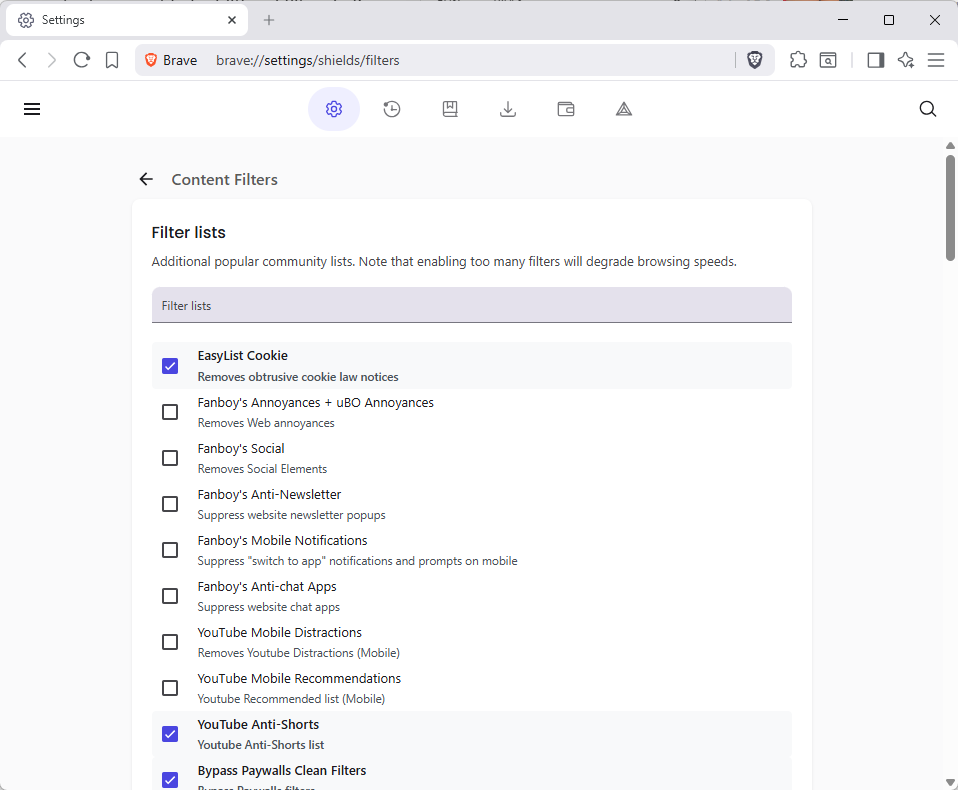
It is quite easy to add more filters to Brave to extend the content blocking functionality.
Note: Each list that Brave supports natively offers a short description of what it does. Fanboy’s Anti-Newsletter list, for instance, blocks newsletter popups on websites.
Select Menu > Settings, or load brave://settings/ directly in the address bar.
Go to Shields > Content filtering.
Click on “show full list” to display all included filter lists.
Check the lists that you want to enable in Brave.
Note that adding lists will increase the memory usage of the content blocker and thus Brave. It is recommended to keep the list as short as possible.
As for recommendations, it depends largely on your Internet browsing and which annoyances you encounter regularly. YouTuber regulars, for instance, could enable filters for mobile distractions and recommendations, if they use Brave on their mobile devices.
There are also language-specific block lists, which are useful if you visit websites regularly in a specific language.