Chipp.in Tech News and Reviews

Windows, Security & Privacy, Open Source and more

Menu
  • Home
  • Windows
  • Security & Privacy
  • Gaming
  • Guides
  • Windows 11 Book
  • Contact
  • RSS Feed
Menu

Tag: YouTube

YouTube Premium Lite subscribers get background playback and downloads with a big “but”

Posted on February 25, 2026February 25, 2026 by Martin Brinkmann

If you want to watch content on YouTube without ads, then you have just one official option: a subscription for YouTube Premium. For a price of about $14 per month, subscribers get an ad-free experience and some other benefits, including access to YouTube Music, background playback on mobile devices and also downloads.

Google introduced YouTube Premium Lite as a cheaper option in some regions. It is not entirely ad-free though, and up until now, did not support any of the extras that come with a Premium subscription.

This meant no options to download videos for offline playback or to play videos in the background on mobile.

Google tried to block third-party solutions that allowed background play recently, but as usually, it did not work out too well.

This is changing though. Google announced today that downloads and background play are rolling out to Lite subscribers, for the most part. There is this little asterisk behind the feature that informs you that this is not unlocked for all videos.

Here are the details:

  • Advertisement: Still shows up on music content, Shorts, when searching or browsing.
  • Background play: Not available for Shorts or music content, or user-generated content that includes content from music partners.
  • Downloads: Not available for Shorts or music content, or user-generated content that includes content from music partners.

In other words, if you want to download regular videos or play these videos in the background on mobile, you are fine as a YouTube Lite subscriber. However, if you want to play music in the background or download your favorite songs, then you still can’t do it.

Not that great for many users. I would assume that many use background playback for music, but I could be wrong.

YouTube is reportedly hiding video descriptions and comments for some adblock users

Posted on February 16, 2026February 16, 2026 by Martin Brinkmann

Ah, the never ending battle between YouTube and adblock users. If you lost the round-count then you are not alone. This time, users report that Google is hiding comments and video descriptions on YouTube, if a content blocker is used.

One such report comes from Reddit. The user writes that YouTube is not showing descriptions and comments anymore, if an adblocker is turned on.

It would be a new strategy, as Google focused on disabling video streaming entirely for users with content blockers in the past.

While many users might not miss the comments that much, it is another story for the video description, as it may include vital information or links. If you, for example, watch a cooking video, you may find the recipe in the description.

Tests on my own systems using different browsers returned no such blocking. It seems likely that Google is once again testing the waters or rolling out the change over time.

Some users affected by the change noted that reloading the webpage restored access to the description and the comment section. It is probably only a matter of time before filter lists will be updated to reflect the changes.

For now, it is recommended to refresh the page. If that does not work, I suggest using a different browser and / or content blocker. If all of that fails, try playing videos on third-party sites such as Bing Video.

I ran tests with Brave and uBlock Origin in several browsers, and did not run into any of the described issues.

Lost in Translation: YouTube doubles-down on AI dubbing – what you can do about it

Posted on February 5, 2026February 5, 2026 by Martin Brinkmann

It usually happens in the first five seconds: you click on a video expecting the familiar, expressive voice of your favorite creator, only to be greeted by the flat, sterile drone of a synthetic narrator. That Japanese video game trailer? Has a voice over that sounds like a bored car salesmen from the Midwest.

If you watch YouTube content in different languages, there is a good chance that you encountered the video hosting site’s auto-dubbing feature before.

The idea is simple: To make content available to a wider audience, YouTube is giving creators access to tools that translate speech into other languages. This, according to YouTube, makes videos more accessible.

However, if you speak multiple languages or prefer to watch videos in the original language, you may have run into the problem that YouTube picked an AI-powered translation for you regardless.

YouTube announced an extension of AI dubbing on the platform recently. The feature is now available to creators worldwide and in eight languages. Expect this to increase further in the coming years.

What you can do about it

Google has implemented two options for YouTube users. One works for individual videos and requires no account, the other for all videos, but requires an account.

Third-party solutions, in the form of extensions, are also available.

The Quick Fix (Per Video)

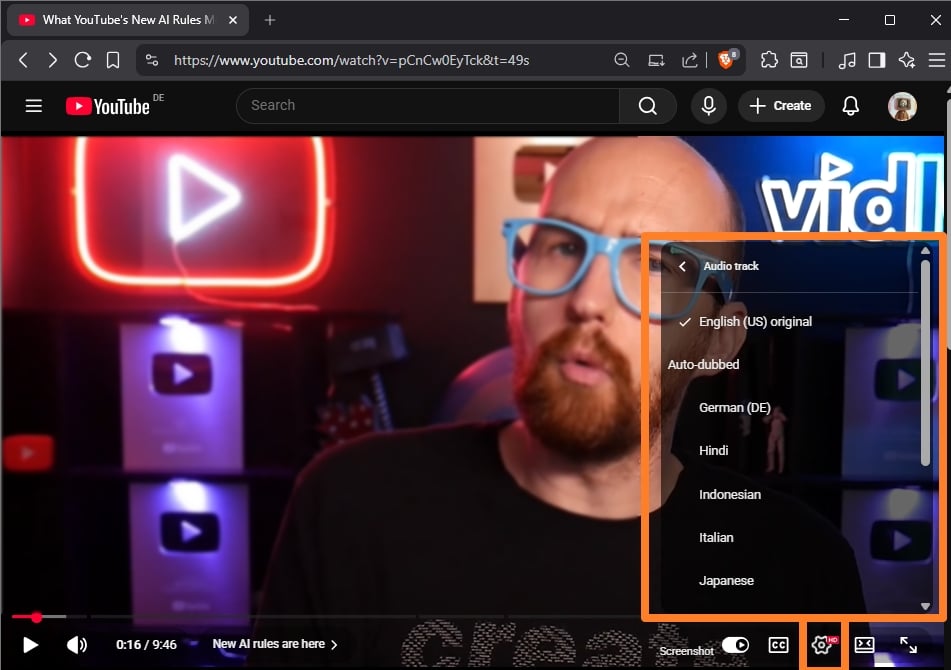
YouTube shows the original language and all dubbed languages when you open the Audio Track setting. (Image Source: vidlQ / YouTube)

If you are watching a video and hear an AI voice, you can switch back to the original voice immediately.

  • Pro: Works without account.
  • Con: Needs to be done for each video, preferences are not saved.

Here are the steps:

  1. Click/Tap the Gear Icon (Settings) on the video player.
  2. Select Audio Track.
  3. Choose the option labeled Original (e.g., “English (Original)” or “Japanese (Original)”).

The Permanent Fix (Account Settings)

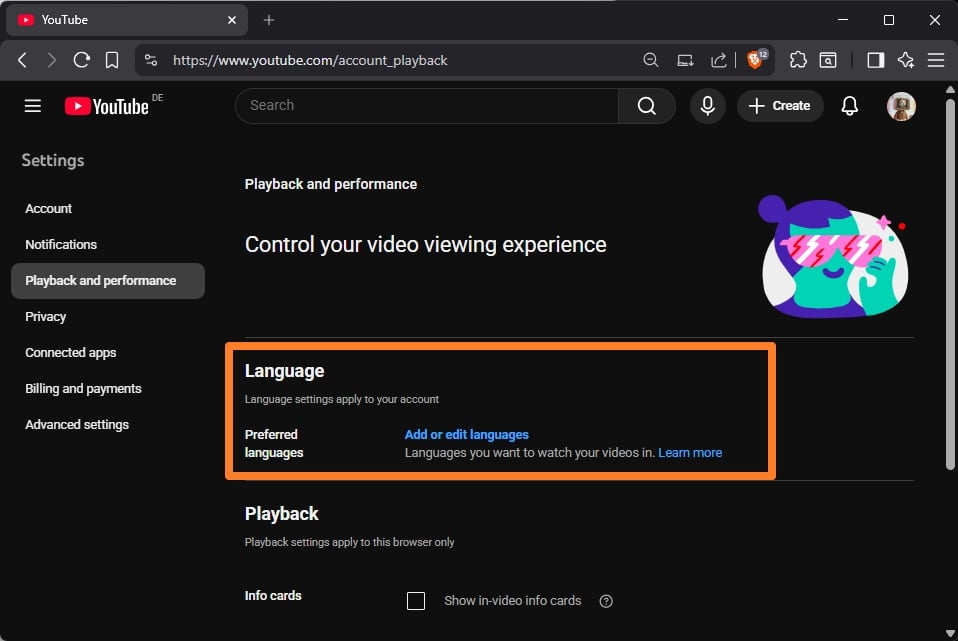
If you are signed in, add languages that you never want YouTube to dub using AI.

A new YouTube setting enables you to set all languages that you understand (or do not want dubbed).

  • Pros: Works for all videos.
  • Cons: Not a true “never” option. Requires a YouTube account and using it all the time.

Here are the steps:

  • Go to the YouTube Settings.
  • Select Playback and performance.
  • Look for “Preferred languages“ or “Add or edit languages“.
  • Select all the languages you speak/understand/don’t want dubbed.

The browser extensions

Extensions offer best of both worlds: they do not require an account and they work for any video that you encounter. Set once and forget.

Here is a short selection of extensions that you may want to try:

  • YouTube Anti Translate (Chrome / Firefox) – The extension disables the automatic translation of YouTube titles, audio, or descriptions using AI. Works automatically, open source extension.
  • YouTube Audio Selector (Chrome) — Set preferred languages for YouTube to make sure that they are never AI-translated.

What about you? Did you encounter AI dubbed videos on YouTube before?

No More Free Background Play: Google Patches one of YouTube’s Biggest Mobile Loophole

Posted on February 3, 2026February 3, 2026 by Martin Brinkmann

Google is tightening its grip on one of YouTube Premium’s most coveted feature, officially patching a long-standing loophole that allowed Android users to enjoy background playback through third-party browsers without a subscription.

By implementing new technical restrictions, the search giant tries to neutralize workarounds in popular browsers like Brave and Vivaldi that previously bypassed the paywall by tricking the site into playing audio while the screen was off or the app minimized.

This latest crackdown draws a firm line in the sand: if you want to keep the music playing while you multitask on mobile, Google expects you to pay for the privilege. After trying to hinder content-blockers for years and blocking vital extensions in Chrome for Android, the company seems to have found another target for its thumbscrew tactics.

Google made several features exclusive to paying YouTube Premium subscribers when it launched the plan. Premium subscribers get several benefits, including an ad-free experience on the site. Another benefit is background playback on Android.

Google tries to block background play workarounds

Give it a try. Open YouTube in Chrome for Android, play any video, and switch to another app or turn off the screen. The effect? Video playback stops. Not great, considering that many devices turn off the display automatically after a short period of inactivity. Listening to a video while napping? Forget it.

That is where third-party browsers and other tools came into play. Fire up Brave, Vivaldi or several other browsers, and you will notice that video playback continued, even while the YouTube tab was in the background.

This loophole is reportedly being closed. I tested several browsers and found some to be working — Brave — and others not at the time — Vivaldi — but that does not mean that you will experience the same.

Google, clearly, is after Premium subscribers only. If your favorite way of listening to YouTube videos no longer works, you might buy Premium after all to regain the function. Some users might try and find other workarounds, like downloading videos first to play them locally. This works, but it requires more steps before a video can be played.

Google seems to have confirmed the change to various news outlets, including Android Authority. This is the statement from a Google spokesperson according to the site:

Background playback is a feature intended to be exclusive for YouTube Premium members. While some non-Premium users may have previously been able to access this through mobile web browsers in certain scenarios, we have updated the experience to ensure consistency across all our platforms.

There you go. If you can’t play YouTube videos in the background anymore on Android, it is Google that you need to blame. There is a good chance that this is the start of yet another cat-and-mouse game. Browsers and tools might find ways around this, which are then closed or torpedoed by Google again.

Someone predicted that YouTube would show just a single video on its homepage and it became reality

Posted on November 28, 2025November 28, 2025 by Martin Brinkmann

How many videos do you get when you open the YouTube homepage on your device? When I do open YouTube in any browser I get zero, because I have turned off the YouTube history and Google decided it would push users into signing in to an account by disabling the generic feed of videos that it was showing previously to anonymous users.

However, even if you sign in, your mileage may vary depending on device, application and the screen of the device. It is clear that Google seems to be interested in showing less and less videos on the homepage of YouTube.

Turns out, someone predicted that this would happen in early 2025 already, stating back then that YouTube would soon — in the same year — display just a single video on its homepage on his main device, a 32″ 1440p display.

Back in early 2025, YouTube showed five videos and a big ad on the homepage, a stark contrast to the 30 videos and zero ads that YouTube showed back in 2019.

When the same author opened YouTube this month on Apple TV, he was greeted with a layout that showed just two thumbnails, one of them being an ad.

So, just one video remained on the homescreen as predicted. Here is where it gets crazy: he is now predicting that Google won’t show a single video going forward on YouTube’s above the fold homepage (but likely a big ad for something).

The approach is similar to how Google turned Google Search into a vessel for delivering ads to visitors rather than sites. For some queries at least, Google shows zero organic links above the fold. Only ads, lots of them. The first organic result may show up on the second page.

Any other website would get penalized into oblivion by Google for doing so, but the same rules that Google applies to websites don’t apply to Google itself.

I’m less and less interested in YouTube because of Google’s stance of making the live of users who are not signed in miserable.

Anyway, what is your take on this and more importantly, how many ads and videos do you see on the YouTube homepage currently?

Google launched a new anti-ad-blocking update on YouTube, reportedly

Posted on November 8, 2025November 8, 2025 by Martin Brinkmann

Ah, the battle continues as predicted. Over the past one or two years, a cat and mouse game played out between Google-owned YouTube and content blockers. YouTube implemented various systems to limit or block users with ad-blockers from accessing videos, and the makers of the solutions tweaked their extensions and services to bypass them again.

The next stage of this back and forth battle has just begun, claims Tom’s Guide. According to the website, YouTube has updated its systems on November 7. While the company has not publicly revealed anything about the update, thousands of users flocked to various Internet sites reportedly since then claiming that YouTube was down or not working for them anymore.

Turns out, YouTube did not have an outage but did make changes that blocked certain ad-blockers from doing their works. Most users reported that the YouTube homepage was not loaded at all for them and that videos would not buffer, or take a very long time to start playing.

Especially extensions, like AdBlock Plus, are affected reportedly. However, some extensions or options seem to work still. Brave Browser’s built-in content blocker, for instance, worked just well this morning when I tested it on YouTube.

Firefox with uBlock Origin installed worked as well. It is possible that only some content blockers are affected, or that updates were released already that address the issue.

In any event, it is very likely that this is not Google’s last attempt at blocking users with ad-blockers from accessing videos on YouTube.

Affected users have a few options to address the issue. The first thing they may want to do is disable the content blocker to verify that YouTube is not down. Once verified, using a different content blocker or web browser with integrated content blocker might help.

Now You: do you use YouTube regularly? What do you use to watch videos on YouTube?

YouTube Row Fixer

How to change the number of videos YouTube shows per row

Posted on October 15, 2025October 15, 2025 by Martin Brinkmann

When you open the YouTube homepage or a channel, you may see videos neatly listed as thumbnails in rows. If you feel like the number of videos is too small or large, you might consider adjusting the video-per-row count on YouTube.

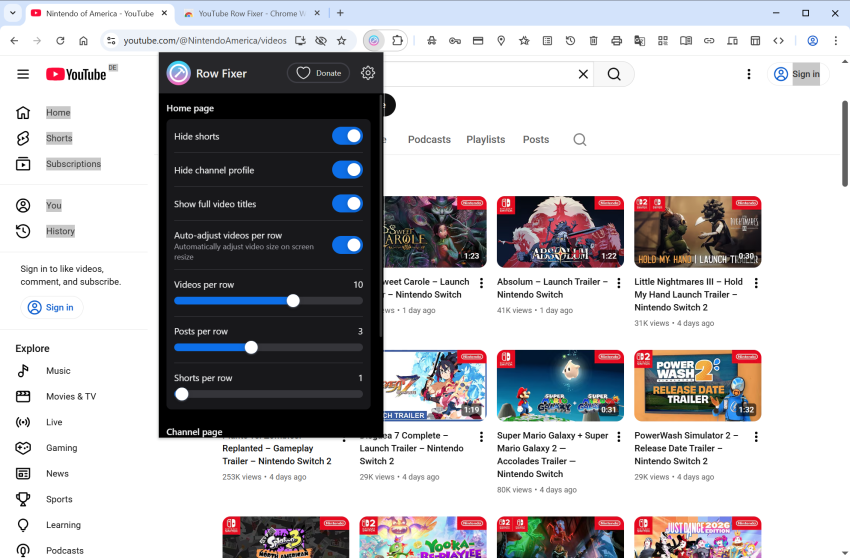
Enter YouTube Row Fixer, a browser extension for Chromium-based and Firefox-based browsers, that lets you do just that. The main idea is to give you customization options. Once installed, activate the icon of the extension to display the configuration options.

You can select the number of videos, posts, and shorts per row on YouTube for the homepage and for channels. Additionally, if you dislike Shorts, you can turn them off entirely to hide them.

Other options include showing full video titles for each video, which YouTube does not, if the video title is too long. It gets cut off, but when you enable the option, you get the full video title for all videos.

Last but not least, you may also enable an auto-adjust option. This changes the number of videos per row based on the size of the browser window. The maximum is always the number that you get in the configuration though. In other words, if you make the window of the browser smaller, you may get fewer videos per row than you set in the settings.

The changes happen automatically. You do not need to restart the browser or even refresh the page. Just exit the settings page by clicking on another interface element, and you should notice that the changes get applied to the page.

YouTube Row Fixer is an open source extension. You can download and install it from the Chrome Web Store, the Mozilla Add-ons Store for Firefox, or directly from the project’s GitHub repository. The Firefox version has the advantage that it also runs in mobile Firefox.

I ran tests in several browsers, including Chrome and Firefox, and it worked as advertised. Extensions like it have a tendency to break when the developer of the website they manipulate makes changes. This could happen with YouTube Row Fixer as well, but an update should fix any issue that may arise.

Now it is your turn. Do you use YouTube in your browser? If so, have you installed any extensions or scripts to tweak the video site?

Google is hunting YouTube Premium Family subscribers now that are not living in the same household

Posted on September 3, 2025 by Martin Brinkmann

Last month, Google confirmed that it is trying to end a loophole that allows YouTube Premium subscribers to subscribe for less. The idea was simple: instead of subscribing from a country where YouTube Premium costs an arm and a leg, you use a VPN or other means to subscribe from a country where it costs a tenth or less of the actual price.

Now, Google confirmed that it is also investigating YouTube Premium Family subscriptions for misuse. Here, Google is going after subscribers who share a subscription with members who do not live in the same household.

For instance, when household members move out but continue to use the family’s YouTube Premium subscription at the new place. There have also been instances where access was shared between a group of friends or even resold.

Google is sending out emails to YouTube Premium subscribers reportedly, if it believes that the Family Plan is misused. The subscription is paused for those users, which means that they will see ads and do not get access to any of the other benefits that come with a YouTube Premium subscription.

A YouTube Premium Family subscription costs about $23 at the time of writing in the USA. This allows the subscriber to share the subscription with up to five family members. A single YouTube Premium subscription sets users back about $14 right now in the USA.

Six friends who would share a subscription would pay $4 per month for YouTube Premium effectively. That is still more expensive than a single subscription in some countries, but much cheaper than a regular subscription.

The scope of the investigation is unknown. Google could be testing the waters to analyze reactions of subscribers that it contacts. In the long run, however, it seems likely that Google plans to end all “get YouTube Premium for cheaper” loopholes.

Now You: Do you have a YouTube Premium subscription? Feel free to leave a comment down below.

YouTube Premium Lite Check

Google could go after YouTube Premium users who bought the subscription in another country

Posted on August 23, 2025August 23, 2025 by Martin Brinkmann

YouTube users who want to sign up for YouTube Premium have one or multiple options to do that. Officially, you get to pick between YouTube Premium, which is completely ad-free, and YouTube Premium Lite, which includes some ads in some videos.

The price of the subscription differs significantly from region to region. Some Google users have used this to their advantage until now. The main idea was to sign up for YouTube Premium in another country. Once done, you’d be able to enjoy YouTube Premium in your own country and language(s), without any restrictions or limitations.

Google is updating the terms of YouTube Premium. From September 26, 2025 onward, the terms include a new paragraph that deals with this.

Google writes:

Your use of and access to any Premium Service should be used from the country or territory where you signed up for that Premium Service. Accessing or using any Premium Service predominantly outside of that country, or attempting to misrepresent your sign-up country, is a violation of the Premium Service Terms and may result in termination of your access to the Premium Services. If you move to a new country, you may be required to re-subscribe to the Premium Services there to maintain your access, subject to the Premium Service’s availability, pricing, and feature offerings in that new country.

In simple terms, Google is explicitly disallowing the use of any means that allow customers to subscribe to YouTube Premium in a country that they do not predominantly live in. Google does not define any limits in the terms, but has published details on the YouTube Help website.

There, the company writes that it may take action if the user is “traveling for more than 30 days” or moving ” to a different country or territory. Actions may include pausing or canceling the subscription.

Additionally, Google reserves the right to take action against users who misrepresent their location, for instance by using a VPN.

To ensure we can offer the correct plans and pricing, you must accurately represent your country when you sign up for and use YouTube Premium subscription plans. If you misrepresent your location (e.g., use VPN), or attempt to circumvent access and availability restrictions, your subscription may be subject to cancellation.

It remains to be seen if Google will take action against the users who subscribed to YouTube Premium using a VPN or other means.

Now You: what is your take on this? Do you think that Google will take action and pause or cancel subscriptions from users?

Google is testing floating ads on YouTube that overshadow part of the video

Posted on July 30, 2025July 30, 2025 by Martin Brinkmann

If you thought that the current state of the Internet and advertisement in general is at a threshold already, then you may be surprised that companies like Google, Meta, Netflix, or Amazon don’t really think so.

Google seems to be one of the main driving forces behind ads. The advertising company that also operates a search engine, browser, and the YouTube website, announced last month that YouTube Premium Lite users would soon start seeing more ads.

The brunt of ads, however, is reserved for users who do not pay Google to see less or no ads. A report on Tech Issues suggests that Google is pushing it again on YouTube.

The site mentions two reports by YouTube users. The first is about the missing skip button on YouTube, which Google started to hide as early as October 2024. Google displayed a skip button when ads played in the past, but this appears to have changed for some users. No skip button means that you have to sit through the entire ad or ads before you can start watching the video.

The second new type of ad may even be more annoying. Since users only accept a number of ads on the site, Google thought it a good idea to add floating ads to videos.

The example given by a user on Reddit shows a small banner overlay on the video screen that promotes a seemingly unrelated channel on the site. To make matters worse, there does not appear to be an easy way to close that banner. Apparently, you need to click on the three-dots first before you can hide it again.

So, if you do use a content blocker, then there is a good chance that a rules update will hide this new form of advertisement on YouTube. However, depending on how you access YouTube, you may not be able to run a content blocker. For instance, if you use the official YouTube app, you can’t block ads that it displays easily. You can check out my guide on blocking most ads on Android for starters.

Now You: how do you handle ads on sites like YouTube? Do you block them? Feel free to leave a comment down below.

  • 1
  • 2
  • 3
  • 4
  • 5
  • Next

Support This Site

If you like what I do please support me!

Any tip is appreciated. Thanks!
  • March 2, 2026 by Martin Brinkmann Don't Bother with Windows 11's new Speedtest feature
  • February 27, 2026 by Martin Brinkmann Warning! That laptop on Amazon? It comes with temporary storage
  • February 26, 2026 by Martin Brinkmann "If your printer works today, it will continue to work": Microsoft corrects previous announcement
  • February 25, 2026 by Martin Brinkmann YouTube Premium Lite subscribers get background playback and downloads with a big "but"
  • February 24, 2026 by Martin Brinkmann Firefox 148.0 is out with its AI kill switch and support for Windows 7 and 8.1 comes to an end

About

We talk, write and dream about Technology 24/7 here at Chipp.in. The site, created by Martin Brinkmann in 2023, focuses on well-researched tech news, reviews, guides, help and more.

Legal Notice

Our commitment

Many websites write about tech, but chipp.in is special in several ways. All of our guides are unique, and we will never just rehash news that you find elsewhere.

Read the About page for additional information on the site and its founder and author.

Support Us

We don't run advertisement on this site that tracks users. If you see ads, they are static links. Ads, including affiliate links, never affect our writing on this site.

Here is a link to our privacy policy

©2026 Chipp.in Tech News and Reviews