Chipp.in Tech News and Reviews

Windows, Security & Privacy, Open Source and more

Menu
  • Home
  • Windows
  • Security & Privacy
  • Gaming
  • Guides
  • Windows 11 Book
  • Contact
  • RSS Feed
Menu

Tag: gmail

Gmail is getting a full dose of Gemini AI

Posted on January 8, 2026January 8, 2026 by Martin Brinkmann

Google started to add AI features to its popular email service Gmail last year. These focused on productivity and included options to summarize long emails, optimize drafts, or improve search.

These features were limited to Google AI Pro or Ultra subscribers, and also available as part of a Google Workspace subscription.

Tip: looking for emails on Gmail? They may have been pushed to the updates category.

Google announced today that Gmail has entered the Gemini era. It does not come as a surprise that more AI is being added to Gmail.

Here is an overview of the new features that Google announced today on its The Keyword blog.

AI Overviews

AI Overviews, which are already available when you search using Google Search, is coming to Gmail. Google expands the feature somewhat, as Gmail will display summaries of emails to display key points to Gmail users.

The feature comes into play as well when you type a question in the inbox. Gemini will display the answer as a simple AI Overview” in that case.

Google says that this enables new and better interactions with the content. Gmail users may search for “Who was the plumber that gave me a quote for the bathroom renovation last year?” to quickly get the answer they are looking for, according to Google.

The AI Overview feature is being rolled out starting today to all Gmail users while Google AI Pro and Ultra subscribers get the option to ask inbox questions.

Help me Write

Another new feature is Help me Write. Google describes it as a way to use AI to draft emails from scratch or improve them.

The already available Smart Replies feature is upgraded to Suggested Replies, which is now using the context of the conversation to offer more relevant responses.

Last but not least, a new proofread feature makes “advanced grammar, tone and style checks”.

Help me Write and Suggested Replies are rolling out to all Gmail users. The advanced proofreader is only available for Google AI Pro and Ultra subscribers.

AI Inbox

Gmail users will also see a new AI Inbox entry above the regular inbox on Gmail going forward. Google says that this new feature is designed to remove clutter from the inbox so that users “can focus on what’s most important”.

The company compares it to a personalized briefing that is helping Gmail users catch up quickly.

It helps you prioritize, identifying your VIPs based on signals like people you email frequently, those in your contacts list and relationships it can infer from message content. Crucially, this analysis happens securely with the privacy protections you expect from Google, keeping your data under your control. This lets high-stakes items — like a bill due tomorrow or a dentist reminder — rise to the top

This feature is only available to “trusted testers” at the time but rolled out broadly in the coming months.

Closing Words

All three features roll out to Gmail users in the United States who are Google AI Pro or Ultra subscribers first.

Google has little to say about privacy, but it should be clear that the AI needs access to the emails for its functionality. Google did not reveal if there will be options to turn off the AI features in Gmail.

Now You: do you use AI features in your email client or on a website already? What is your take on these new features?
You may soon be able to change your Gmail address

Posted on December 25, 2025December 25, 2025 by Martin Brinkmann

Up until very recently, setting up a Gmail account meant that you’d be stuck with the selected email address. Google did not offer any option to change the address. In fact, the only option available was to create an entirely new account to pick a new email address.

This meant that you would lose access to preferences, emails, data and everything else associated with the account.

This seems to be changing, as Google revealed on a support page that address changing is coming to Gmail.

However, the news needs to be taken with a grain of salt. The help page is in Hindi only, which could mean that Google is making the change exclusive to a subset of users.

There, Google writes the following (auto-translated):

Changing the email address of your Google account

Your Google account email address is the address you use, lets you sign in to Google’s services. This email address lets you and others identify your account. If you prefer, your Google account’s email address whose last part is gmail.com can be changed. It could be replaced with a new email address with gmail.com last.

In other words, Google is rolling out a change that lets users change their Gmail address.

What about the old address then, you may ask? It is retained as well to avoid that someone else snags it up and gains access to your emails.

Google reveals that the process can be used once every 12 months at the most. Once a new email has been set, it, or the old, can be used to sign in to Google services.

When is it coming? The functionality is rolling out gradually, as usual. If this is indeed rolling out worldwide, expect weeks or even months before you see the functionality in your account.

Closing Words

The new process makes it easier to switch to a new email address by Gmail. Since you retain access to the old email, you effectively create a second account that you may use from that moment on, without losing access to the first.

Data seems to be shared though, so that your preferences and data are retained, regardless of the account that you use to sign-in.

Now You: do you have and use a Gmail account? Would you change its address name to a new one, if the feature lands? Feel free to leave a comment down below.

Gemini in Gmail may have been enabled by default, and turning it off takes other features with it

Posted on November 22, 2025November 23, 2025 by Martin Brinkmann

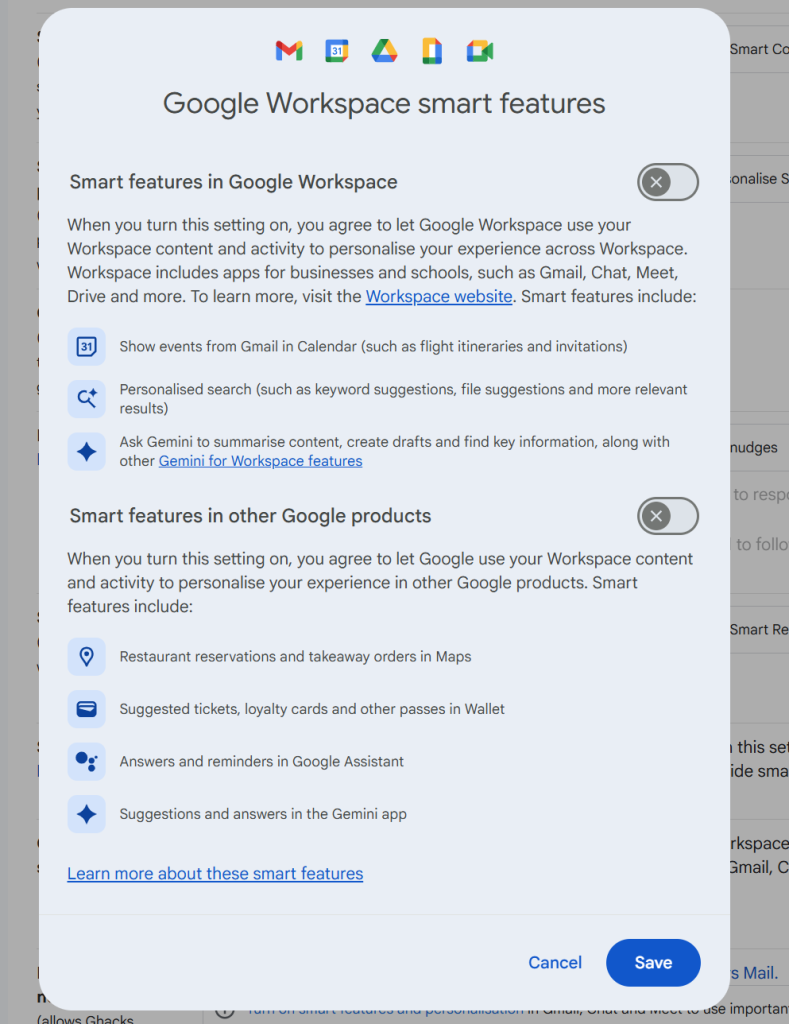
If you are using Google’s Gmail email service, you may have stumbled upon Smart Features already, especially if you are using the web-version of the service. Up until recently, Smart Features did not include AI, but this changed in 2025.

Now, Google has baked its AI Gemini into the Smart Features of Gmail. Depending on where you live, Smart Features are enabled by default. Note that while Google claims that Smart Features are not turned on for user in the European Union (Japan, UK and Switzerland are the three other regions), they were in fact enabled in one of my accounts.

So, what do you get with Smart Features?

  • Automatic email filtering and categorisation.
  • Smart Compose.
  • Smart Reply.
  • Nudges (suggests emails to reply to or follow-up on)
  • Summary cards above emails.
  • Grammar, spelling, and auto-correction.

Some of these features are powered by AI nowadays and Gemini, Google’s AI, needs access to your data for the features to work. Google claims that personal data is not used for training and that everything is kept within the boundaries of the account.

However, if you prefer that Gemini does not access your emails at all, your only option is to turn of the Smart Features in Gmail.

Here is how that is done:

  1. Load https://mail.google.com/mail/u/0/#settings/general in a web browser.
  2. Scroll down to Smart Features in Settings under General.
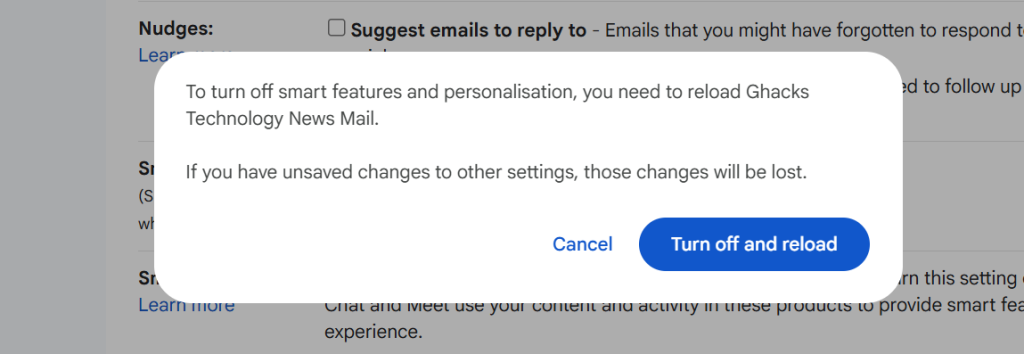
  3. Remove the checkmark of the Smart Features box.
  4. Confirm the removal.
  5. Gmail restarts.

Smart Features should be turned off now.

Note that you may also need to click on “Manage Workspace smart feature settings”, if the account is a Google Workspace account and not just a single Gmail account.

There you can turn off Smart Features for Gmail and other Google products.

Again, when you enable the feature you do not get any auto-corrections anymore as well. That is a trade-off for some, others may use the functionality that their browser provides for that anyway.

Now You: do you use Gmail as your mail provider or another service? Black Friday might be a good option to make a switch, as plenty of deals are live already or will be offered in the coming weeks.

Gmail’s new end-to-end encryption feature is atrocious for non-Gmail users

Posted on April 7, 2025April 7, 2025 by Martin Brinkmann

Google announced support for end-to-end encrypted emails on Gmail for organizations and later this year for end users last week. This allows Gmail users to encrypt emails so that only the recipient can read them.

Gmail is far from being the first email provider to offer such a feature. Proton Mail, for instance, supported end-to-end encrypted emails from the get-go.

When you read Google’s announcement, you may stumble upon the explainer on how this is implemented. Not technically, but how it works from the user’s perspective.

According to Google, end-to-end encrypted emails on Gmail work differently depending on whether you are a Gmail user or not, and whether an administrator has configured use of the restricted Gmail version for all users.

So, here are the different scenarios when someone sends an encrypted email from Gmail.

  • When the recipient is a Gmail user, the user may read it in their inbox. The email is decrypted when it reaches the inbox and the email can be read.
  • When the recipient is not a Gmail user, they receive an invitation to open the email in a guest Google Workspace account. This allows them to view and reply to the email in a restricted version of Gmail.
  • If S/MIME is configured, Gmail sends the encrypted email via S/MIME.

Google Workspaces administrators may furthermore configure encrypted emails to always require the restricted version of Gmail.

Here is why that is bad

Some emails, all end-to-end encrypted ones, no longer land in your inbox, if you do not use Gmail or when the admin enabled restricted mode. You furthermore need to sign in using an invite link and a pin. Organizations may furthermore limit access to emails by revoking access at any time.

To be fair, this is not all that different from how Proton Mail handles sending encrypted emails to non-Proton users.

Still, if you are not a Gmail user, you may have to read some emails on the Gmail website in the future using the guest account feature of Google Workspaces. This may have severe consquences:

  • When you search emails in your dedicated client or web service, encrypted email content is not included.
  • Filters may not work correctly, as they may only apply to the public part of the email and not the body.
  • Security tools can’t scan the emails.

It is probably only a matter of time before malware campaigns start to use the new feature.

Now You: what is your take on this? Do you use encrypted email already? Feel free to leave a comment down below.

Gmail

Gmail: low priority emails pushed to Updates inbox category

Posted on May 25, 2024May 25, 2024 by Martin Brinkmann

Google is rolling out an update for Gmail on Android and iOS that is moving what it considers low priority emails to the update inbox category.

Google’s email service Gmail classifies emails into different inbox categories automatically by default. This is done to display fewer emails to the user by default to avoid email overload according to Google.

Here is the current classification:

  • Primary—Emails from people you know and messages that don’t appear in other tabs.
  • Social—Messages from social networks and media-sharing sites.
  • Promotions—Deals, offers, and other promotional emails.
  • Updates—Notifications, confirmations, receipts, bills, and statements.
  • Forums—Messages from online groups, discussion boards, and mailing lists.
  • Reservations—Flight confirmations, hotel bookings, and restaurant reservations.
  • Purchases— Order, shipping, and delivery emails.

Soon, Gmail will move emails that its algorithm classified as low priority to the Updates inbox. In other words, some emails that you would expect in the Primary inbox may not be there anymore.

Good to know: this change applies only if you have not disabled the inbox category system. This can be done in Settings > Email Address > Inbox Categories.

There you find options to disable all but the primary inbox. When you do that, all emails are shown in a single inbox in the Gmail application.

The change is rolled out only in Gmail for Android and iOS. The web-based version of Gmail won’t move low priority emails to the Updates group for now.

Google shows a banner in the Gmail app when it is activating the change. It says:

Now, Gmail puts messages that may not need your immediate attention in Updates. You can change this any time in settings.

Google told 9to5Google that it has been testing this change and that it has received positive feedback from testers about it.

Closing Words

Automatic classification of emails is always problematic and Google may make incorrect classifications at times on Gmail. You can disable the functionality entirely to restore a single inbox in Gmail apps and Gmail for the web though.

Do you use Gmail at all or do you use another email service?

Spam

Gmail launches improved text classifier to combat spam

Posted on December 5, 2023December 5, 2023 by Martin Brinkmann

Email spam is still a great problem on today’s Internet. Most users who have email accounts receive spam regularly. While most of the spam is detected by mail filters, at least when it comes to most providers, there is still enough spam that slips through the cracks.

Google launched a new text classifier on Gmail that promises better detection rates, less false positives and also improved performance. Called RETVec — Resilient & Efficient Text Vectorizer — it is improving spam detection on Gmail by 38% and reducing false positives by almost 20%.

Google says that RETVec achieves this “combining a novel, highly-compact character encoder, an augmentation-driven training regime, and the use of metric learning”.

Its architecture makes RETVec compatible with any language out of the box and all UTF-8 characters without the need for text processing.

Spammers and malicious actors use different methods to bypass spam filters. Frequent methods include the use of homoglyphs, characters that look very much alike, or the use of invisible characters.

Google claims that Gmail’s new anti-spam system is better suited to identify these tactics and deal with them accordingly.

The company trained the new model internally at Google for a time to better understand its effectiveness. Google says it found it “highly effective for security and anti-abuse applications” as a result of its internal tests.

RETVec in detail

RETVec Gmail anti-spam

RETVec is released as open source. You may visit the GitHub project website for access to the source. There, you will also find more information, including the paper and links to demos.

Google describes RETVec in the following way on GitHub to a development-focused audience:

RETVec is trained to be resilient against character-level manipulations including insertion, deletion, typos, homoglyphs, LEET substitution, and more. The RETVec model is trained on top of a novel character encoder which can encode all UTF-8 characters and words efficiently.

Google notes that RETVec may also be a choice for “on-device and web use cases”. The technology is supported natively in TensorFlow Lite and there is also a custom JavaScript implementation.

Closing Words

Gmail users benefit from the new anti-spam filter on the site. A reduction by 38% is a massive improvement, especially considering Gmail’s daily mail volume. Google benefits from the deployment as well, as performance improves significantly thanks to the lightweight nature of the new text vectorizer.

Now You: do you use Gmail?

Support This Site

If you like what I do please support me!

Any tip is appreciated. Thanks!
  • March 2, 2026 by Martin Brinkmann Don't Bother with Windows 11's new Speedtest feature
  • February 27, 2026 by Martin Brinkmann Warning! That laptop on Amazon? It comes with temporary storage
  • February 26, 2026 by Martin Brinkmann "If your printer works today, it will continue to work": Microsoft corrects previous announcement
  • February 25, 2026 by Martin Brinkmann YouTube Premium Lite subscribers get background playback and downloads with a big "but"
  • February 24, 2026 by Martin Brinkmann Firefox 148.0 is out with its AI kill switch and support for Windows 7 and 8.1 comes to an end

About

We talk, write and dream about Technology 24/7 here at Chipp.in. The site, created by Martin Brinkmann in 2023, focuses on well-researched tech news, reviews, guides, help and more.

Legal Notice

Our commitment

Many websites write about tech, but chipp.in is special in several ways. All of our guides are unique, and we will never just rehash news that you find elsewhere.

Read the About page for additional information on the site and its founder and author.

Support Us

We don't run advertisement on this site that tracks users. If you see ads, they are static links. Ads, including affiliate links, never affect our writing on this site.

Here is a link to our privacy policy

©2026 Chipp.in Tech News and Reviews