Chipp.in Tech News and Reviews

Windows, Security & Privacy, Open Source and more

Menu
  • Home
  • Windows
  • Security & Privacy
  • Gaming
  • Guides
  • Windows 11 Book
  • Contact
  • RSS Feed
Menu

Tag: amazon

Warning! That laptop on Amazon? It comes with temporary storage

Posted on February 27, 2026February 27, 2026 by Martin Brinkmann

I do not think that Amazon is the best place to shop for computer parts, laptops or full PC systems. The main reason for that is price, but there are other factors that should make you pause before you hit the “add to cart” button on the shopping site.

A new issue that has been uncovered by Neowin is that some sellers on Amazon inflate the storage of the devices that they sell. A laptop with 1.1 TB of storage? What an odd number. While it is possible that such a laptop exists, for instance one with a 128 GB solid state drive and a 1 TB platter-based drive, in this case, something different is being sold.

See, these particular sellers add a one year subscription to OneDrive to the laptop, and they add the 1 TB of cloud storage to the total of the laptop’s storage. So, instead of getting a laptop with 1.1 TB of storage, buyers get a laptop with 128 GB of storage and 1 TB of cloud storage.

This should not be a problem for users who know what OneDrive is, as physical and cloud storage is clearly separated in the title and Microsoft’s cloud service is mentioned by name. The system configuration is also displayed correctly, but it can still be problematic for users who hit the buy button too quickly or do not know the difference.

At the very least, it can be very confusing. If you open such a result on Amazon, say this HP 14″ laptop, you find the following title on Amazon:

HP 14″ Natural Silver Ultrabook Laptop, Intel 4-Core CPU, 4GB RAM, 1.1TB Storage (1TB OneDrive and 128GB SSD), HD Display, Windows 11, Microsoft 365 Web Apps

The title says 1.1 TB of storage first before the seller highlights how much of that is physical and how much is cloud-based.

This laptop comes in three configurations: the base model comes with 4 GB of RAM and 128 GB of storage, the most expensive model with 16 GB of RAM and 256 GB of storage. Here, the seller has not added the 1 TB to the laptop’s total.

However, when you scroll to the specs right below, you see 1.1 or 1.2 TB as the hard disk size. The “about this item” section again differentiates the storage between local and cloud storage.

Ultimately, it is a new selling strategy on Amazon that you may want to look out for, if you do buy laptops or PCs there. It is quite possible that Amazon is not the only marketplace where the strategy is used.

Amazon is disabling apps on Fire TVs now

Posted on December 2, 2025December 2, 2025 by Martin Brinkmann

If you use a Fire TV device by Amazon, then you know that you may install third-party Android apps on the device that are not provided via Amazon’s official App Store. This is an excellent option to install apps that you may want to use, like streaming apps or YouTube frontend clients that get rid of all the annoyances.

However, Amazon announced this year that it is going to disable certain apps on the Fire TV devices of customers without giving customers any say in the matter.

Amazon claims that it only disables apps “that are identified as using or providing access to unlicensed content”. In other words, Amazon targets apps that provide users with free access to streaming content that is restricted in some way or another.

A prime example are apps that give you access to sports streams that are not available for free. Amazon has a FAQ-website up that answers some questions that customers may have. It covers topics such as refunds (not really) to exceptions (none).

Put simple, Amazon will disable any application that it has on its list, which it keeps private. Customers should receive warnings next time they try to load an app that is on the list. The only options at this point are to close the app or to uninstall it.

Will this also affect frontends for services that get rid of advertisement? It is too early to say and even if that is not the case right now, the infrastructure is in place to add any app to the block list at any time.

Now You: do you use a streaming device or stick, like the Fire TV sticks? If so, did you install third-party apps on the device that are not offered via the official store?

Amazon

Amazon may send you ads via WhatsApp: here is how to turn that off

Posted on November 26, 2025November 26, 2025 by Martin Brinkmann

WhatsApp is one of the most popular messaging apps out there. One reason why more and more businesses try to establish channels on WhatsApp. Most to reach customers and sell them something.

Amazon is no exception to that. Maybe you have noticed already that you are getting ads from Amazon in WhatsApp.

Even if not, you may want to make sure that you won’t in the future. Good news is that there is an option to turn that off. It appears, however, that the feature is turned on by default. I can’t remember allowing Amazon to use WhatsApp for communication.

Here is what you need to do:

  1. Load the Notifications website on the Amazon website of your choosing: https://www.amazon.com/preferences/cpc/homepage
  2. Check the “Turn on WhatsApp” or “Turn off WhatsApp” button on the page.
  3. Select “Turn off WhatsApp” to disable communication.

Note that the page may look different depending on your locale. In Germany, it was called Communication Preferences Center and it looked different from the page opened on Amazon.com.

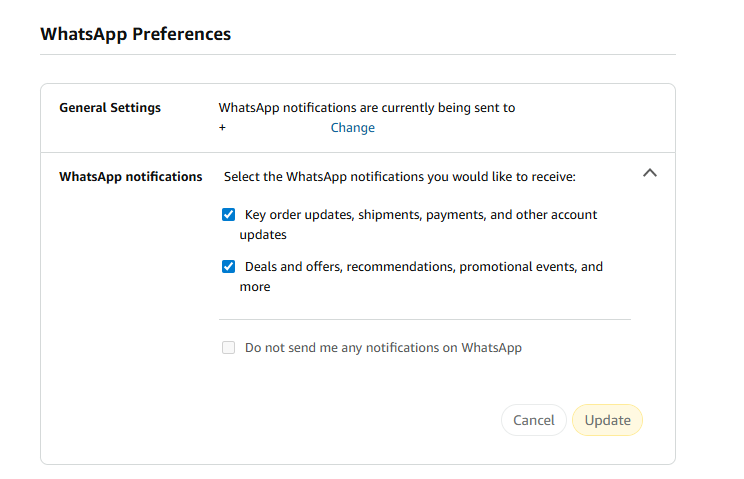
There, you an entire section dedicated to WhatsApp Preferences.

As you can see on the screenshot. the account was set up to receive WhatsApp notifications.

To change that here, you have to uncheck one or both of the options listed on the page:

  • Key order updates, shipments, payments, and other account updates.
  • Deals and offers, recommendations, promotional events, and more.

The second option sends ads to your WhatsApp account, while the first seems to be limited to Amazon notifications about orders and such. However, if you disable both, you can check “Do not send me any notifications on WhatsApp.

Don’t forget to hit the update button to save the change.

Now You: did you see the WhatsApp preferences when checking your Amazon account? Were the settings enabled? Feel free to leave a comment down below.

Amazon Prime Video Recaps

Users of streaming services dislike ads, but subscriptions continue to grow

Posted on November 17, 2025November 17, 2025 by Martin Brinkmann

When asked about their preference regarding streaming media, with or without ads, most users would like pick the latter. I would go even so far to claim that many dislike ads with a passion. However, when you add a monetary component to the question, things get interesting.

Get the cheaper, but ad-powered streaming option, or pay more, but save up on time and get rid of the ads?

It appears that the strategy of companies like Disney, Amazon, or Netflix is paying them huge dividends already. Ad-powered streaming subscriptions are pushing to new highs every financial quarter, it appears, and there does not seem to be any slowing down either.

Introduced just a few years ago, ad-supported plans make up a sizeable portion of total subscribers for major streaming platforms.

  • Netflix: last figure is 190 million users who use an ad-powered plan, but uses new metric.
  • Disney: about 164 million, does include Disney+, Hulu, and ESPN+ however.
  • Amazon: 315 million

Netflix introduced a new metric for its ad-powered plan recently. Previously, the company counted subscriptions only, which, according to the last report for which the company used the metric, was 94 million. The new report looks at household numbers as well.

Regardless, about a third of Netflix subscriptions seem to be ad-powered. For Amazon, it is even more. The reason is simple: Amazon decided to make all Prime Video subscriptions ad-powered. If you do not want ads, you have to pay Amazon a few extra bucks to avoid them. Most users apparently don’t.

Even more interesting, Amazon boasted in its last earnings call that it managed to boost subscribers from 200 million in 2024 to the-now 315 million.

Four out of ten Netflix subscribers pick the ad-powered plan, according to Netflix. Disney is likely seeing signups in a similar range.

Why are ad-powered plans growing? The most likely, and simple, answer is: because they are cheaper. Much cheaper in fact. The Standard with Ads plan of Netflix USA costs subscribers around $8 per month. The cheapest ad-free plan costs more than double at around $18 per month. If you want 4K, it is thrice as much at around $25 per month.

While subscribers of the Premium plan get some benefits that the other two plans do not support, notably 4K, Spatial Audio and HDR support, the only differentiating factor that matters between Standard with Ads and Standard is the advertisement.

Disney pricing is very similar in this regard, albeit considerably below the twice as expensive mark. The Disney+, Hulu Bundle, both with ads, costs around $13 per month. Without ads, the price rises to around $20.

While the “with ads” plans will likely become more expensive as time passes, there does not seem to be an end to their growth yet.

Now You: Are you subscribed to an ad-powered plan? Or do you prefer plans without ads, or no plans at all? Feel free to leave a comment down below.

Did you know that Amazon sells Smart Beds? They did not work during the AWS outage

Posted on October 22, 2025October 22, 2025 by Martin Brinkmann

Companies plaster “smart” on everything these days. While that is a generalization, it is clearly a trend that is getting more traction as the years go by only to be overshadowed by the use of AI. From smart hairbrushes to AI-powered toasters, companies come up with incredible ideas to justify premium pricing for their products. Not always do the products benefit from smart functionality.

Amazon offers a range of smart devices. You probably think of Alexa-powered devices, like the Amazon Echo, first. Did you know that Amazon sells Smart Beds as well?

At $2000 and more, beds of Amazon’s Eight Sleep brand are not exactly cheap, but they can control the temperature of different regions individually, support elevation, and come with sound-functionality.

However, to function properly, Amazon’s Smart Beds require cloud connectivity. Without it, they apparently become non-functional, as in, dead weight. With no manual overrides available, users are up for a hellish-experience when connectivity breaks.

The AWS outage exemplified this, according to a post by Dextero. When AWS went down, owners of the bed lost connectivity and could not use the app anymore to control their bed. This left them stuck with the last setting that was active, according to the report.

Even worse, some beds overheated apparently while the cooling stopped in others entirely. One user reported that his bed locked itself at a temperature level that was nine degrees above room temperature, stating that it felt like “sleeping in a sauna”. Others claimed that the bed was stuck in a position that they could not change anymore.

No offline mode

Amazon’s Smart Beds have no offline mode at the moment, which is more than puzzling. Even if the company thought that an AWS outage was very unlikely, it must have considered the possibility of local Internet outages that would then also impact a user’s control?

Should not something like this, a manual override for core features, be at the forefront of one’s thoughts when designing a smart product?

Now You: do you own smart devices? If so, which and for what purpose?

Amazon Prime Video Ad Free

Amazon kills Freevee, because it moved ads to Prime Video

Posted on July 3, 2025July 3, 2025 by Martin Brinkmann

The writing was on the wall. Some time ago, Amazon pulled a fast one on Prime subscribers by introducing ads for everyone. Subscribers who did not want the new experience could pay Amazon a few bucks extra to get rid of the advertisement again. To hammer that home even more, Amazon recently started to show more ads to users per hour.

Questions about the fate of Amazon’s then ad-powered streaming service Freevee came up at the same time. It did not really make sense to have Freevee as an option if all of the streams on Prime Video would also show advertisement to users.

Amazon kept Freevee around for the time being. CNBC reports that some Freevee users see notifications when they launch the app on their devices about the upcoming end of it.

According to the report, Amazon plans to put the standalone Freevee app to rest in August 2025. The notice states “Prime Video is the new exclusive home for Freevee TV shows, movies and Live TV”.

The app will stop working in August 2025 and users may tune in directly on the Amazon streaming service to get their Freevee fix. Amazon users, with or without Prime Video subscription, may continue to watch free content with advertisement on the Amazon website. The only requirement for that is an Amazon account.

Closing Words

Amazon established Freevee in 2019 to stream videos with ads to users. The decision to turn Prime Video into a bigger version of Freevee came in 2024. The only differentiating factor will be that users may watch Freevee content on Amazon without a Prime subscription going forward. Other than that, you will get ads either way unless you pay extra.

It is probably only a matter of time before Freevee is retired entirely and the available media library is integrated into the Amazon Prime Video library.

As far as I’m concerned, I started to watch more content on DVD and Blu-Ray again as it is giving me full control and a (mostly) ad-free experience.

In about a week, Amazon is removing the ability to download Kindle ebooks to non-Amazon devices

Posted on February 18, 2025February 18, 2025 by Martin Brinkmann

Ebooks can be a great alternative to traditional books. They do not weight anything, which means that you can carry around hundreds if not thousands of books effortlessly. They also come with extra features, like the ability to search books.

If you have bought ebooks in the past, you may know that you do not really own the books. Like most digital content, you get a license to use the book. This license can be revoked at any time and you do not have any say in the matter. If you are lucky, you get a refund. Besides outright removal, rightsholders may also update books at any time.

You are probably wondering what this has to do with Amazon. Well, Amazon is taking away a fundamental feature of its ebook store that existed for a long time: the ability to download your ebooks to your PC, Mac, and other devices that are not owned by Amazon.

Here is why that is bad. Currently, you have an option to download any ebook you bought from Amazon to a computer, say, a Windows PC. When you do that, you store the book in a place that Amazon has no control over. It cannot remove the book from the computer nor can it updated the book. Even if the book gets removed from Amazon’s ebook store, you retain that copy on your device.

This option is removed on February 26, 2025. Means, you only get the option to load ebooks onto Amazon Kindle devices. Amazon does have control over these. It can remove books from Kindle devices or push updates to the devices.

Another example of why that is bad for you. If you get locked out of your Amazon account, close it, or get banned by Amazon for whatever reason, you will lose access to all of the books that you bought.

So, if you own Kindle ebooks, you may want to download them before February 26 to a device that Amazon has no control over. You can do that by accessing the Content Library on Amazon’s website, selecting the “more actions” option, and then download & transfer via USB.

Note that you cannot do so anymore when you buy books after February 26th, as Amazon is removing it.

Now it is your turn. Do you buy digital content or prefer to buy physical content, if possible? Let us know in the comments.

Amazon Prime Video Recaps

Amazon uses AI to improve TV show recaps on Prime Video

Posted on November 5, 2024November 5, 2024 by Martin Brinkmann

I dislike recaps. Not as much as precaps, which give you a summary of what you are about to see, but still. Whenever they come up, I immediately activate the skip button to get past them.

Amazon is now experimenting with AI to improve recaps for viewers on Amazon Prime Video. The feature, which has launched for Prime Video customers in the United States, is part of the service’s X-Ray feature.

Related News:

Amazon launches the AI Clerk Rufus

Amazon calls the feature X-Ray Recaps; it is designed specifically to help customers who forgot where they left off. While that may not happen when you binge-watch a TV show or season, it may happen when you pause watching a show for weeks or months.

Amazon says:

Prime Video will deliver summaries of memorable moments and important plot points so our customers can quickly jump back into what they were watching or rediscover why they fell in love with a series in the first place.”

I have no idea how well this works. I do not use Prime Video, but it would be interesting to know if this works better than the regular recaps that you get.

Amazon says that recaps are only available for select MGM Studios Original series at the time.

To use the feature, select the recap icon on the TV shows starting page. There you get options to get a recap of the current episode, current season, or previous season.

The ability to get full season recaps could be helpful. The option to get a recap up to the minute you watched the show seems to be missing though.

In the future, Amazon could very well link these recaps to a customer’s viewing habits or purchases. Guesswork.

You may check out Amazon’s post on its About Amazon website for images and additional information on the feature.

What is your take on this new feature? Would you use it or ignore it? Feel free to leave a comment down below.

Amazon Prime Video Ad Free

More Ads are coming to Amazon Prime Video next year

Posted on October 3, 2024October 3, 2024 by Martin Brinkmann

Most streaming services have two levers when it comes to increasing profitability on the customer side.

  1. Increase the price of subscriptions.
  2. Show more ads.

Major streaming services like Netflix, Disney+, or Amazon Prime Video introduced ad-supported plans only recently.

These are cheaper, but the downside is that ads are shown regularly. Pricing varies from region to region, but if you take Netflix in the United States as an example, you get the following options:

  • Standard with ads: $6.99
  • Standard: $15.49
  • Premium: $22.99

Netflix increased the pricing of ad-free plans several times already and will likely continue that practice. The service did kill of a popular ad-free plan this year to put even more pressure on users.

Other major streaming services follow the same strategy. Plans with ads have not increased as much, or at all, in the meantime.

Ads introduce an interesting option now for these services. I call it the YouTube-strategy: increase ads steadily to push users into subscribing to a premium plan.

The effect is twofold: you either earn more, because more ads are viewed, or you get an increase in ad-free plan signups, because users hate ads.

Related content

Like Clockwork: Disney+ is getting another price increase

It is possible that some users choose to unsubscribe from a service as a response, but subscriptions increase in number right now, which suggests that the effect is not large enough to matter to these companies.

Amazon Prime Video: more ads in 2025

Amazon plans (paywall FT) to increase the number of ads that users see in 2025 when watching Prime Video. The service is special for several reasons.

  • It is available as part of an Amazon Prime subscription, which offers additional benefits.
  • Amazon is showing ads to all subscribers, unless they pay extra to have these removed.

Amazon follows the same strategy that all major streaming services follow right now. Users will be exposed to additional advertisement to earn more revenue and increase the number of users who pay for an ad-free experience.

Closing Words

You do not have to be a genius to predict that the companies will continue to push ads and increase the price of plans as well in 2025.

This will stop only when the number of subscribers is going down significantly or when enough users leave a free streaming service for another.

What is your take on all of this? Are you subscribed to a streaming service right now? Feel free to leave a comment down below.

Amazon

5 tips to survive Prime Day without going bankrupt

Posted on July 15, 2024July 15, 2024 by Martin Brinkmann

Amazon’s Prime Day is a major shopping event. Even if you are not an Amazon customer, you may notice that another Prime Day is about to happen when all of your favorite sites suddenly start to list deals.

While it may be tempting to shop at Amazon during Prime Day, it is usually better to play it cool and not fall into the trap of overspending on items that you may not even need or are not the best choice.

Here are five tips.

Tip 1: Prime Day does not mean you get the best price

While news outlets and sites try to paint Prime Day in the best light possible, it is always a good idea to compare the price on Amazon with other marketplaces.

Sites like Idealo or Google Shopping help finding the best price for most products. Other options include searching for the product name using your favorite search engine or searching for items on marketplaces like eBay.

Tip 2: Make a list of what you need before Prime Day

Visiting the Amazon website or app on Prime Day is like being a kid in a candy store. Products with discounts are shown left and right, and it is easy enough to get distracted and add items to the shopping cart because they are discounted, and not because you may need them.

It is a good idea to create a list of items that you need or want to buy prior to big shopping events. I have a list of about 15 items that I would buy during Prime Day, Black Friday, or other shopping events, provided that the price is right.

Yes, that sounds like a lot of stuff, but many are replacements for items that need replacing in the coming months or the next year.

Tip 3: Do not overspend

Regardless of whether you have created a list of articles or not, it is a good idea to set a budget for Prime Day. It is quite easy to overspend during major shopping events.

Before, during, and after you add items to your shopping cart, you will see promotions or other items. It is often just a click or two to add these to the cart as well.

Even if you stick to the plan, you may overspend. Either, because you did not compare prices, or because you opted for something more expensive. Why not buy the phone with more storage, the slightly larger TV, or the video card that promises more frames? Because you may overspend in that case.

Tip 4: Do not rush yourself

Many offers may be limited. Amazon may not have endless stock of an item, and when it is gone, it is gone. While that speaks for rushing and buying immediately, rushing also means that you may not compare prices or may buy items that you do not really need, but fear missing out on.

Even if an item sells out quickly, you may still be able to purchase it at a later point in time. Black Friday is just around the corner, and so are the dozen or so other “sales” that happen regularly online.

Tip 5: Do not browse randomly

It can be tempting to check out a few categories. If you like to play Switch or PlayStation games, you may be tempted to browse deals in those categories.

Browsing may lead to buying items that you did not have any intention of buying. This may lead to overspending and you ending up with items that you may not have researched properly before buying them.

What about you? Do you buy items regularly on major shopping events such as Prime Day or Black Friday?

  • 1
  • 2
  • Next

Support This Site

If you like what I do please support me!

Any tip is appreciated. Thanks!
  • March 2, 2026 by Martin Brinkmann Don't Bother with Windows 11's new Speedtest feature
  • February 27, 2026 by Martin Brinkmann Warning! That laptop on Amazon? It comes with temporary storage
  • February 26, 2026 by Martin Brinkmann "If your printer works today, it will continue to work": Microsoft corrects previous announcement
  • February 25, 2026 by Martin Brinkmann YouTube Premium Lite subscribers get background playback and downloads with a big "but"
  • February 24, 2026 by Martin Brinkmann Firefox 148.0 is out with its AI kill switch and support for Windows 7 and 8.1 comes to an end

About

We talk, write and dream about Technology 24/7 here at Chipp.in. The site, created by Martin Brinkmann in 2023, focuses on well-researched tech news, reviews, guides, help and more.

Legal Notice

Our commitment

Many websites write about tech, but chipp.in is special in several ways. All of our guides are unique, and we will never just rehash news that you find elsewhere.

Read the About page for additional information on the site and its founder and author.

Support Us

We don't run advertisement on this site that tracks users. If you see ads, they are static links. Ads, including affiliate links, never affect our writing on this site.

Here is a link to our privacy policy

©2026 Chipp.in Tech News and Reviews