
Microsoft announced an upcoming change regarding the titles of Windows Update. Going forward, Microsoft wants to simplify the name of updates so that they are “more intuitive, consistent, and informative”.
The company hopes that this change will make it easier for regular users to understand what an update does that is installing or was installed on the Windows device. Original equipment manufacturers and partners should benefit from this as well, according to Microsoft.
The updated titles follow a simple structure and will focus on the name of the update. Most updates, the exception is a driver update, include the KB ID as before. Windows Updates include the build number furthermore, while drivers the version of the driver.
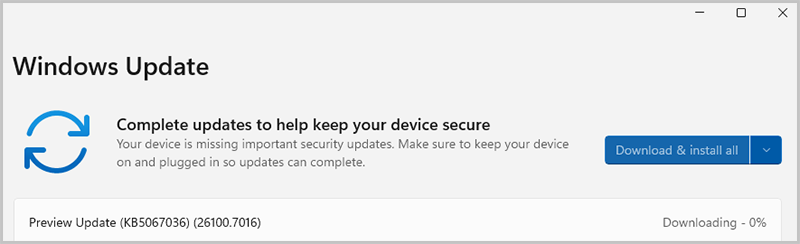
Microsoft posted several examples of how driver updates will be named in the future:
- Monthly or out-of-band security updates: Security Update (KB5034123) (26100.4747)
- Monthly preview non-security updates: Preview Update (KB5062660) (26100.4770)
- .NET Framework security updates: .NET Framework Security Update (KB5056579)
- .NET Framework non-security updates: .NET Framework Preview Update (KB5056579)
- Driver updates: Logitech Driver Update (123.331.1.0)
- AI component updates: Phi Silica AI Component Update (KB5064650) (1.2507.793.0)
Generally speaking, the new titles apply to Windows operating system updates, such as monthly cumulative updates, .NET Framework updates, driver updates, AI component updates, and Visual Studio updates.
Windows users will find the new titles under Settings > Windows Update and also in the update history, which can be accessed from the Windows Update page of the Settings. Lastly, it is also shown on the Windows release health website.
Microsoft says that updates that do get deployed via WSUS (Windows Server Update Services) or the Microsoft Update Catalog, won’t reflect the changed titles for the most part. Windows feature update titles will also keep the traditional title.
The new titles may omit the version of Windows the update is for. While that may not affect regular users who install the update on their devices, it could affect users who want a quick overview of the released updates on Microsoft’s website or elsewhere.
Now You: What is your take on this change? Is it for the better?
For whatever reason, your grammar is getting worse all the time making it harder to understand your writing. 🙁
My take on the change is that they want to better conceal the PUPs they regularly include in the updates these days.
Before I forget and though it doesn’t concern specifically this article but Windows 11 as a whole:
Do view this video if you are using Windows 11 or intend to:
“Your Windows 11 Computer’s Hidden Spy: The Dark Truth About TPM Chips
[https://www.youtube.com/watch?v=t1eX_vvAlUc]
–
If you’re running Windows 11, your computer has a TPM Chip Version 2.0. This is one of the requirements to using Windows 11 and of course Windows 10 has been declared as “End-Of-Life”. While you think that Windows 11 is an improvement, wait till you find out what this TPM chip is all about. It is such a giant invasion of privacy that I turned mine off.”
–
Read the video’s comments as well.
Please just Stop updating drivers.