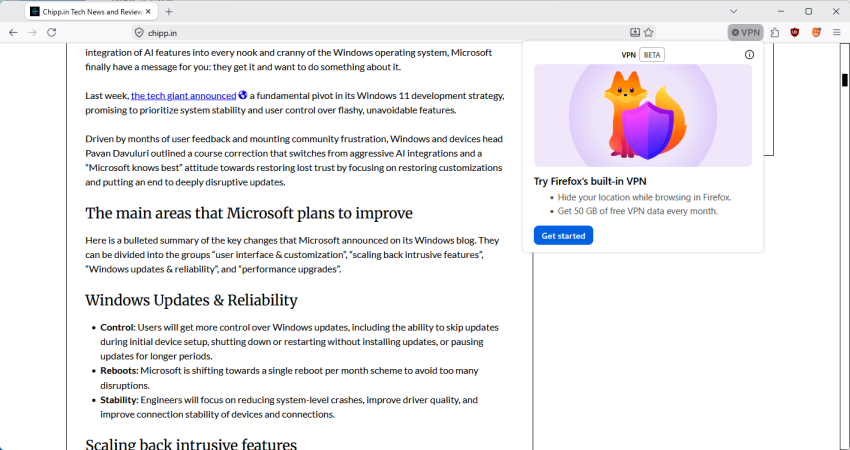
Mozilla published Firefox 149 to the stable channel this week and it comes with a bunch of new features and changes. Besides split-view, which allows users to display two webpages side-by-side in a single browser tab, Mozilla advertises a free built-in VPN as one of the main new features.
Mozilla describes the feature in the following way:
Firefox now offers a free built-in VPN. Whether you’re using public Wi-Fi while traveling, searching for sensitive health information, or shopping for something personal, this feature gives you a simple way to stay protected. Once you sign in and turn it on, you can hide your location and IP address by routing it through a secure proxy while you browse in Firefox. You will get 50 GB of protection every month, with the option to turn it on or off for specific websites. This feature is progressively rolling out in the US, UK, Germany and France starting today.
The paragraph is different when you check out the linked support page:
VPN is a built-in Firefox feature that adds privacy by routing your browser traffic through a secure proxy server and masking your IP address. The feature includes a monthly data limit of 50 GB. Firefox will notify you when you are approaching this limit with a prompt in the browser. It is available to a limited set of users during the initial rollout, starting with Firefox version 149.
The latter is accurate, as it confirms that the solution is actually a secure proxy and not a VPN. Mozilla has likely picked VPN as it is more popular. Microsoft, actually, did the same when it introduced the Secure Network feature in Edge.
The main difference between a secure proxy and a VPN solution is that the integrated proxy only protects data from a single application, in this case Firefox.
Once activated, Firefox will route all traffic through the proxy. This protects the device IP of the user and improves privacy and security.
Mozilla says that Firefox users get 50 gigabytes of free traffic per month. This is ten times the amount that Microsoft gives Edge Secure Network users for free each month.
Another difference between the two solutions is that Mozilla relies on its own partner network for the feature, whereas Microsoft partnered up with Cloudflare.
Mozilla says that it does not log visited websites or “the content of your communications”. It does “collect technical data”, which it says is “needed to provide, maintan, and ensure the performance and stability of the service”. It also collects interaction data to “understand usage of the feature and help guide improvements”.
The feature is rolling out to users in the US, UK, Germany, and France only at the moment. You see a VPN icon in the address bar once it is available. A click displays the option to start using it.
Note: You do need to sign in to a Mozilla account to use the proxy. Once that is out of the way, you can complete the onboarding process. Users who do not want to use it can right-click on the icon to remove it from the toolbar.
Toggle browser.ipprotection.enabled to TRUE on about:config to enable it immediately, or set it to FALSE to disable the feature.
Now You: do you use a proxy or VPN when you are on the Internet?
No VPN and even less a proxy here.
Should I consider an anonymity network it’d be Tor.
Should I nevertheless consider a VPN, it would be restricted to the browser, but with this awareness anchored in mind: a tool for accessing geography restrictions but not for seeking anonymity given fingerprinting has become so developed that if it’s not your devices IP that signs your device it’ll be several other that will. At the end a site may not know your device’s true location thanks to a VPN but it’ll recognize for sure a device’s signature in a way i’d call semi-anonymity.
I don’t like the very concept of a VPN yet recognize its legitimacy when facing authoritarian regimes which restrict your access to the entirety of the WORLD Wide Web. Otherwise, the idea of hiding is one I deeply dislike given, maybe paradoxically, it relates to a loss of freedom rather than to its expansion, with the exception of above-mentioned country political barriers.
I wish, aim to move around, physically as digitally, without having to wear a mask, without having to hide which, IMO, is a choice which limits my identity and my personality. To be, and behave accordingly, an aim slowly and increasingly replaced by ‘to look like’, to be not what, who we are, but by the image we wish to whisper or yell to the rest of the world: anonymity propagates falseness, and who says false says fake.
Side-note: nice to read again your articles, Martin.
Was on vacation, back in full strength now 🙂
I hope you had a nice vacation and are all refreshed now.
Thanks, yes was lovely. Even went to Walhalla (https://www.schloesser.bayern.de/englisch/palace/objects/walhalla.htm) 🙂
“If your not paying for the product, you are the product”.
I sort of suspected that this would be Mozilla’s way of deceptively getting more telemetry data. It’s good they offer a way to disable it.
not vpn related but really hate the browser.search.widget.new set to true.
reset mine to false.
https://connect.mozilla.org/t5/discussions/update-149-0-made-searching-more-difficult/td-p/120608
I actually will never use this, although I see it being useful for certain people in certain circumstances. I use Proton VPN when on vacation in some cases; but that is more to prevent MITM attacks than for general privacy per se. At home I have no need for one.
And I agree with Tachy.
I hope you enjoyed your vacation, Mr. B.
I agree. This can be useful for some users. I prefer using a VPN, as it covers all traffic. Had a great time, thanks!
What would be better would be to enable users to utilize their own vpn of choice per tab basis in a similar fashion to multitabs or integrated into that.
Can this new vpn be used along with multi-account containers like the paid mozilla vpn? That would be the main benefit over proton vpn (I cannot try it as I am not in the right country )