Chipp.in Tech News and Reviews

Windows, Security & Privacy, Open Source and more

Menu
  • Home
  • Windows
  • Security & Privacy
  • Gaming
  • Guides
  • Windows 11 Book
  • Contact
  • RSS Feed
Menu

Free Windows 10 ESU has a catch: it auto-expires every 60 days

Posted on September 26, 2025September 26, 2025 by Martin Brinkmann

Many Windows 10 users are eying the Extended Security Updates program for the operating system to extend support by a year. Microsoft announced the program for home users for the first time, and while it decided to limit it to a single year, it may be enough to buy users some time or help them keep on using their trusted PCs.

Microsoft revealed that users had three options to join the ESU program on Windows 10:

  • Pay about $30 to receive updates for another year.
  • Pay with Microsoft Rewards points.
  • Enable the cloud backup functionality of Windows Backup.

While two of the three options do not require any money to change hand, you’d still have to either pay with accumulated points or allow Microsoft to transfer some files to the cloud.

Microsoft announced a new option this week. This one only for users from the EEA region, which includes all EU member states, Norway, Liechtenstein, and Iceland. Microsoft said that users from these countries could join ESU for Windows 10 without completing any of the three options that users from any other region in the world had at their disposal.

This sounded like a great deal on paper for users from the region. However, Microsoft has added another requirement. Users need to sign in with a Microsoft account regularly to stay subscribed.

Here are the details:

  • You need to sign in with a Microsoft account for an opportunity to join ESU and start receiving security updates after October 2025.
  • You need to do this every 60 days. Microsoft stops delivering ESU-updates to a machine, if no Microsoft account sign-in was recorded in that period.
  • Windows 10 users may rejoin ESU by signing in with a Microsoft account again.

This affects Windows 10 users who sign in with local accounts. They need to make sure that they sign in with a Microsoft account every other month to keep on getting the extended security updates.

Microsoft plans to end the program for home users on October 13, 2026. There is a slim possibility that Microsoft might get pressured into extending the program, at least in some regions, but I would not hold my breath.

Now You: Are you using PCs with Windows 10? What is your plan going forward?

Who would have thought? Customers of Samsung fridges are not happy about ads their smart fridges started to show

Posted on September 25, 2025September 25, 2025 by Martin Brinkmann

Do fridges, toasters and other household appliances may come with “smart functionality” or wireless connectivity these days. In the case of some, TVs for instance, the functionality may also be used to display advertisement to users and collect data about users.

Samsung recently announced that its smart fridges would start showing ads. A software update introduced the feature and first reactions of customers are not exactly glowing.

The company introduced the change for some of its Family Hub refrigerators in the United States. This turned the screen of the device into a vehicle for ads. And who does not love ads, especially for items that cost thousands of Dollars?

Techspot reports that the update introduced new Terms of Service and a Privacy Notice that covers the addition of advertisement. Samsung’s smart fridge displays the ads on the fridge’s screen. It appears when the screen is idle, which likely means most of the time and only if users have selected certain themes, including weather, daily board, or color.

Users may enable certain themes to avoid ads for now. If the cover screen is set to art mode, which displays photos, then no ads are shown. A setting to fully disable ads is not provided, but users may block certain ads from reappearing.

You could disconnect the fridge from the network, but might not be able to use most of its functions in that case.

Samsung says that the advertisements “are designed to enhance value for owners”. I’m pretty certain that most owners would beg to differ.

Maybe next time, it would be better to buy a “dumb” fridge or other items, especially if the provided functionality is not adding value or has the chance of being turned into something that is highly annoying or invasive.

Disney is increasing Disney+ and Hulu plans again

Posted on September 24, 2025September 24, 2025 by Martin Brinkmann

Ah, the wonderful world of streaming video. Just subscribe, download an application or visit a website, and start streaming your favorite shows and movies right away. The initial idea of replacing traditional cable TV with something better is turning out into something that seems to get worse by the year.

Disney announced another round of price increases. This time, it is for subscribers in the United States who have Disney+ or Hulu plans.

The most-basic Disney+ plan, Disney+ with ads, rises by $2 per month to $11.99 starting October 21, 2025. Disney+ Premium, the ad-free version, goes up by $3 to $18.99 per month in the United States.

Similarly, Hulu’s standalone plan with ads is getting a bump by $2 to $11.99 as well. However, Hulu’s premium plan remains at the $18.99 level, according to reports.

Considering that Disney started its streaming service with a price of $6 per month for an ad-free experience just a few years ago, it is a massive increase in that time.

Subscribers pay more than three times as much for an ad-free experience than when the service started. Disney increased the price of subscription plans in the US in October 2023 and October 2024 previously.

Somehow though, subscriber counts are not going down. Disney reported 128 million subscribers by the end of June 2025, a number that has gone up by a few million subscribers in the year.

Like clockwork, streaming services increase the price of subscriptions regularly. Disney is not the only company that is squeezing money out of subscribers without really improving the service in significant ways.

The only option that subscribers have is to cancel their plans to make a statement. Less-costly options exist. From buying used DVD or Blu-Ray selectively and ensuring that you can play the media forever, to one-month per year subscriptions to watch all content that interests you in that time period, thus saving fees for the remaining eleven months.

Lastly, there is also abstinence to consider, especially with the quality of most movies and TV shows going downhill every year.

LANIPScanner

LANIPScanner: new Nirsoft tool to quickly scan network devices on Windows

Posted on September 23, 2025September 23, 2025 by Martin Brinkmann

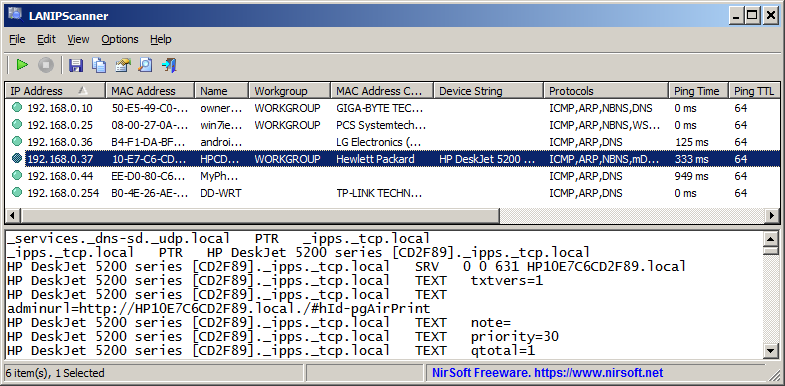
LANIPScanner is a new free and portable network scanner for Windows by one of my favorite developers NirSoft. The main idea is simple: quickly scan which devices are connected to the same network as the Windows PC that you run the program on.

As is the case with all Nirsoft apps, it is a portable program that you can run right after you have extracted its archive. Windows may object — as usual – with its SmartScreen warning, which you can safely bypass to run the app.

From there, it is just the matter of clicking on the scan button to get the list of connected computers and devices.

Each device is listed with its IP addres and other information, including, if available, workgroup, device string, supported protocols, ping time and more.

The application supports several network protocols, which makes it versatile. It supports ICMP (ping), ARP, mDNS, DNS, NBNS, SSDP, ensuring that it can pick up a wide range of different devices that are connected.

The raw data of devices that respond to SSDP or mDNS protocols are also displayed in the lower pane of the application.

LANIPScanner comes with the usual assortment of Nirsoft features, including the option to generate reports and save the data to various formats.

Support-wise, it will run on Windows XP and all newer versions of Windows, including the latest version of Windows, Windows 11.

The new tool may look similarly to Nirsoft’s Wireless Network Watcher application on first glance, but there are differences. Notable ones include support for several different network protocols, recognition of devices on another subnet, if they respond to ping queries, and less reliance on a device’s MAC address for identification and features.

Closing Words

LANIPScanner is a lightweight network scanner for Windows that is easy to use. It returns a list of devices connected currently, which you may find useful for a number of purposes, including spotting devices that should not be connected.

Think smart TVs or other gadgets that may be connected, even though you might prefer them not to.

Now You: do you scan your networks regularly for devices? If so, which program(s )do you use for that?

Mozilla extends Firefox for Windows 7 support again and it may not be the last time either

Posted on September 6, 2025September 6, 2025 by Martin Brinkmann

Mozilla’s Firefox web browser continues to be supported on Windows 7 and older versions of Apple’s macOS operating systems, according to an update that Mozilla published on its website.

According to the update, Firefox ESR 115 support is extended until at least March 2026. Mozilla plans to evaluate the end of support again in March 2026 to determine whether it will extend support again.

Firefox is one of the few web browsers that continue to support Windows 7 and older macOS versions. Most browsers have ended support for the discontinued versions of Windows and macOS some time ago already.

Firefox ESR 115.33 will be released in February 2026. It could be the last version of that ESR branch, if Mozilla decides to end support then and there.

More than six percent of Firefox users use Windows 7. That is a large number, even with Firefox’s declining userbase.

Firefox 115 was released in 2023 initially. The Extended Support Release version of the browser is only supported with security and bug fix updates. New features are not introduced in the same ESR branch usually. The next major ESR release introduces the features that Mozilla released in stable Firefox in the meantime.

Since there is no upgrade for Firefox ESR 115 users, their version of the browser remains on the 2023 feature set. Means, features such as tab groups, vertical tabs and others are not available.

The consumer editions of Windows 7 are no longer supported by Microsoft. This means that the operating systems do not receive security updates anymore. Micro-patching service 0Patch continues to support the operating system, however.

Google is hunting YouTube Premium Family subscribers now that are not living in the same household

Posted on September 3, 2025 by Martin Brinkmann

Last month, Google confirmed that it is trying to end a loophole that allows YouTube Premium subscribers to subscribe for less. The idea was simple: instead of subscribing from a country where YouTube Premium costs an arm and a leg, you use a VPN or other means to subscribe from a country where it costs a tenth or less of the actual price.

Now, Google confirmed that it is also investigating YouTube Premium Family subscriptions for misuse. Here, Google is going after subscribers who share a subscription with members who do not live in the same household.

For instance, when household members move out but continue to use the family’s YouTube Premium subscription at the new place. There have also been instances where access was shared between a group of friends or even resold.

Google is sending out emails to YouTube Premium subscribers reportedly, if it believes that the Family Plan is misused. The subscription is paused for those users, which means that they will see ads and do not get access to any of the other benefits that come with a YouTube Premium subscription.

A YouTube Premium Family subscription costs about $23 at the time of writing in the USA. This allows the subscriber to share the subscription with up to five family members. A single YouTube Premium subscription sets users back about $14 right now in the USA.

Six friends who would share a subscription would pay $4 per month for YouTube Premium effectively. That is still more expensive than a single subscription in some countries, but much cheaper than a regular subscription.

The scope of the investigation is unknown. Google could be testing the waters to analyze reactions of subscribers that it contacts. In the long run, however, it seems likely that Google plans to end all “get YouTube Premium for cheaper” loopholes.

Now You: Do you have a YouTube Premium subscription? Feel free to leave a comment down below.

Proton Emergency Contact

Proton launches Emergency Access feature for paid accounts

Posted on August 28, 2025August 28, 2025 by Martin Brinkmann

Proton AG has been quite busy lately. It launched Proton Authenticator, a free open-source two-factor authentication app, and the privacy-friendly AI Lumo in the past month.

Today, the company announced a new feature for paid members. Emergency Access is designed to provide a way into a user’s account under certain circumstances, such as injury or death.

Proton writes in a new blog post:

With our new Emergency Access feature, you can grant permission to trusted contacts to securely access your Proton Account after a set period of time, ensuring nothing important is lost if you’re unable to enter your account due to death or illness.

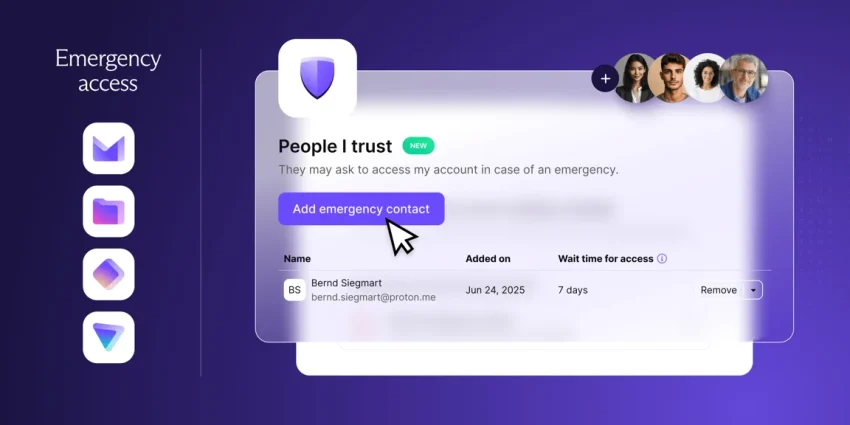
Proton users may select up to five trusted contacts who may access a user’s account either immediately or after a select wait time that they may set in advance. For this to work, the trusted contacts do need a Proton Account of their own.

When a trusted contact requests access, one of two things happens: if the user set up a wait time, they may approve or deny the request in that period. Once the wait time is over, the request is granted automatically and the trusted contact gains access to the entire account.

For instance, if you set the wait time to four weeks, you have four weeks to allow or deny the request.

Emergency access can be disabled at any time by the account owner. Furthermore, Proton notes that it is applying to the entire Proton account of the user and not just a single application.

Proton users may set up the feature under Recovery > Add emergency contact. There they may add email addresses of their trusted contacts. Proton notes that the emails need to be associated with a Proton account.

Trusted contacts may request emergency access under Settings > Recovery.

Now You: do you have set up emergency options for accounts that support it? Feel free to leave a comment down below.

0Patch promises to keep Microsoft Office 2016 and 2019 secure after official end of support

Posted on August 27, 2025August 27, 2025 by Martin Brinkmann

Windows 10 is not the only Microsoft product that is reaching end of support in October 2025. Microsoft Office 2016 and 2019 will also reach end of support in that month. The two Office products do not get an option for extended security updates, unlike Windows 10.

Windows 10 home users may extend support by a year only, through one of three options, but it is better than nothing. The best option is to run a free open source script, which makes the entire process effortless.

With Office 2016 and Office 2019, Microsoft made it clear that it won’t offer the same option. In other words: Come October 2025, both products will not receive future updates, at least not from Microsoft.

Microsoft suggests that customers either buy the latest Office 2024 application or subscribe to Microsoft 365 instead. This can be expensive. A standard edition license costs about $150, and it will run out of support in five years since its release. A Microsoft 365 subscription costs about $100 per year currently, but discounts are available from time to time. Businesses and Enterprises pay considerably more.

While both Office products will continue to work, they will be affected by security issues that Microsoft will only fix in newer versions of Office.

However, not all is lost. Micro-patching service 0Patch announced that it will add both Office products to the list of supported applications.

The company promises to deliver critical security updates for both Office versions for at least three years. Means, the worst critical issues will be fixed until at least October 2028.

An 0Patch subscription for consumers costs about $30 per year. Good news is that a subscription includes other Microsoft products, including Windows 10, version 22H2, as well.

So, if you run Windows 10 and either Office version, you get security updates for both products for the price of one.

Granted, there is also the option to switch to a free Office suite, such as LibreOffice, instead. It is free, but it may take a bit of adjusting and there is no 100% compatibility.

Android

Starting next year, all Android apps need to be registered by verified developers, even sideloaded ones

Posted on August 26, 2025August 26, 2025 by Martin Brinkmann

Android users have two main options to install apps on their devices. Through Google Play, if the marketplace for apps is installed, or through sideloading. Up until now, releasing apps through Google Play required a verified developer account. This meant that the developer had to verify their identity before apps could be published.

Starting in 2026, developers who do not publish their apps through Google Play will also be required to verify their identity, if they want their apps to be installed on certified Android devices. A certified Android device, in a nutshell is any device with installed Google services.

Google says that it won’t check apps that are registered through the new program but not made available through Google Play. However, developers are required to use a new special Android Developer Console for sideloading.

Furthermore, the verification process requires that developers provide Google with personal information, including their name, address, email, and phone number, and verification of their identity, for instance by providing Google with documentation that confirms the identity.

Google plans to invite select developers of applications from October 2025 onward and enable free registrations from March 2026 on.

The sideloading of apps by unverified developers will be blocked in the countries Brazil, Indonesia, Singapore, and Thailand from September 2026 on. More countries are added to the list starting in 2027.

Google claims that the new process is designed to “better protect users from repeat bad actors”, as it will make it harder for malware actors to quickly release new malicious apps after Google has taken down an app from a developer.

The change will make it difficult for malware creators, as they need a certificate to distribute their malicious apps outside of Google Play. However, it is also giving Google access to additional data and ends the anonymous development and distribution of apps.

Now You: what is your take on this? Good decision by Google to stop malware and threat actors in their tracks, or a move to gain access to even more data and control?

Resume Android app on Windows 11

Windows 11: Resuming apps from Android is coming, again

Posted on August 24, 2025 by Martin Brinkmann

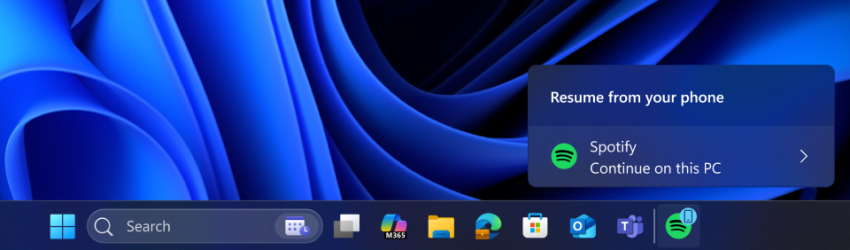
Microsoft released a new Windows 11 test build this week that is bringing the Dev channel version to 26200.5761. With it comes a new option to “seamlessly resume apps from Android phone on PC”, at least for some users, as Microsoft has the habit of split testing features even in developer builds.

Microsoft admits that this initial version of the feature works only with the Spotify app. If you have Spotify installed on your Android device and on your Windows 11 PC, you may resume listening on PC to whatever you listened to on your phone.

Still requires you to click on the resume notification that Windows 11 displays and have the Android phone and the Windows 11 PC linked as well.

Microsoft reveals that the notification will also display if Spotify is not installed on the PC. In that case, a 1-click installation of the app from the Microsoft Store will be started and the installed application will be launched. However, you are still required to sign in to the same Spotify account before you can resume the playback.

Microsoft encourages other app developers to integrate resume functionality into their apps. Media streaming apps seem the main target for this at this point, but it could also include apps to call or maybe even some games. However, this requires that an app is available for Windows and Android, which limits the reach.

Closing Words

How useful is that feature? I have to admit that I do not have any use for it, but then, I’m probably not the target demographic for this anyway. I can see some use for users who commute to work and work on a PC there, but is it really more comfortable than just launching the app manually or even automatically on PC to continue using it? Considering that you need to go through some hoops to set up the link between the Android device and the PC in first place, it is probably going to stay pretty niche.

Now You: what is your take on this? Would you use it, if it would be launched by Microsoft? Which apps or games would you like to see supported? Feel free to leave a comment down below.

  • Previous
  • 1
  • …
  • 10
  • 11
  • 12
  • 13
  • 14
  • 15
  • 16
  • …
  • 70
  • Next

Support This Site

If you like what I do please support me!

Any tip is appreciated. Thanks!
  • March 4, 2026 by Martin Brinkmann The March 2026 Android Security update is here and you should install it asap (if you can)
  • March 3, 2026 by Martin Brinkmann Google to release two Chrome Stable releases per month
  • March 2, 2026 by Martin Brinkmann Don't Bother with Windows 11's new Speedtest feature
  • February 27, 2026 by Martin Brinkmann Warning! That laptop on Amazon? It comes with temporary storage
  • February 26, 2026 by Martin Brinkmann "If your printer works today, it will continue to work": Microsoft corrects previous announcement

About

We talk, write and dream about Technology 24/7 here at Chipp.in. The site, created by Martin Brinkmann in 2023, focuses on well-researched tech news, reviews, guides, help and more.

Legal Notice

Our commitment

Many websites write about tech, but chipp.in is special in several ways. All of our guides are unique, and we will never just rehash news that you find elsewhere.

Read the About page for additional information on the site and its founder and author.

Support Us

We don't run advertisement on this site that tracks users. If you see ads, they are static links. Ads, including affiliate links, never affect our writing on this site.

Here is a link to our privacy policy

©2026 Chipp.in Tech News and Reviews