Most web browsers display warning messages when you attempt to load a website that does not use HTTPS, the secure version of the HTTP protocol, or when a site has misconfigured HTTPS.
Starting in October 2026, Chrome will make HTTPS the default for all connections in the browser. Means, whenever you visit a site that does not use it or has configuration issues, you will get a prompt.
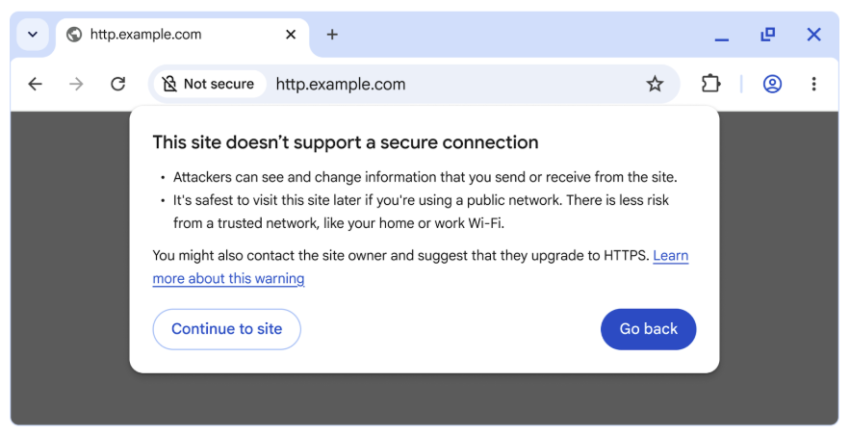
“This site doesn’t support a secure connection” is displayed in that case. The prompt includes quite a bit of text explaining why that is bad. However, Chrome displays two options to the user in that case.
The first, “go back” returns to the previous site or the new tab page, depending where you started your request. The second, “continue to site” still allows you to visit the site in question.
The planned change makes the optional feature “always use secure connections” mandatory once it lands next year. Since the feature is available already, albeit as an optional preference, it is possible to enable it right away to see what it does. Ideal for testing purposes.
Here is how you enable it (or disable it again):

- Load chrome://settings/security in the browser’s address bar. You can also select Menu > Settings > Privacy and Security manually, if you prefer that.
- Scroll down to the Secure connections section.
- Toggle “Always use secure connections” here to enable or disable the feature.
When you enforce HTTPS, you will receive security prompts whenever something is loaded in Chrome that does not use HTTPS.
Google says that non-HTTPS traffic has dropped significantly, but that HTTPS has plateaued at about 95% of all sites. The main driver for insecure traffic, according to Google, is navigations to private sites that are insecure. While less risky than navigations to insecure public sites, attackers may exploit them either way.
Google predicts that the actual warning volume in Chrome will get lower once it lands the change in the browser and sites start moving towards HTTPS even more than before.
It will certainly make it more difficult for users to access sites that do not use HTTPS and do not plan on migrating, for whatever reason.
Now You: have you visited sites that do not use HTTPS in the recent past, or have all of your sites that you visit switched to HTTPS already? Feel free to leave a comment down below.