
When you check File Explorer on a freshly installed copy of Windows, you will likely notice that the main drive, the Windows drive, has the label C:. Why not A: or B:?
Computer users who grew up in the age of floppy disks and drives know the answer. Back in the days when computers shipped with floppy disks as the main storage system, drive A: and drive B: were reserved for these.
The first floppy drive got the A: label and it was used as the boot drive. You would insert a MS-DOS or Windows startup disk and the computer would load the operating system from the drive.
The second floppy drive, if the computer had one, got the B: label. Two floppy drives were useful, as it meant that you could copy data from one floppy disk to another easily, and also needed to swap disks less often.
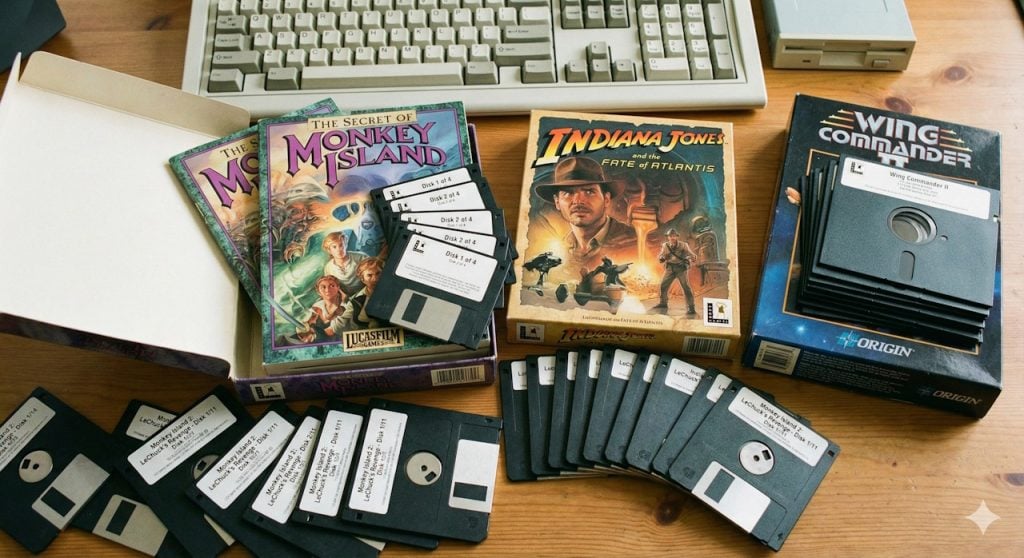
However, some games came on more than ten floppy disks. Even if you had two disk drives, you still had to swap disks a lot. While you could connect more than two floppy drives to computers, barely any computer user had more than two floppy drives.
The age of the hard drive
Computer hard drives became more affordable in the mid to late 1980s. Floppy drives were still common, and since it would mean utter chaos to change the default order of assigning the first two drive letters to floppy disk drives, the first hard drive of the computer got C: assigned as the next available letter after A and B.
Drive C:, a hard drive with an astonishing amount of storage space — 20 or 40 megabytes– in the late 80s, became the standard drive for the operating system.
Fun fact: The first 1 gigabyte hard drive cost about $5,000 in 1991.
A computer with two hard drives would assign the drive letters C: and D: to the two drives by default.
CD-ROM drives enter the world
Disk drives increased in storage capacity rapidly, and so did requirements of operating systems, software, and games. Games and apps started to become that big, that they could not be delivered on floppy disks anymore.
CD-ROM became the new standard for delivering software and games. These optical drives were often assigned the label D:, on a computer with just a single hard drive, or the letter E:, on a computer with two hard drives or mapped partitions.
Why has not Microsoft moved to using A: for the system drive?
Floppy disks and drives are hard to come by these days. This has not changed the fact that the drive letters A and B are still not used by Windows for the main system drive.
The main reason why Microsoft has not changed the default mapping is backwards compatibility. Doing so could break countless older programs, scripts and shortcuts that reference hard-coded file paths on drive C:.
Technically speaking, it is possible to use the drives A: and B: on Windows. You can, for example, assign a hard drive or USB flash drive to the drive letters, and they will work. However, Windows will never map new drives or partitions to the first two drive letters.
Hacks even allow knowledgeable users to install Windows on A: or B: instead of C:, but it may lead to instabilities and most users might want to refrain from doing so because of that.
Thanks for making feel so old! *laughing*
My first PC required the 5-1/2″ DOS diskette in the drive to boot. I remember playing games that were text only on it. The Intel 80286 was a technical marvel at the time.
I still have a PC stored in the attic with a Pentium III Proccessor, the one that looks like an old console game cartridge.
There’s also a large box full of old video cards. I fondly remember the Voodoo 5 5500 with it’s twin processors. It’s still up there.
And there’s a box full of 3-1/2″ floppies and a drive for them.
Reminds me the Commodore Computer era, back in the eighties, Commodore 64 then 128. Was great at the time. And those floppy disks… we were young, strong and heavily presumptuous (little old me anyway). The article reminds me not only how computing was really starting in those days but many associated memories as well. I remember the ‘Compute’ magazine… her smile, night life… Gosh!
Just wondering: how would we have to proceed to copy floppy disks?
When not in the gaming world, I own three IT consulting locations. From time to time, we get a customer that wants, (usually asking in a quiet tone as if this will be an insane request), “can you guys…do you guys know…how to access or transfer data from old floppies to a modern device?”
That call is always routed to me! Don’t see much of the 8” or 5 1/4” anymore but we still do get calls about the 3 1/2” 712kb and 1.44mb disks.
I have a machine at our main location that has the hardware to accommodate and read those sizes. With a little ‘magical wiring’, we were able to put in (solder in) a 512Mb IDE Seagate drive which is removable. The computer itself is extremely old and has no possibility of internet or even usb connections. After transfer of the floppy data to the IDE, we then place the Seagate into an external box, connect to a modern pc and transfer its contents, to a CD, flash drive, customer provided hard drive or the cloud.
Last one done was maybe a year and half ago. Customer came in with a box of maybe 15 – 3 1/2” floppies and wanted all of their contents (college papers and phd thesis), transferred to flash. Took about an hour and half to complete.
So the idea is that performing this sort of transfer (data from old floppies to a modern device) is not a service you’ll find easily, proposed by shops but one requiring a bit of luck to find someone as you who’ll manage to get things done given he has the hardware and the expertise… good to know.
Loved the times being a young guy starting with C64 (I was so proud when getting my first VC1541), upgraded to Amiga 2000 and Atari 1040STF. Had to be creative finding space in the bedsit back then. All that followed by the transition into the PC era…
Anyone remembering becoming a floppy disk DJ while installing Novell Netware including documentation (35 disks at least…)… :-))
Will never forget how it all started. I’m very grateful that I was allowed being a part of that time. So many thanks for the time travel.