Chipp.in Tech News and Reviews

Windows, Security & Privacy, Open Source and more

Menu
  • Home
  • Windows
  • Security & Privacy
  • Gaming
  • Guides
  • Windows 11 Book
  • Contact
  • RSS Feed
Menu

Author: Martin Brinkmann

When I was young, I studied German, History and English at Essen University in Germany. I worked in computer support for several years at the time to help other computer users when they ran into issues. Writing started out as a passion project, as I wanted to help more users and not just the ones that I handled in support. This lead to the founding of Ghacks Technology News in 2005. First, as a side-project, but shortly thereafter as a full-time project as the site's popularity exploded. I sold Ghacks to Softonic some years ago, but stayed on as Editor. You can still read my articles on the site. I do publish on Betanews as well. In recent years, I started to write and publish technology books, including my latest book "Windows 11 From Beginner to Advanced", which is available on Amazon. I'm also a freelance writer for the German publisher Gamestar. Chipp.in is my newest project. I want to use it to talk about my book projects, sell my books directly, and write about technology, as this is what interests me.

Google Chrome Gets a Major Upgrade with Gemini 3 and Auto-Browse

Posted on January 30, 2026January 30, 2026 by Martin Brinkmann

Google is officially transforming the web browser from a static tool into an active personal agent with the launch of Gemini 3 and “Auto-Browse” in Chrome, and the push into a personalized AI experience.

Announced yesterday for desktop users, with the exception of Chrome for Linux, this major update integrates Google’s most advanced AI model directly into the browser to handle complex, multi-step tasks.

Google is pushing Gemini with the help of its Chrome browser

Lookout OpenAI, Gemini could get a massive user boost thanks to the integration in the world’s biggest browser.

Here is an overview of the features that Google announced:

Auto-Browse (Agentic Browsing): The flagship feature for AI Pro and Ultra subscribers in the U.S. that performs multi-step “chores” on your behalf. It can research travel costs across dates, fill out complex online forms, file expense reports, or add specific items to a shopping cart based on an image.

Gemini Side Panel: A persistent area in Chrome that supports interactions with the AI without losing focus. It supports the usual AI-features, such as summarizing a page, comparing features across several tabs, or finding time in your calendar.

Integrated “Nano Banana”: The latest version of Google’s image generator is integrated into the browser. Also accessible from the side panel, you can use text prompts for creative tasks, such as turning research data into infographics or manipulating images open in the browser.

Connected Apps Integration: Deeper connectivity with the Google ecosystem, allowing Gemini to pull information from Gmail, Calendar, Maps, and Google Flights to execute workflows (e.g., finding a flight based on an event invitation in your email).

Personal Intelligence: A proactive feature that remembers context from past conversations to provide tailored answers. It learns user preferences over time to transform the browser into a “trusted partner” rather than a general-purpose tool.

Universal Commerce Protocol (UCP) Support: Integration with a new open standard (co-developed with brands like Shopify and Wayfair) that allows AI agents to navigate checkout processes and take commercial actions across different retail sites securely.

Enhanced Security & “Pause and Confirm”: New defenses designed for agentic AI, including a safety mechanism where Auto-Browse must pause and ask for explicit user confirmation before completing sensitive actions.

Closing Words

It is clear that Gemini will get a huge user boost from this. Even if Google limits exposure to certain regions or subscription models at first, it is clear that it will expose as many users as possible to Gemini in Chrome in the long run.

Why? Because it is giving Google an edge over the competition. Plus, when users run into usage limits, they may become paying subscribers, which seems to be on the preferred options right now to increase revenue and compensate expenses.

The benefit for users invested in Google’s ecosystem is there, especially if you connect the AI to other Google services. Whether you really want that, an all-knowing AI that may know more about your desires, life and plans than your closest friends, is up for you to decide.

I see the benefits, but also the dangers. While I do use AI tools for some tasks, such as creating a teaser image for an article here or the weekly newsletter, I do not really see a benefit in letting AI do the shopping for me, even with all safeguards in place.


1 Billion and Counting: Windows 11 Reaches Massive User Milestone Faster Than Windows 10

Posted on January 29, 2026January 29, 2026 by Martin Brinkmann

Microsoft launched its newest operating system Windows 11 back in October 2021 to mixed reviews. Its predecessor, Windows 10, held the top spot firmly at the time while Windows 7 and Windows 8 were reaching the official end of life dates. While companies could extend support of Windows 7 by three years, Microsoft did not give home users such an option.

Microsoft CEO Satya Nadella announced during the company’s FY26 second-quarter earnings call that Windows 11 has officially surpassed one billion monthly active users.

Windows reached a big milestone: One billion Windows 11 users, up over 45% year-over-year.

In about four years, Windows 11 managed to reached the coveted one billion users mark. Windows 10, which was equally criticized when it launched in 2015, took longer to reach the important milestone.

How much longer? Not that much, it turns out. Let us take a look at the official dates that Microsoft provided for Windows 10 and Windows 11 first.

Windows 10Windows 11
Launch DateJuly 29, 2015October 5, 2021
1 Billion Users DateMarch 16, 2020January 2026

Windows 10 reached 1 billion monthly active users 1,706 days after it was released by Microsoft. Windows 11 managed to cross the one billion monthly active users mark in 1,576 days.

That is 130 days faster. While not impressively faster, it is important to note that Windows 11 had a handicap all along: new system requirements prevented a sizeable chunk of Windows 10’s userbase from upgrading directly to Windows 11.

While Microsoft never released numbers, estimates suggest that several hundred million devices can’t be upgraded directly. While a high percentage of these devices can be upgraded by skipping the requirements checks, the technical nature of the process likely prevents this on the vast majority of devices running Windows 10.

For users, it does not really matter how fast or slow an operating system growth, provided that it manages to reach a number of users that is sizeable enough to warrant continued support.

Windows 10 Home and Pro editions will reach end of servicing later this year. It will be interesting to see what the millions of home users will do when that time comes.

The Long Tail of CVE-2025-8088: How One WinRAR Flaw Outlived Its Patch

Posted on January 28, 2026January 28, 2026 by Martin Brinkmann

It has been over six months since Rarlab released a fix for the critical WinRAR vulnerability known as CVE-2025-8088, but attacks continue to target it as if the patch was released just days ago.

Despite a patch being available since August 2025, Google Threat Intelligence reports that state-sponsored actors and financially motivated hackers are still finding immense success targeting users who have neglected to hit the update button.

This “long tail” of exploitation serves as a stark reminder that a vulnerability doesn’t disappear just because a solution exists.

Key Information:

DetailUpdated Information
Vulnerability IDCVE-2025-8088
Patch StatusAvailable for 6+ months
Primary ThreatState-sponsored and financially motivated actors
Action RequiredEnsure WinRAR is updated to the latest version

When Rarlab released WinRar 7.13 to patch the security vulnerability back in July 2025, barely anyone thought that this security issue would remain a problem six months later.

A report by Google security researchers suggests that the issue is still exploited actively. It appears that a percentage of WinRar users have not patched the archiving software yet.

Google found out that attacks originate from several countries, including Russia and China. To exploit the issue, attackers need to create a specially prepared RAR archive. When a victim unpacks the archive, malicious files are moved to the autostart of the system for execution.

Google writes:

CVE-2025-8088 is a high-severity path traversal vulnerability in WinRAR that attackers exploit by leveraging Alternate Data Streams (ADS). Adversaries can craft malicious RAR archives which, when opened by a vulnerable version of WinRAR, can write files to arbitrary locations on the system.

The issue affects WinRar and also related apps and files, including unrar.dll. However, the issue affects RAR on Windows only. Other operating systems with RAR apps, including Linux and Android, are not affected by the issue.

How to protect your systems

It is necessary to update WinRar or any of the other Rar tools affected by the issue, to the latest version. Windows users need to install WinRar 7.13 to protect their devices. Downloads are provided on the official Rarlab website.

Just download the latest release and run the installer to update the application. Installation of WinRar 7.20 Beta will also resolve the issue, but since it is a beta release, it is not recommended to run it on most PCs.

The OLE Overlook: High-Stakes Security Bypass in Microsoft Office (CVE-2026-21509)

Posted on January 27, 2026January 27, 2026 by Martin Brinkmann

The “trust but verify” era of document security has been blindsided by a sophisticated new threat that turns Microsoft’s own integration features against the user.

This week, Microsoft disclosed a critical zero-day vulnerability, CVE-2026-21509, which allows attackers to bypass core Object Linking and Embedding (OLE) security mitigations within the Microsoft Office Suite.

The flaw is actively exploited in the wild, affects most versions of Office, and allows malicious actors to execute unauthorized code when a victim opens a compromised file.

The essentials

  • Name of vulnerability: Microsoft Office Security Feature Bypass Vulnerability
  • Severity: Important
  • ID: CVE-2026-21509
  • Affected Software: Office 2016, Office 2019, Office LTSC 2021, Office LTSC 2024, Microsoft 365 Apps for Enterprise

Microsoft has a solution for the issue that is applied automatically in some cases and requires an update in others.

In short: If Office 2016 or 2019 is used, an update is required to patch the vulnerability. All newer versions of Office do not require an update, as Microsoft is adding the protection using a service-side change. However, Office needs to be restarted before this protection is applied.

Downloads, if necessary, are provided on the official Update Guide website linked above (under ID).

Microsoft published mitigations as well, but these are not really required, unless updates can’t be installed immediately. The mitigations require Registry edits and as such a restart before they protect the application from potential exploits.

WhatsApp Premium? New Leak Reveals Meta’s Plan to Launch Ad-Free Subscriptions

Posted on January 26, 2026January 26, 2026 by Martin Brinkmann

Ever since its inception, the world’s most popular messaging app has retained the status of an ad-free, then almost ad-free experience, but that “free” ride is officially reaching a fork in the road. WhatsApp is reportedly preparing to launch a paid membership tier this year starting with users in Europe to allow them to bypass the advertisements currently rolling out across the platform.

As Meta looks to monetize the “Updates” tab, this new ad-free subscription marks the first time in history that users may have to pay to keep their messaging experience clean.

This move is not happening in a vacuum. WhatsApp, owned by Meta, is following the exact strategy that Meta deployed for Facebook and Instagram across Europe. Under the model, users are asked to make the following choice: either allow Meta to track their activity for personalized advertisement or pay a monthly fee to keep the feed clean.

While Meta is copying the base strategy directly from Facebook and Instagram, WhatsApp’s personal chats remain ad-free, at least for now. This means that users pay Meta to keep the Status and Channels sections ad-free and stop creating an advertising profile of users who pay the premium.

What happens if you don’t pay?

Personal chats remain free of advertisement, at least for now. This is something that Meta has shied away from as it would like drive users towards competitors like Signal or Telegram.

Users who do not subscribe will continue to see sponsored content in the “Updates” tab.

The Verdict: Is WhatsApp Premium Worth It?

ProsCons
Clean Interface: Removes intrusive banners and sponsored posts from the Status and Channels tabs.New Monthly Expense: Adds to “subscription fatigue” for an app that has been free for over a decade.
Data Privacy: Meta may not create a profile for advertising, since there are not any ads to show.Partial Solution: Early reports suggest ads remain in “Channels” you don’t follow, so it may not be 100% ad-free.
Early Access: Potential for premium-only features, such as larger file sharing or advanced chat organization.Limited: Meta may limit the ability to pay to avoid ads to certain countries, similarly to how it handles this on Facebook and Instagram.

As the line between personal messaging and social media continues to blur, WhatsApp’s transition into a “freemium” service feels like the end of an era. For now, the core of WhatsApp, private conversations between users, remains untouched and ad-free.

However, now that the infrastructure is in place, Meta might consider pushing ads more aggressively on WhatsApp.

Microsoft Issues Urgent Out-of-Band Fix for Critical Windows 11 and 10 Bug

Posted on January 25, 2026 by Martin Brinkmann

Microsoft has just released another, “out-of-band” series of updates—including KB5078127 and KB5078132—to address a critical system issue currently impacting Windows 11 (versions 25H2, 24H2, and 23H2) and Windows 10 (22H2) users worldwide.

Unlike standard monthly patches, this emergency rollout was triggered to immediately resolve a high-priority bug that was causing load and save issues for files stored in the cloud. It is the second out-of-band update of January 2026, after last week’s emergency patch to fix broken Remote Desktop Connections.

The patches are distributed automatically to all non-managed Windows PCs via Windows Update.

Essential information

  • Windows 11, versions 25H2 and 24H2: KB5078127
  • Windows 11, version 23H2: KB5078132
  • Windows 10, version 22H2 (ESU-only): KB5078129
  • Windows Server 2019: KB5078131
  • Windows Server 2022: KB5078136
  • Windows Server 2025: KB5078135

The issue occurred after installing the January 2026 cumulative updates for client and server versions of Windows.

Microsoft admits that users of Outlook were especially affected by the issue, provided that the Outlook PST files were stored in the cloud and not on the local machine.

Outlook users might notice hangs or issues when reopening Outlook. Other issues that users might experience included noticing that sent items were missing or that previously downloaded emails were downloaded again.

Windows users who use Outlook and store the PST files in the cloud should install the update immediately. Microsoft does not mention any other changes in the update, which means that users of unaffected systems can ignore it for now. It will be included in the February 2026 cumulative update.

How to check your Windows Version

To find your version, press Win + R, type winver, and hit Enter. Once you know your version, look for the corresponding update in Settings > Windows Update.

Windows VersionUpdate ID (KB)New OS Build
Windows 11, version 25H2KB507812726200.7628
Windows 11, version 24H2KB507812726200.7628
Windows 11, version 23H2KB507813222631.6495
Windows 10, version 22H2KB507813719045.6812

While these frequent “out-of-band” patches can feel like a game of digital whack-a-mole, they serve as a reminder that updates do not only fix issues but may also introduce them.

As such, it is highly recommended to take necessary precautions, such as backing up the system partition before installing updates.

Microsoft Hands BitLocker Keys to FBI: How to Stop Windows From Uploading Yours

Posted on January 24, 2026January 24, 2026 by Martin Brinkmann

In a move that confirms privacy advocates’ long-held fears, Microsoft has reportedly handed over BitLocker encryption keys to the FBI, allowing federal agents to unlock the laptops of suspects in a fraud investigation without their consent.

The disclosure reveals a critical issue in how modern Windows devices handle security: convenience often comes at the cost of privacy. While BitLocker is designed to make your data unreadable to third-parties, the default settings on millions of Windows 11 PCs automatically upload the recovery key to Microsoft’s servers—creating a lawful “loophole” when served with a valid warrant.

For the suspects, this meant their encrypted hard drives were an open book. But for the average user, it serves as a grim reminder: if your recovery key lives in the cloud, Microsoft holds the master key to your digital life. Anyone else who may gain access, think malicious hackers, may also.

The good news? You can revoke their access today—if you know where to look.

Checking the status

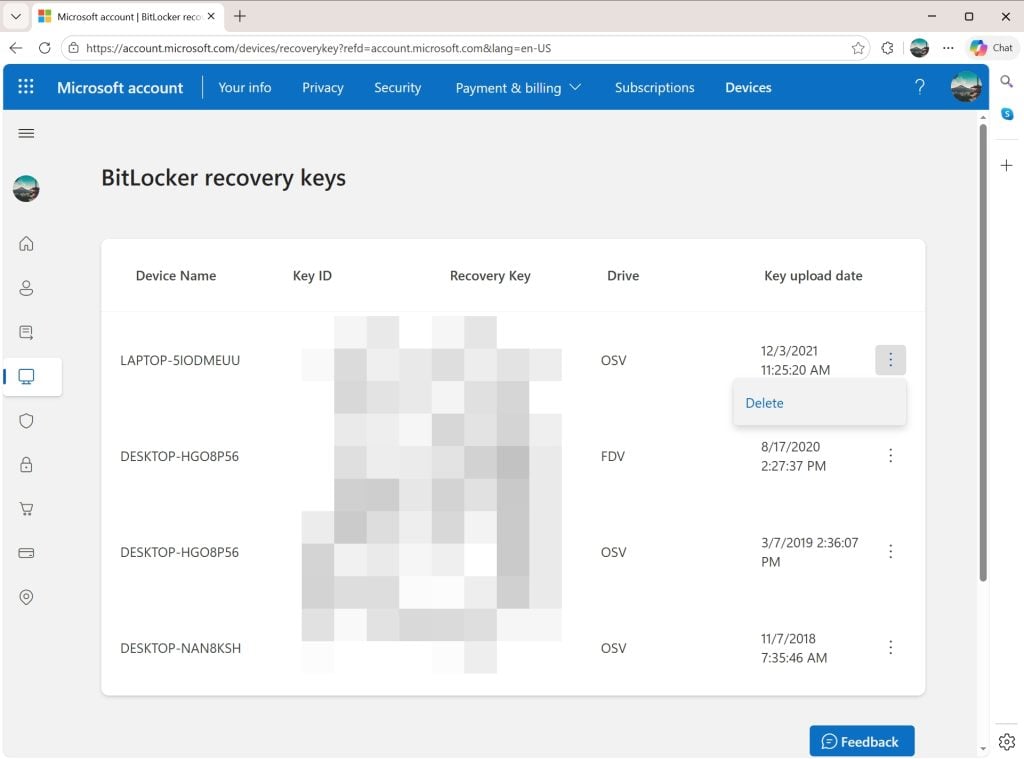
The Microsoft online website lists all BitLocker recovery keys uploaded to the cloud, even for devices that you may not use anymore.

If you do use computers with Windows 11 and a Microsoft account, chance is that BitLocker is used on the device and that the encryption keys are synced to the connected cloud storage.

The best way to find out if that is the case already is the following:

  1. Open a web browser on your computer.
  2. Navigate to https://account.microsoft.com/devices/recoverykey.
  3. Sign-in to your Microsoft account (the same that you use to sign-in to Windows)

The page that opens displays all connected devices, dates, and the Bitlocker recovery key. These keys can be used to decrypt hard drives encrypted by BitLocker.

Tip: You can delete any instance here with a click on the menu icon next to an item and the selection of delete.

You can also check the status of the active computer in the following way:

  1. Open Start.
  2. Type CMD.
  3. Select “run as administrator” while Command Prompt is selected.
  4. Paste or write manage-bde -status and press the Enter-key.

Check the conversion status to find out if a drive of the computer is encrypted.

Prevent the upload of recovery keys

The Control Panel applet reveals the status of BitLocker on each drive.

The easiest option, by far, is to rely solely on local accounts on Windows 11. Since local accounts are not linked to a Microsoft account, they do not sync data to the cloud. However, it is necessary to make sure that the local account is created during the initial setup.

Another option is to avoid BitLocker altogether and use a third-party — trusted — encryption software, such as VeraCrypt instead.

For that, you have to disable BitLocker on each Windows machine. Here is how you disable it on the active machine.

Notes:

  • Turning off will take some time. Windows begins decrypting the selected hard drive. It can take minutes to hours, depending on the size of the drive / partition and the speed of the PC.
  • You can keep using the computer. While Windows decrypts the drive in the background, you can keep on using it. It may be a bit slower than usual though.
  • Keep the PC turned on during the entire process. Ideally, you keep the PC on until the decryption of the drive completes. Keep the Control Panel open or check the notification area for status updates.
  • If “turn off” is not available, you are either not logged in as an administrator or there is a policy in place that prevents you from making changes.

Method 1:

  1. Open the Start menu and click on the Settings icon.
  2. Select Privacy & security in the Settings app.
  3. Look for Device encryption.
    • If you do not see the option, skip the process and check method 2 below.
  4. Click on Device Encryption.
  5. Toggle the feature to Off.
  6. Confirm the choice by selecting turn off again.

Method 2:

  1. Press the Start button.
  2. Type Manage BitLocker and select the result.
  3. Check all drives listed on the Control Panel page that opens.
    • If you see “BitLocker Off” next to a drive, the encryption is disabled.
  4. Select “Turn off BitLocker” for each drive with “BitLocker on”.
  5. Confirm your choice by selecting “Turn off BitLocker” again.

Method 3: The Pro-method

  1. Right-click on the Start menu, select Terminal (Admin).
  2. Type the command manage-bde -off C: and press the Enter-key.
  3. Note: replace C: with the drive letter that you want to disable BitLocker for

Google wants to personalize your search experience even more, but needs your data for that

Posted on January 23, 2026January 23, 2026 by Martin Brinkmann

Imagine if Google Search didn’t just know the internet, but actually understood your context. Scary? Wonderful?

Google is making this a reality for AI Pro and Ultra subscribers with the launch of Personal Intelligence in AI Mode, a new feature that lets you securely connect Gmail and Google Photos directly to your search results.

This update is designed to save your time by transforming — often — generic search queries into personalized answers while ensuring your personal data remains private, opt-in, and strictly under your control, according to Google.

Announced yesterday, Google continues to push a personal angle into its products. Last week, Google introduced Personal Intelligence that connects its Gemini AI with Gmail, YouTube and some other company services.

This week’s announcement extends Personal Intelligence to Google Search. More precisely, to AI Mode of Google Search.

Personal Intelligence in AI Mode for Search

What it does: It connects Gmail and Google Photos to the AI Mode of Google Search. This allows Gemini to cross-reference information from emails or photos with general search information to provide answers that are specific to the user.

For example, if you ask for an itinerary, it may look up flight or accommodation information in Gmail as well as what you liked to do in past holidays on Google Photos to suggest an itinerary that is personalized.

Who gets it: The feature is rolling out as a Labs experiment. It is only available for Google AI Pro and AI Ultra subscribers in the United States who search in English.

What about privacy? The feature is strictly opt-in. Google claims that it is not using any personal data for training and users may disconnect the feature from Search at any time to end it.

Google’s ultimate goal is to bridge the gap between a search engine that knows “the world” and its users. For some, it is a new level of convenience that makes searching on Google better and faster. For others, it is a nightmare come true.

However, since the feature is opt-in and limited to Google AI Pro and Ultra subscribers, the latter camp is likely very small at this point. This could change with a general rollout to non-paying Google Search users.

The success of the feature will ultimately hinge on trust, not so much on the technology and its effectiveness. While Google implemented important guardrails, including making the feature opt-in and promising that personal emails or photos won’t be used for training, handing over the keys to private memories and information requires a huge leap of faith, especially considering that Google’s main line of business is advertisement.

No More $10 Plan: Bitwarden Hikes Prices to Fund ‘Proactive’ Defense Features

Posted on January 22, 2026January 22, 2026 by Martin Brinkmann

For years, Bitwarden held the undisputed title of the tech world’s best password manager bargain, offering top-tier password security for just $10 a year. But that era officially ended today.

In a major strategic shift, the open-source company announced an immediate price increase that sees its individual Premium plan rise to $1.65 per month—effectively doubling the annual cost—while the Families plan climbs to $3.99 per month.

Here is the old and new price comparison.

Old PriceNew Price
BasicFreeFree
Premium$1 per month
$10 per year
$1.65 per month $19.80 per year
Family$40 per year$3.99 per month
$47.88 per year
  • The free basic plan remains as is.
  • Premium nearly doubles to $20 per year.
  • Family increases by about $8 per year.

The company argues the hike is necessary to fund a transition from passive storage to “proactive” defense, rolling out new features like real-time vault health alerts, expanded encrypted storage, and an upcoming phishing blocker designed to stop attacks before they happen.

Here is an overview of the new security features that Bitwarden announced:

Real-Time Vault Health & Coaching

The new feature automates the security process of checking for weak or exposed passwords.

  • In-Vault Alerts: Bitwarden shows a risk-icon next to vault items if a password is weak, reused, or was found in a breach.
  • Password Coaching: The moment a user logs in a site with a weak or compromised password, Bitwarden will prompt them to change it and guide them through the process.

Phishing Blocker

Upgrades defenses against phishing attacks.

  • Proactive Blocking: Bitwarden will attempt to discern legitimate from phishing websites in order to block the latter before filling any credentials.
  • Protection Layer: Aims to stop credential theft before it happens.

Expanded Encrypted Storage

Bitwarden Premium and Family plan customers get five times more storage space under the updated plans. This gives each user five gigabytes of secure file storage space, which they may use to store digital copies of passports, backup codes, wills, and other sensitive documents or files.

Advanced Two-Step Login options

Here, users get two expansions to existing support:

  • More Hardware Keys: Users may register up to ten hardware keys, e.g., a Yubikey, with Bitwarden. This doubles the old limit of five hardware keys.
  • Passkey Support: Improved support for the password-less authentication standard.

Closing Words

Ultimately, this update signals Bitwarden’s growth from a budget-friendly utility into a comprehensive security suite.

While a 100% price jump may sting long-time loyalists, the new ~$20 annual cost remains nearly half the price of top-tier competitors like 1Password and Dashlane.

Bitwarden is softening the blow with a one-time 25% renewal discount for existing users, but the company is clearly betting that active phishing defense and expanded storage are worth the premium. The days of the $10 vault are gone; users must now decide if they are ready to pay double for a smarter, more protective Bitwarden, or if the service’s robust free tier is effectively all the security they need

Cloudy with a Chance of Freezing: The New Windows 11 Bug That’s Locking Up Your PC

Posted on January 21, 2026January 21, 2026 by Martin Brinkmann

Imagine this: You’ve just finished a critical document or a long email, you hit “Save,” and suddenly—nothing. Your screen freezes, the cursor spins endlessly, and your application enters the dreaded state of “Not Responding.”

If this sounds like your week, you aren’t alone. A frustrating new bug in the latest Windows 11 update is causing freezes for users relying on cloud storage.

Microsoft confirms yet another bug

Will it ever end? Microsoft confirmed several bugs already that plague users who have installed the January 2026 update for Windows.

Today, Microsoft confirmed yet another issue and this one appears more widespread than the others.

  • The issue: Apps might become unresponsive when saving files to cloud-backed storage
  • Support page: Link
  • Affected systems:
    • Windows 11: Version 25H2, 24H2, 23H2
    • Windows 10: Version 22H2
    • Enterprise: Windows 10 LTSC 2021, Windows 10 LTSC 2019
    • Server: Windows Server 2019, Windows Server 2022, Windows Server 23H2, Windows Server 2025

Microsoft admits that the bug affects file operations, such as load or save, when cloud-storage is involved. Attempts to save files to OneDrive, Dropbox or other cloud storage services may trigger the issue. Similarly, opening files from cloud locations may also cause the freezes.

Microsoft writes:

For example, in some configurations of Outlook that store PST files on OneDrive, Outlook might become unresponsive and fail to reopen unless its process is terminated in Task Manager, or the system is restarted. In addition, sent emails might not appear in the Sent Items folder, and previously downloaded might be downloaded again.

The company says that it is working on a resolution. It does not have a universal workaround for affected users at the time of writing. While it has published a workaround for users who load Outlook PST files from cloud storage, it simply states that users should contact the application developer to learn about other access options.

I will update this article once there is a fix or a universal workaround. Keep you posted.

  • Previous
  • 1
  • 2
  • 3
  • 4
  • 5
  • 6
  • 7
  • …
  • 69
  • Next

Support This Site

If you like what I do please support me!

Any tip is appreciated. Thanks!
  • March 2, 2026 by Martin Brinkmann Don't Bother with Windows 11's new Speedtest feature
  • February 27, 2026 by Martin Brinkmann Warning! That laptop on Amazon? It comes with temporary storage
  • February 26, 2026 by Martin Brinkmann "If your printer works today, it will continue to work": Microsoft corrects previous announcement
  • February 25, 2026 by Martin Brinkmann YouTube Premium Lite subscribers get background playback and downloads with a big "but"
  • February 24, 2026 by Martin Brinkmann Firefox 148.0 is out with its AI kill switch and support for Windows 7 and 8.1 comes to an end

About

We talk, write and dream about Technology 24/7 here at Chipp.in. The site, created by Martin Brinkmann in 2023, focuses on well-researched tech news, reviews, guides, help and more.

Legal Notice

Our commitment

Many websites write about tech, but chipp.in is special in several ways. All of our guides are unique, and we will never just rehash news that you find elsewhere.

Read the About page for additional information on the site and its founder and author.

Support Us

We don't run advertisement on this site that tracks users. If you see ads, they are static links. Ads, including affiliate links, never affect our writing on this site.

Here is a link to our privacy policy

©2026 Chipp.in Tech News and Reviews