When I was young, I studied German, History and English at Essen University in Germany. I worked in computer support for several years at the time to help other computer users when they ran into issues.
Writing started out as a passion project, as I wanted to help more users and not just the ones that I handled in support.
This lead to the founding of Ghacks Technology News in 2005. First, as a side-project, but shortly thereafter as a full-time project as the site's popularity exploded.
I sold Ghacks to Softonic some years ago, but stayed on as Editor. You can still read my articles on the site. I do publish on Betanews as well. In recent years, I started to write and publish technology books, including my latest book "Windows 11 From Beginner to Advanced", which is available on Amazon.
I'm also a freelance writer for the German publisher Gamestar.
Chipp.in is my newest project. I want to use it to talk about my book projects, sell my books directly, and write about technology, as this is what interests me.
Google has issued an urgent security update for the Chrome desktop browser following the discovery of a high-severity vulnerability being actively exploited in the wild.
The update, which brings the Stable channel to version 145.0.7632.75 or 145.0.7632.76 for Windows and Mac, and 144.0.7559.75 for Linux, specifically addresses a “use after free” flaw within the browser’s CSS engine.
Identified as CVE-2026-2441, the bug was reported by security researcher Shaheen Fazim just days prior, prompting an accelerated rollout to protect users from potential attacks that leverage this exploit to compromise system memory.
Here are the key points from the update:
New Versions: The Stable channel has been updated to 145.0.7632.75/76 for Windows and macOS, and 144.0.7559.75 for Linux.
Zero-Day Patch: The update addresses CVE-2026-2441, a high-severity security flaw classified as a “Use after free” vulnerability in CSS.
Active Threat: Google has confirmed that they are aware of an exploit for this specific vulnerability existing in the wild.
Rapid Response: The bug was reported by researcher Shaheen Fazim on February 11, 2026, just two days before the release of this patch.
Rollout: The update will continue to become available to all users over the coming days and weeks.
How to install the Chrome update
Most unmanaged Chrome installations should receive the update automatically. The browser is configured to install updates automatically by default. Since this does not happen immediately, it is recommended to run a manual check for updates to speed up the process.
Open Google Chrome and select Menu > Help > About Google Chrome to do so. The browser should begin downloading and installing the security update immediately.
Windows users may also run winget upgrade google.chrome.exe to install the update from the command line without opening Chrome at all.
Note that it is highly recommended to upgrade the browser, even if it is not the main browser on the system. In short, if the browser is installed, upgrade it to protect it from potential exploits.
Ah, the never ending battle between YouTube and adblock users. If you lost the round-count then you are not alone. This time, users report that Google is hiding comments and video descriptions on YouTube, if a content blocker is used.
One such report comes from Reddit. The user writes that YouTube is not showing descriptions and comments anymore, if an adblocker is turned on.
It would be a new strategy, as Google focused on disabling video streaming entirely for users with content blockers in the past.
While many users might not miss the comments that much, it is another story for the video description, as it may include vital information or links. If you, for example, watch a cooking video, you may find the recipe in the description.
Tests on my own systems using different browsers returned no such blocking. It seems likely that Google is once again testing the waters or rolling out the change over time.
Some users affected by the change noted that reloading the webpage restored access to the description and the comment section. It is probably only a matter of time before filter lists will be updated to reflect the changes.
For now, it is recommended to refresh the page. If that does not work, I suggest using a different browser and / or content blocker. If all of that fails, try playing videos on third-party sites such as Bing Video.
I ran tests with Brave and uBlock Origin in several browsers, and did not run into any of the described issues.
There are few feelings better than unboxing a brand-new smartphone, but that excitement can turn to frustration quickly if your trade-in gets rejected weeks later.
While most people remember to wipe their photos and messages, many overlook the invisible ‘digital locks’—like Factory Reset Protection—that can render a phone useless to a recycler and instantly drop your trade-in value to zero.
Before you seal that shipping box or head to the store, you need to do more than just a quick reset; you need to ensure your Android phone is completely unlocked, secure, and legitimately ready for its next owner.
The Pros and Cons of Trading in your old Android phone
The main benefit of trading in an old smartphone is that you get money for it. This is especially useful if you don’t need the old device anymore. Sometimes, merchants pay you extra when you trade in a device, even if the device is not worth as much anymore.
The downside is that you are giving away a device that you used in the past. Unless you are careful, it may be possible to access personal data or accounts.
Another issue is that you need to make sure that the device is not protected from being reset by the processing company or the new owner. If the trade-in company realizes that the phone is locked, it will reject it.
Here is a quick overview of the pros and cons:
Pros
Cons
Convenience and safety
“Bill Credit” Trap
Inflated prices (sometimes)
Low value without special promotions
Instant discounts
Grading may sometimes disagree with your assessment
Environmental responsible
Delayed gratification
Note that I assume that you have moved the data from the old device to the new already. A good option for that is to connect both devices via an USB cable and start the transfer process this way.
The mandatory steps before sending the old device in
First, make sure that you back up all important data. This includes photos and videos, files, and anything else. It is a good idea to create a full phone backup, but you can also use internal features to create this backup. This ensures that you can restore the data, if the need arises.
Go to Settings > Google > Backup on the device. Note that this backs up essentials, such as contacts or device settings. The location may be different depending on the device manufacturer. Samsung device owners go to Settings > Accounts and backup, and select “back up data” there.
Backing up photos and videos is another story. You could back them up in the cloud, and Google is very pushy about this, or, and this is what I prefer, store them on a local computer instead.
Second, removing the Google account is essential. If you do not, you won’t disable Factory Reset Protection. This is designed to prevent the theft of devices, as the new owner needs the password of the previous owner to start using it.
Go to Settings > Passwords & accounts (or Users & accounts, or Manage accounts). Locate the Google account there and select the remove option. I suggest you do the same for any other account on the device, as this removes them all. The accounts on the new device are not affected by this.
Third, run a factory reset. This restores the original state of the Android device and removes all personal data from it. Go to Settings > System > Reset Options > Erase all Data. On Samsung, you find the setting under Settings > General management > Reset > Factory data reset.
Finally, remove any SIM-cards, eSIMs, or SD cards from the device.
Recommended Steps (good practice, but not mandatory for trading in)
Here is a quick list of tasks that you might want to consider as well:
Unpair any Bluetooth devices.
Remove any network connections.
De-register from chat services.
Save the phone’s IMEI number (dial *#06# to see it on the screen).
Charge the battery to at least 50 percent.
Document the phone’s condition with photos or video, also write down the information).
Ultimately, the difference between a successful trade-in and a rejected one often comes down to these few minutes of preparation. By ensuring your data is backed up and your Google account is fully removed, you’re not just protecting your privacy—you’re securing your payout.
If you thought holding your cyan ink cartridge hostage was the absolute peak of HP’s audacity, think again—they have finally found a way to bring that same “subscribe or suffer” energy to your actual PC.
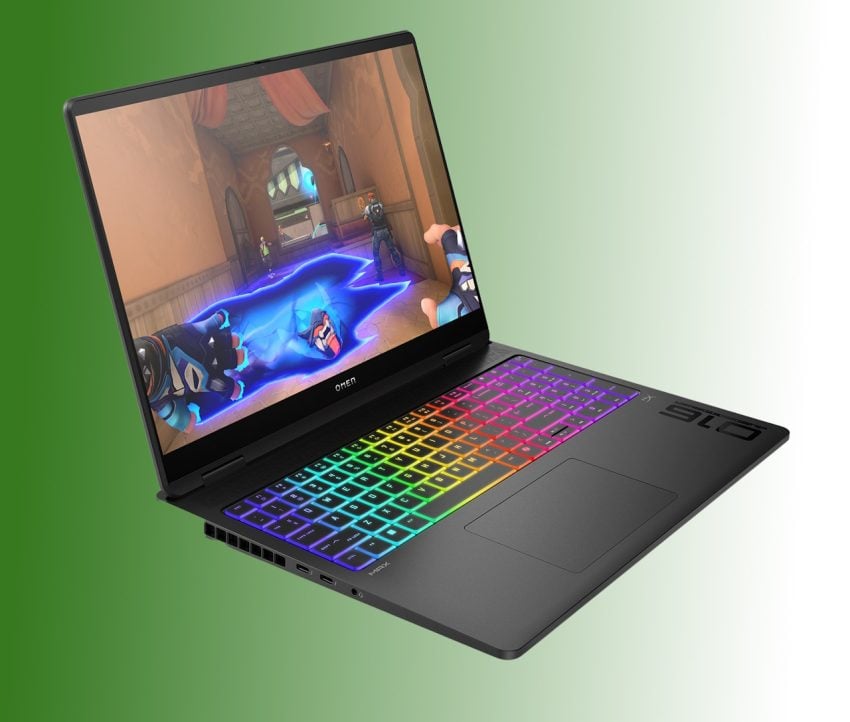
This month, the tech giant launched its new gaming laptop subscription, a “hardware-as-a-service” pilot program that invites US gamers to lease gaming laptops for a monthly fee rather than buying the devices outright.
But before you get seduced by the low upfront cost, you need to see the numbers HP left off the slide deck: a pricing structure where you pay nearly the full retail price, carry the liability, and ultimately return the laptop with absolutely zero equity to show for it.
“Gaming as a Service”: The program at a glance
Let’s take a look at what subscribers get when they subscribe.
HP offers several gaming laptop tiers to choose from, starting with entry level laptops like the Victus 15 for about $50 per month and going up to the top tier Omen brand for about $130 per month.
To justify the cost, HP is offering the following services: 24/7 support, next-day replacements, full guarantee throughout the subscription period.
Upgrades are allowed after 12 consecutive months of payments for a laptop. In other words, subscribers can upgrade to other models each year.
HP pitches this as a cure for “upgrade anxiety”, claiming that gamers will never again have to worry about their computers becoming obsolete.
The financial reality: the math behind the offer
HP’s marking slides look great, because they compare small monthly numbers against the full retail price for the laptops. For just $130, gamers can start playing the latest and greatest games on a laptop with an Nvidia RTX 5080 video card.
However, if you run the math over the mandatory subscription period, which is 12 months, or beyond, you will notice that HP is the only beneficiary here.
The “Subscriber” vs. The “Owner” comparison
Time
Subscription ($130/mo)
Purchase ($2500)
Remark
Day 1
$130
$2500
Year 1
$1560
$2500
Year 2
$3120
$2500
Break-even in the second year.
Year 3
$4680
$2500
Overpaying.
The trap: The subscription premium kicks in around month 19 and it gets worse from then on. It is also worth noting that owning a device also means resell rights. While you won’t get the paid $2500 for the gaming laptop, you might get $1000 or even more for it after two years.
Total costs are even more in favor of buying over subscribing because of that. If that would not all be bad-deal-worthy enough, there are cancellation fees.
The “Gotcha” Clause: Cancellation Fees
It might actually make sense to subscribe for a month or two, maybe to continue gaming while your main PC or laptop is being repaired or to bridge a short period of months.
However, the subscription does not allow short term rentals. You can only cancel for free in the first 30 days. Afterwards, you pay hefty fines if you want to get out early. Starting with day 31, you pay a termination fee.
How much? As much as you would have paid anyway for the entire year. That is a more than $1400 for the premium gaming laptop, if you decide to cancel in the second month. Cancelling is only free after the initial year. If a subscriber would have that much money lying around, it would even make less sense to rent and not buy a laptop outright.
Conclusion
HP’s OMEN Gaming Subscription is a fascinating experiment in the “Netflix-ification” of hardware, but for the vast majority of gamers, the math simply refuses to behave. It solves a problem—upfront cost—that traditional 0 percent financing already solved years ago, but it does so by stripping you of the only thing that makes a $3,000 purchase palatable: ownership.
When you subscribe to Spotify, you accept that you own no music because the library is infinite. When you subscribe to an HP laptop, the library is one single machine that sits on your desk, depreciating while you pay full price for it every two years.
The allure of an annual upgrade is undeniable. Who doesn’t want the newest RTX card the moment it launches? But HP is banking on you valuing that convenience at a 100 percent markup. They are betting that you will look at the monthly payment, ignore the long-term total, and sign away your right to resell, modify, or keep your hardware.
My advice: Don’t do it, unless you need the services that HP is offering, especially the next-day replacement deal. If you need a gaming rig but can’t afford one outright, consider buying used or looking for a system in a more suitable price range.
Don’t let your gaming rig become another monthly bill that you pay forever but never own.
When Windows 11 launched in 2021, it was defined as much by what was missing as by what was new, with a redesign that inexplicably stripped away the deep customization options power users had relied on for decades.
Microsoft locked and limited the taskbar in Windows 11 to the bottom of the screen. A big downgrade to how things were on the predecessor Windows 10.
Now, nearly five years after that controversial debut, Microsoft is finally preparing to right that wrong. According to new internal reports, the company is actively developing a fully movable and resizable taskbar that will allow users to dock their start menu to the top, left, or right of the screen once again, with the feature slated to arrive in a major update later in 2026.
Windows Central reports that Microsoft is working on bringing the functionality back, citing sources familiar with Microsoft’s plans.
If that sounds familiar, you may think of Mozilla. The Firefox maker started to bring back features and introduce features that Firefox enthusiasts wanted for years recently.
It could reflect how serious the situation is for Microsoft. Mozilla faces a declining user base, as it tries to juggle a user-first approach with the necessity of having the world’s largest advertising company finance operations.
Microsoft’s situation is different. Windows is still the dominating desktop operating system. Yes, there is Apple with macOS, but it does not really seem to be a focus of the company. Linux is gaining, but recent gains come down to a large degree on Valve’s Steam Deck, which runs Linux.
Still, Microsoft’s bet on AI and the first rush of integrating AI into everything seems to have backfired somewhat. It did not help that features such as Recall were not designed properly and seen as threats by many users instead of useful tools to help them in their day-to-day activities when using Windows.
Whether it is able to regain the trust of Windows users remains to be seen. A very good start would be to deal with the looming Windows 10 end of support situation for home users. Come October 2026, millions of Windows 10 devices that can’t be upgraded to Windows 11 officially won’t get any updates anymore.
Extending this to the three years that corporate customers get would show plenty of good will and would certainly help paint Microsoft’s image in a better light.
Internet users have plenty of options to make their connections more private. Popular choices include content blocking, using VPNs, or disabling services or features that may reveal information about them.
However, in rare circumstances, it is the very tools designed to protect users that may reveal information about them.
Enter Adbleed
Adbleed is a proof-of-concept designed to highlight a specific privacy risk associated with the use of regional adblocking rules.
The tool functions by detecting which country-specific filter lists—such as EasyList Germany or Liste FR—are currently active within a user’s browser. By probing for the blocking of domains unique to these specific lists, Adbleed creates a “filter fingerprint” that can reveal a user’s likely country of origin or language preference.
This technique demonstrates that users can be partially de-anonymized based solely on their adblocking configuration, even when employing VPNs or proxies to mask their physical location.
The detection process follows three simple steps:
Domains: The tool uses a curated list of domains that are blocked exclusively by certain filter lists, such as EasyList Germany.
Probing: Adbleed attempts to load resources from these specific domains. It then looks at what is returned. Blocked requests, which happen near instantly, are what the tool is after. It measures the time it takes to get a response to distinguish blocked requests from other errors, e.g., network failures.
Fingerprinting: When a specific number of domains are blocked from a regional listing, Adbleed concludes that the list is active.
What does it mean? It means that a site can detect if certain regional content blocking lists are likely enabled. This adds another factor to fingerprinting attempts.
Mitigation & Protection
Here are a few suggestions to mitigate Adbleed or limit its use for fingerprinting:
Stick to the defaults. If you do not enable any regional lists, Adbleed won’t detect any, which in turn makes your configuration less unique.
Enable anti-fingerprinting: If the browser supports anti-fingerprinting techniques, make sure they are enabled.
Disable JavaScript or enable hard-mode blocking: This may not be practicable, especially the JavaScript part, but this should protect against this particular type of attack.
Use different browsers: If you use different browsers, you torpedo tracking attempts, as the trackers can’t link your activities between different apps or browsers (unless there is a common factor that is unique).
Adbleed demonstrates that the tools designed to protect users on the Internet can sometimes be used against them. It reveals how regional content blocking preferences may allow sites to fingerprint and track users. It is not an argument against content blocking, but rather a wake-up call that things are never as straightforward as they look like on first glance.
If January was the warm-up, February is the sprint.
Microsoft’s second Patch Tuesday of 2026 has arrived with significant urgency, addressing 59 vulnerabilities in total. While the total count is manageable, the severity is high, as it contains six zero-day vulnerabilities that are currently being exploited in the wild.
Here is the breakdown of what you need to know, what to patch first, and what might break.
Key Action Item: Administrators must prioritize workstation patching immediately due to three “one-click” security bypasses (Shell, MSHTML, Word) that allow code execution without user confirmation. Simultaneously, restrict and patch RDP servers to prevent the active SYSTEM-level escalation exploit (CVE-2026-21533).
Important Patches
CVE-2026-21510 — Windows Shell Security Feature Bypass Vulnerability
Security updates and non-security changes. Adds “Cross-Device resume” and MIDI 2.0 support.
Deep Dive: The Critical Vulnerabilities
Microsoft confirmed that six already exploited zero-day vulnerabilities are fixed after installing the cumulative updates. Attackers may exploit the issues on unpatched systems to bypass protections and gain system-level access.
Allows attackers to craft malicious links or shortcut files to bypass Mark of the Web (MotW) and Windows SmartScreen prompts. As a result, malicious payloads may execute on unpatched systems without the usual “Are you sure” security warnings of SmartScreen.
Allows attackers to bypass security prompts using malicious HTML files, if the Internet Explorer engine (MSHTML) is used for rendering. The threat is similar to the Windows Shell issue described above, as it may be used to skip security screens to run malicious code on target systems.
CVE-2026-21514 (Microsoft Word Security Feature Bypass)
The third of the feature bypasses, this exploits an issue in Object Linking & Embedding (OLE) in Microsoft Office. Attackers may use it to run malicious Word documents and sidestep certain protections designed to block the execution of risky external content.
CVE-2026-21519 (Desktop Window Manager Elevation of Privilege)
The vulnerability is a type confusion flaw in the Desktop Windows Manager (DWM). Attackers need basic access for exploitation, but if they have, they may use the flaw to elevate their privileges to SYSTEM level, which allows them to take control of the system.
CVE-2026-21533 (Windows Remote Desktop Services Elevation of Privilege)
Describes an improper privilege management flaw in Remote Desktop Protocol. Exploitation opens another route to SYSTEM privileges on unpatched system. Especially problematic in Enterprise environments, which usually use RDP a lot.
CVE-2026-21525 (Windows Remote Access Connection Manager Denial of Service)
A null pointer dereference issue in the VPN / Dial-up manager. A local attacker, even with low privileges, may use the issue to crash the service repeatedly.
Significant Changes in the February 2026 updates
The Virtual Secure Mode (VSM) restart loop bug is fixed.
Cross-Device resume arrives in Windows 11. When a phone is paired with the Windows system, its recent activities are now displayed in Start. You can continue those. Requires the latest Link to Windows app.
Native MIDI 2.0 support. The new protocol is now supported, which creators and audio engineers may take advantage of.
The Secure Boot change is entering the targeting phase. In this phase, Windows can determine whether the device’s UEFI is compatible with the upcoming certificate rotation. If it is, it will be queued to receive the actual update in the coming months. No user action required.
First Steps: Your Patch Tuesday Strategy
Patch the six zero-day vulnerabilities immediately. Start with user workstations.
If you paused updates in January because of the VSM restart loop bug, deploy this month’s cumulative update to get it fixed.
Microsoft revealed recently that it plans to regain the trust of its users and focus in areas such as Windows stability and security. Yesterday, the company announced two new initiatives that it says will strengthen “Windows trust and security through user transparency and consent”.
The two features, Windows Baseline Security Mode and User Transparency and Consent, will make Windows more resilient according to Microsoft.
Baseline Security Mode is a new architectural safeguard designed to ensure that every application, regardless of its origin, operates within a set of “safe” boundaries by default. Only “properly signed apps, services and drivers” are allowed to run by default, but users and administrators may override the defaults to run apps, services or drivers that do not meet the new requirements.
User Transparency and Consent shifts the Windows experience toward a mobile-centric privacy model, giving users granular control over what their apps can access. This includes new real-time prompts by apps when they try to access sensitive data, such as the location, camera, or personal files, or install unintended software.
Microsoft plans to roll out the changes “through a phased approach”. It says that it is already working with partners and that the work has begun already. Next step is — probably — the integration in Insider builds for a first round of extended tests before the features will land eventually on stable machines.
It remains to be seen how these features are integrated. Run-time permission prompts sound useful, as they introduce much needed transparency to Windows for users. Baseline security mode could go either way. It might help protect machines, especially in corporate environments, but it could also become a nightmare for users who need to run something that is not signed or meeting Microsoft’s requirements. Especially, if there is no easy option to whitelist apps, drivers, or services.
It does not look as if this is coming soon, as Microsoft seems to have taken a cautious approach to introducing major new features to Windows. Slow, steady and stable could be the mantra of the year for Microsoft, especially after a rather frustrating first patch day in January 2026.
Ask any PC enthusiast what the most critical component for gaming is, and they will almost certainly say “the graphics card” — but Microsoft begs to differ.
In a controversial update to its official Windows Learning Center, the tech giant is now aggressively positioning its AI-centricCopilot+ PCs as the ‘ideal’ hardware for gamers, recommending a staggering 32GB of RAM and a neural processing unit (NPU) as the new standard for high performance.
Is this advice actually about achieving higher frame rates, or is Microsoft simply trying to upsell AI capabilities that most modern games don’t even use yet?
Microsoft’s Offload-Theory
Microsoft argues that the neural processing unit (NPU) is a game-changer. The logic goes something like this: Windows can delegate background AI tasks to the NPU, so that the processor and the graphics card have more resources available for rendering games.
This, according to Microsoft, results in smoother gameplay and higher frame rates compared to traditional Windows PCs without an NPU.
To support this claim, Microsoft has updated the specifications for gaming on Windows.
RAM: While 16 GB remains the minimum, Microsoft now strongly recommends 32 GB of RAM as the “sweet spot” for high-performance gaming.
Storage: A fast NVMe SSD with at least 512 GB to 1 TB of space to handle modern game file sizes and ensure fast load times.
Processor: A CPU with an NPU-chip (like the Snapdragon X series, AMD Ryzen AI 300, or Intel Core Ultra).
The company leans heavily on Auto Super Resolution (Auto SR) to hammer home its argument. It is an upscaling technology that is exclusive to Copilot+ PCs. Like other technologies of its kind, it is promising higher frame rates and thus a smoother gameplay experience.
This technology allows Copilot+ PCs, which are mostly light laptops without dedicated graphics cards, to run demanding games at acceptable frame rates, according to Microsoft.
Here is a critical breakdown of the arguments
Microsoft’s recommendation for 32 GB sounds good on paper, until you realize that Copilot+ PCs usually do not include a dedicated graphics card.
Traditional PCs have system RAM and dedicated video RAM (if they have a dedicated graphics adapter). Most Copilot+ PCs do not have the latter, which means that all components share the system memory.
If a modern game requires 8 GB of video memory, Copilot+ PCs have to use system RAM for that. Selling 32 GB as high performance is misleading therefore.
While offloading some tasks to the NPU may reduce CPU usage somewhat, it is highly doubtful that this is making big impacts on the performance of games.
Finally, Auto SR is a necessary feature as it boosts game resolutions and frames on laptops that would otherwise be too weak for higher resolutions or frame rates.
The feature competes directly against Nvidia DLSS and AMD FSR, two mature technologies that improve systems with dedicated graphics cards. Even mid-range dedicated video cards should provide better and smoother game plays than Auto SR on systems with NPU but no dedicated cards.
Closing Words
Most gamers won’t buy a Copilot+ PC at this time, unless it comes with a dedicated graphics card. Traditional systems with video cards will outperform Copilot+ PCs without one in gaming, there is little doubt about that. This may change once Copilot+ PCs and laptops with dedicated video cards become available on scale. For now, Microsoft is making a recommendation that is not in the best interest of most Windows gamers.
While many games do run on ARM already, there are still holdouts, including many popular multiplayer games that run anti-cheat software on the system.
If you have installed the preview update (KB5074105) for Windows 11’s February update, you may have noticed that something is amiss. Opening the Storage part in the Settings app fires an UAC prompt now and some options seem to have been removed.
Microsoft says the security prompt is introduced to “ensure that only authorized Windows users can access system files”. An unelevated process scans and displays only the folders that the current user account has permission to see.
The move has four objectivesfor Microsoft:
Preventing the unauthorized enumeration of system files.
Reducing accidental system damage, for instance when a user deletes the previous Windows installation, as Windows can’t be rolled back anymore in that case.
Reducing local attack vectors.
Alignment with the least privilege security model.
Some cleanup options are AWOL
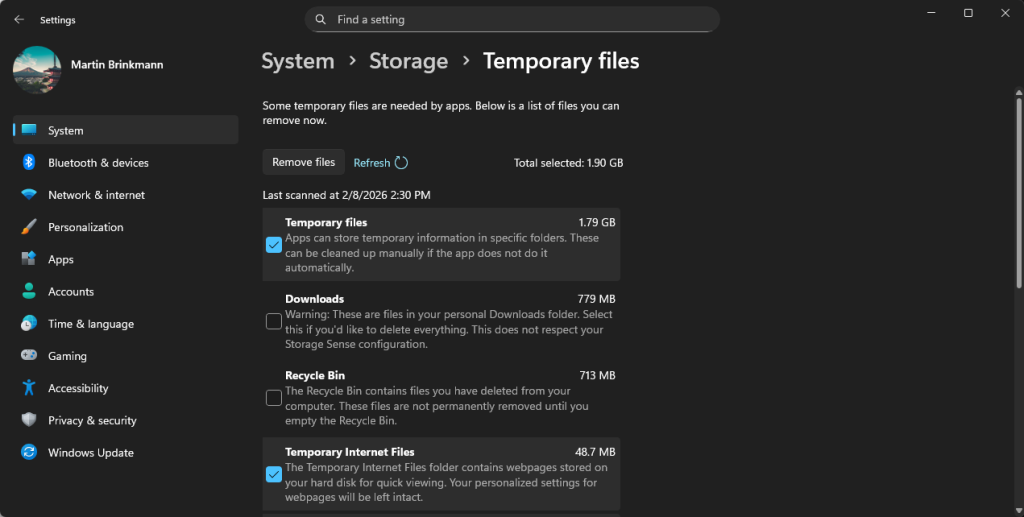
The Temporary files cleaner in Settings / Storage has fewer options after installing the Windows update.
Is it a bug or a feature? While the newly introduced UAC prompt for the Storage part of the Settings app seems to work just fine, users noted that some cleanup options were missing.
Options such as Windows Update Cleanup or Device Driver Packages do not appear anymore when you select the Temporary files option on the Storage page.
Microsoft has not confirmed this as an issue and at this moment, it is unclear whether this is intentional or a bug that will get fixed eventually.
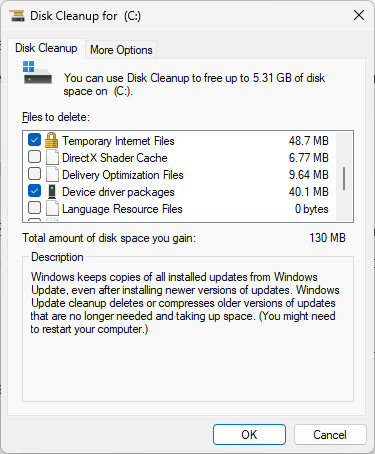
The Disk Cleanup tool has the missing options.
The solution: While Storage in Settings fails to provide users with elevated rights with the proper cleanup options, the legacy Disk Cleanup tool continues to show these options.
Just open the run box with the shortcut Windows-R, type cleanmgr.exe, and press the Enter-key to get started. Make sure you select “clean up system files” after the initial scan to see all options.
Summary: The update didn’t just add a security prompt; it seemingly broke the logic that populates the list in the modern Settings app, forcing users to go back to the old Windows 98-era “Disk Cleanup” tool to do a proper system scrub.
It remains to be seen whether the cumulative updates for Windows 11, which Microsoft will release on February 10, 2026, will correct the issue.